Download Caxton for Free · 7-day free trial of Caxton Pro, no credit card required · 7 MB · macOS 13.0+
The short answer
For read-only viewing you need nothing new: less, built into macOS, pages through a file of any size for free. Caxton was built for the file itself: it memory-maps multi-gigabyte text and data files, opens them immediately, and searches, filters and edits them in place.
Other tools' details were last checked against their vendor documentation in August 2026 and may have changed since. Caxton's figures come from the benchmarks page, which gives the machine, the build and the method behind them.
Is there an EmEditor for Mac?
No. EmEditor, from Emurasoft, is the category's reference point: a Windows text editor positioned specifically for huge files, whose vendor documents opening files up to 16 TB. It is the tool Windows users mean when they say this problem is solved.
There is no macOS version, and the vendor's site describes a Windows product only. On a Mac, the rest of this page is the actual landscape. Moving from EmEditor specifically? The feature-by-feature migration mapping, including the honest gaps, is in EmEditor for Mac. UltraEdit users have the same kind of map in UltraEdit alternatives for Mac, and Notepad++ users in Notepad++ alternatives for a Mac.
Can I use glogg or klogg on a Mac?
glogg describes itself as a GUI application to browse and search through long or complex log files; in its own words, "a graphical, interactive combination of grep and less." klogg is its continuation with the same framing, adding tail to that list. Browsing and searching is the whole design: they are instruments for reading logs, not for changing them.
On availability, the projects' own release pages are the record. When last checked in August 2026, glogg's last release dated to May 2017, and klogg's last stable release, June 2022, shipped macOS builds, with development builds updated as recently as November 2024; check klogg's release page for anything newer. If read-only log exploration is the entire job, klogg remains a working option on a Mac.
Can VS Code open large files?
VS Code is a code editor. Microsoft's FAQ calls it "a streamlined code editor with support for development operations like debugging, task running, and version control", and it is a superb one, which is why it is many people's first attempt at a big file.
Its large-file behavior is documented rather than hidden, and the thresholds depend on the version. The 1.15 release notes, from 2017, designated any file over 30 MB or 300,000 lines a large file, and the editor.largeFileOptimizations setting, "special handling for large files to disable certain memory intensive features," on by default, switches off tokenization, wrapping, and folding past the current threshold. That is a sensible design for a tool whose center of gravity is projects of source files, and a clear signal that multi-gigabyte single files sit outside it. When VS Code reports a file as too large, file too large for VS Code walks through the options from there.
What about Sublime Text?
Sublime Text's own line is "the sophisticated text editor for code, markup and prose," and its reputation among the people who live in it is earned. Code, markup, and prose is also the complete design statement: the vendor makes no large-file claims, and files measured in gigabytes are not what it is positioned for.
Can BBEdit or CotEditor handle huge files?
BBEdit ("the leading professional HTML and text editor for macOS," in Bare Bones' words) has been the Mac professional's editor for over three decades, and it is one of the few whose vendor addresses large files in writing at all. Its FAQ states that handling large files presents no intrinsic problems, with some specific operations limited for files over 2 GB; its 12.0 release notes describe the in-memory document model behind that boundary, noting an in-memory size of roughly twice the file's size on disk. For text work inside those documented bounds, it is a deep and reliable tool.
CotEditor calls itself "the Plain-Text Editor for macOS": free, lightweight, and pleasant for the everyday files it was designed around. Multi-gigabyte documents are not part of that brief, and it does not pretend otherwise.
Can Hex Fiend open a 10 GB file?
Yes. Hex Fiend is the one Mac tool on this page designed for arbitrarily large files. Its site is direct: it "can handle as big a file as you're able to create," "does not need to keep your files in memory," and supports insert and delete rather than only in-place changes. It is free and open source, and if your file is binary, this is the answer.
It is a hex editor, though: the working surface is bytes and offsets, not lines, encodings, and text search-and-replace. For a log or a CSV, the shape of the tool is wrong even though the scale is right.
What's the free way to view a huge file?
less ships with macOS and is the correct free answer for reading. Its manual documents that it "does not have to read the entire input file before starting," which is why a 10 GB log appears the instant you hit Return, and its own FAQ draws the line this page turns on: "Less is a pager… Less is not an editor. You can't change the contents of the file you're viewing."
less -S big.log      # q quits, /text searches, G jumps to the end
tail -f growing.log  # stream a file that is still being written
If an editor is already beachballing on the file, force-quitting is safe: it has only been reading, and nothing writes to disk until a save. And if the job in front of you is one enormous log file right now, the step-by-step walkthrough is how to open a 10 GB log file on a Mac.
If viewing is the whole job, stop here and spend nothing. The rest of this page exists for the day you need to change the file.
Which tool was designed for what?
| Tool | Designed for | macOS? | Edits files? | Designed for multi-GB files? |
|---|---|---|---|---|
| EmEditor | Huge-file text editing on Windows | No | Yes | Yes, documents up to 16 TB |
| glogg / klogg | Browsing and searching log files | klogg ships Mac builds | No, browse and search | Long log files, per its docs |
| Whaile | Viewing large log, text, and CSV files | Yes, plus iPad | No, a viewer | Large files, for viewing, per its description |
| VS Code | Code editing across project files | Yes | Yes | No, documented large-file mode disables features |
| Sublime Text | Code, markup, and prose | Yes | Yes | Not a documented design goal |
| BBEdit | Professional HTML and text editing on macOS | Yes | Yes | Documented: some operations limited past 2 GB |
| CotEditor | Everyday plain-text files on macOS | Yes | Yes | Not a documented design goal |
| Hex Fiend | Hex editing of arbitrarily large binaries | Yes | Yes, as bytes | Yes |
less | Paging without reading the whole file first, per its manual | Built in | No, a pager | Yes, for viewing |
| Caxton | Editing very large text and CSV files on macOS | Yes, native | Yes | Yes, benchmarked at 10 GB |
Is there a free or open-source large file editor for Mac?
Yes for reading, and yes for some kinds of editing. Each of these is free, and each documents what it is built for:
less, built into macOS, is "a free, open-source file pager" whose manual says it "does not have to read the entire input file before starting." It reads; its only editing path is a key that hands the file to another editor.- Hex Fiend is "a fast and clever open source hex editor for macOS" under a BSD-style license. Its README says it "can handle as big a file as you're able to create," has "been tested on files as large as 118 GB," and "does not keep your files in memory," and it "does not limit you to in-place changes." It edits and saves at any size, as bytes.
- klogg (GPLv3) is "a multi-platform GUI application that helps browse and search through long and complex log files"; its README says it "can operate on huge text files (10+ Gb is not a problem)" and "reads the file directly from disk, without loading it into memory." It describes itself as "a graphical, interactive combination of grep, less, and tail."
- lnav (BSD-2-Clause) is "an advanced log file viewer for the terminal"; its performance notes document a 3.3 GB file of over 10 million lines, with an index entry per line.
- CotEditor (Apache 2.0, free on the Mac App Store) is "the Plain-Text Editor for macOS" for ordinary files; its documentation makes no large-file claims.
Where free stops is editing text at multi-gigabyte scale and saving it back. Hex Fiend edits any size, but as bytes and offsets rather than lines and encodings; klogg and lnav browse and search; less pages; CotEditor is built around everyday files. None of them documents opening a multi-GB file as text, changing it, and writing it back. If that is the job, the next section is about the tool built for it.
What was actually built for this?
Caxton's document model is a memory-mapped piece table: opening a file copies nothing and loads nothing up front, so the cost of opening is proportional to what you look at, not what the file weighs. It is a native AppKit application, not Electron, built for one workload: very large text and delimited files on a Mac.
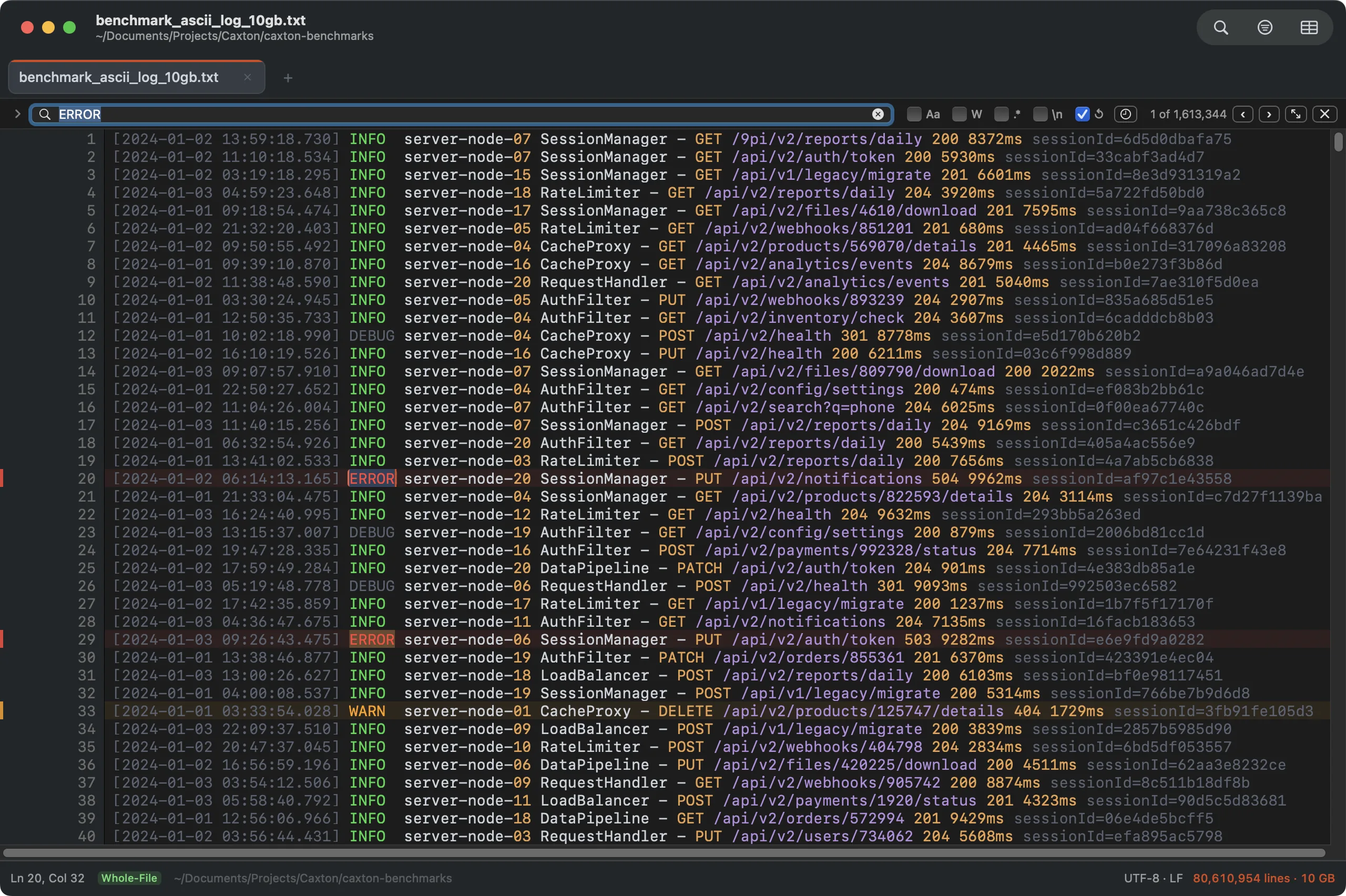
1,613,344 matches across a 10 GB log in 1.0 s. The counter is exact, not an estimate.
The measured numbers, recorded on an M1 Max with 64 GB RAM (methodology and the full table on the benchmarks page): a 10 GB, 80,610,954-line log opens immediately and finishes its background index in 3.7 s. A literal search over the whole file returns 1,613,344 matches in 1.0 s, filtering to those lines takes 1.0 s, and Replace All rewrites every one of those sites in 1.7 s as a single undo step. On the 50 GB log, memory stays under 160 MB through every measured operation. That memory figure is the 50 GB text benchmark on macOS 15.7; CSV grids and other macOS versions use more.
Delimited files get the same treatment plus a grid: a 1 GB CSV of 2,022,947 rows × 50 columns parses to typed, sortable columns in 2.3 s, and a numeric sort of those 2 million rows takes 4.4 s. If CSVs are your whole problem, that lane has its own guide; a CSV that will not open at all is walked through in open a huge CSV on a Mac.
The honest limits: Caxton is not an IDE (there is no debugger, language tooling, or plugin ecosystem) and it is not a spreadsheet. It is Mac-only by design; the native app is the point. It does one job, and the benchmarks above are that job.
Your 10 GB file is the real benchmark.
Download Caxton for Free7-day free trial of Caxton Pro, no credit card required · 7 MB · macOS 13.0+ · notarized
Frequently asked questions
Is there an EmEditor for Mac?
No. EmEditor is a Windows text editor: its vendor documents support for files up to 16 TB, but offers no macOS version. On a Mac, the tool designed for the same workload is Caxton; for free read-only viewing, less. The full migration guide is at EmEditor for Mac.
What's the best free way to view a huge file on a Mac?
less, in Terminal. It is already installed, its manual documents that it does not read the entire input file before starting, and its own FAQ states it is a pager, not an editor. For a file that is still growing, tail -f.
Why do most editors struggle with multi-GB files?
Most editors read the whole document into memory before the first render, and the in-memory form is usually larger than the file on disk. That is documented design, not a defect. Zed's engineering blog describes holding a buffer's text in memory as a rope because, in its words, “not every change should immediately be saved to disk,” in service of its goal “to be a high-performance code editor.” Asked whether Sublime Text could read a file on demand instead of loading it, Sublime HQ answered no, because “the core architecture of our text editing component” chunks text into tokens for navigation and word wrapping, and added that for a 13 GB file Sublime Text “is likely not the correct tool for the job.” Both are built for code and are very good at it. The alternative architecture is memory-mapping, where the operating system pages in only the part being displayed, which is how a file larger than RAM stays workable.
Is there a free or open-source large file editor for Mac?
For read-only viewing you need nothing new: less, built into macOS, pages through a file of any size for free. Caxton was built for the file itself: it memory-maps multi-gigabyte text and data files, opens them immediately, and searches, filters and edits them in place.
Can a Mac open a 10 GB text file at all?
Yes. Any Mac can page through one free with less. Editing one is an architecture question rather than a hardware question: Caxton's published benchmark opens a 10 GB, 80,610,954-line log immediately, and it is measured to 50 GB with memory under 160 MB.
Sources
- Emurasoft: EmEditor large file support
- Microsoft: Visual Studio Code documentation
- Microsoft: VS Code 1.15 release notes, large file support
- Bare Bones Software: BBEdit support and documentation
- Greenwood Software: less home page and manual
- Hex Fiend: README and site
- klogg: README
- lnav: documentation and performance notes
- CotEditor: site and repository
- Zed: Rope & SumTree, on how a buffer's text is stored
- Sublime HQ: reply on loading very large files
- Caxton benchmark methodology and results
The file is on your disk either way. Download Caxton for Free and open it. 7-day free trial of Caxton Pro, no credit card required.