Download Caxton for Free · 7-day free trial of Caxton Pro, no credit card required · 7 MB · macOS 13.0+
The short answer
A spreadsheet is the wrong tool once Numbers refuses the file; for a free look, less in Terminal pages through a CSV of any size. Caxton opens the whole CSV as a table, straight from the file with no import, to view, search, filter and edit.
Numbers, Excel, and Google Sheets limits last checked in August 2026 against each vendor's documentation; they may have changed since. Caxton's own figures come from the benchmarks page.
What is the Numbers row limit?
Each table in a Numbers spreadsheet can hold up to 1,000,000 rows and 1,000 columns. Import a CSV with more, and Numbers keeps what fits and drops the rest; the extra rows are not there when the import finishes. Nothing looks broken afterwards, which is the trap: the spreadsheet scrolls, sorts, and charts normally, just with less data than the file contains.
For comparison, Excel's ceiling is a little higher at 1,048,576 rows, and Google Sheets counts differently: 10 million cells total rather than a fixed row count. All three apps also hold the whole spreadsheet in memory as you work, which is why big files feel heavy well before any ceiling.
A silently truncated import is worse than an error message. A total computed over the million rows Numbers kept, from a file that held 1.6 million, is a plausible-looking wrong number, and nothing on screen says so. If a spreadsheet's totals matter, confirm the row count in the app matches the row count of the file before trusting them.
There is a second, softer wall before the hard one. Numbers keeps the whole spreadsheet in memory and recalculates as you edit, so very large tables make scrolling and typing sluggish long before you reach a million rows. If your file opens but the app crawls, you are hitting this wall, not the cap.
One number worth knowing before you pick a fix: the row count. Open Terminal, type wc -l, a space, then drag the file into the window and press Return. The count that prints includes the header row.
What will open the file instead?
Google Sheets is the closest free substitute if the data fits: its ceiling is 10 million cells per spreadsheet, counted as rows times columns. Divide 10 million by your column count to get the row budget: a 10-column file gets 1 million rows, a 25-column file gets 400,000.
- Open a blank spreadsheet at sheets.google.com.
- Choose File ▸ Import, then Upload, and pick your CSV.
- Select “Replace spreadsheet” when asked where to put the data.
Budget real time for the upload on big files, and expect Sheets to refuse outright if the import would pass the cell limit.
Excel has more headroom than Numbers but its own hard stop at 1,048,576 rows; that wall and its workarounds are covered in CSV too big for Excel.
For a quick look with nothing installed, select the CSV in Finder and press Space: Quick Look shows the beginning of the file. It is read-only and shows only part of a big file, but it answers "what is even in this thing" in two seconds.
And if the file is not oversized in rows but huge in megabytes (a gigabyte of narrow columns), the tools change again; that case is its own guide. If what you have is not a table at all but a giant text file, start from large file text editors on a Mac instead.
Can I just make the file smaller?
Often, yes, and it is worth trying before changing tools, because whatever produced the file can usually produce less of it. If the CSV came from an export screen, look for a date range, a column picker, or a filter on the export itself. A year of data when you need a quarter is four times the rows for nothing.
Cutting the file after the fact is possible too. The Terminal commands for splitting a CSV into million-row pieces are in the Excel guide, and each piece will open in Numbers as long as it stays under the table limits. The catch is the same there as everywhere: totals and charts built on one piece describe one piece, not the dataset.
Which option fits your file?
| Approach | Good for | Breaks when |
|---|---|---|
| Numbers | Spreadsheets under 1,000,000 rows × 1,000 columns | Anything past the caps; big tables slow down before them |
| Google Sheets | Sharing and editing data under 10 million cells | The rows-times-columns math passes 10 million; slow uploads |
| Excel | Up to 1,048,576 rows | Its own row cap; see the Excel guide |
| Caxton | Opening, browsing, and cleaning the whole file | You need formulas or charts |
How do I open the whole file on my Mac?
Drag the CSV onto Caxton and it opens immediately: there is no import step, and the grid fills while the status bar shows parse progress, because Caxton reads the file from disk instead of converting it into a spreadsheet. You get a real grid with a frozen header row, typed columns, and one-click sorting, with every row present.
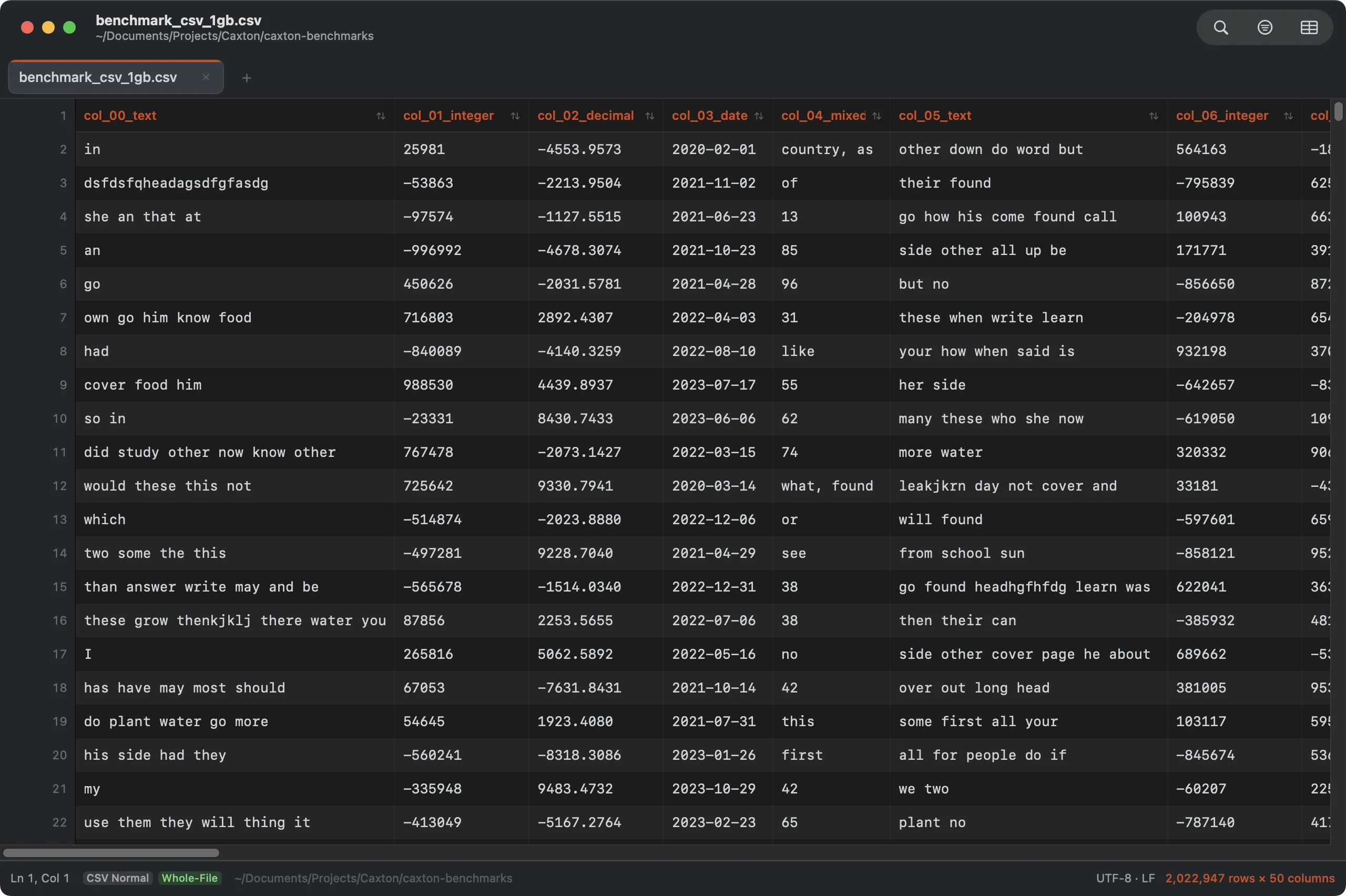
Two million rows open at once, double Numbers’ per-table ceiling, with a frozen header and typed columns.
Working in it feels like the spreadsheet parts of Numbers you actually use on raw data: click a cell to edit it, sort by a column header, filter rows to what matches, find and replace across the whole file. Deleting the junk column, fixing the date format, removing duplicate rows (the cleanup work oversized exports always need) happens in place, and saving writes the same CSV file back.
Scale is the point: a 1 GB file holding 2,022,947 rows across 50 columns, double Numbers' entire ceiling, becomes a working grid in 2.3 s, and sorting those 2 million rows by a numeric column takes 4.4 s, measured on an M1 Max with 64 GB RAM (details on the benchmarks page). Search, filter, find & replace, duplicate removal, and column operations are all in the CSV Workbench.
Caxton is an editor, not a spreadsheet: there are no formulas or charts. The two tools pair well precisely because of that split. Open the full export in Caxton, filter two years of orders down to the region and quarter you are reporting on, save that slice as its own CSV, and hand it to Numbers, now comfortably inside its limits, for the formulas and the chart.
Every row of the file, open on your Mac.
Download Caxton for Free7-day free trial of Caxton Pro, no credit card required · 7 MB · macOS 13.0+ · notarized
Frequently asked questions
Can I raise Numbers' row limit?
No. The 1,000,000-row by 1,000-column ceiling per table is fixed; there is no preference or setting that changes it.
Does truncation in Numbers delete my data?
Not from the original file. The CSV on disk keeps every row; only what Numbers imported is trimmed. The rows are lost only if you export from Numbers over the original file.
Why is Numbers slow even with fewer rows than the limit?
Numbers keeps the whole spreadsheet in memory and recalculates as you work, so large tables get heavy well before the row ceiling. The cap and the slowdown are separate walls.
My file is under the limits and still won't open. Why?
Then the problem is probably the file's size in megabytes rather than its row count; see opening huge CSV files on a Mac.
Sources
- Apple Support: row, column, and cell limits in Numbers
- Microsoft: Excel specifications and limits
- Caxton benchmark methodology and results
Still looking at a file Numbers won’t open? Download Caxton for Free. 7-day free trial of Caxton Pro, no credit card required.