Download Caxton for Free · 7-day free trial of Caxton Pro, no card · 7 MB · macOS 13.0+
Why does a Chinese file look garbled on a Mac?
GBK and Big5 store a Chinese character as two bytes, and GB18030 as two or four. None of those byte pairs are valid UTF-8 and most of them are not valid Windows-1252 either, so a program that assumes either encoding shows a run of accented letters and symbols where the characters were, or a replacement character per byte. The bytes are fine; the label is wrong. Nothing is lost until something saves the garbled text back.
The three encodings overlap. GB18030 is a superset of GBK, so every GBK file is a valid GB18030 file and reads correctly under that label. Big5 is a different table for traditional characters: a Big5 file decoded as GB18030 produces characters, just the wrong ones, which is why detection has to weigh the bytes the file uses and not only whether the decode produces text.
Free routes first
file is a first look. Its manual page documents -I as causing "the file command to output mime type strings rather than the more traditional human readable ones," with a charset. It identifies ASCII and UTF-8 well; on the GB18030, GBK and Big5 sample files used for this guide it reported charset=iso-8859-1, so a Latin answer for a file you know is Chinese is itself the clue.
file -I orders.csviconv converts between encodings, and the copy of it on macOS lists GB18030, GBK and BIG5 among the names it accepts (iconv -l). The result is a new UTF-8 file that every Mac program reads:
iconv -f GB18030 -t UTF-8 orders.csv > orders-utf8.csv
iconv -f BIG5 -t UTF-8 report.csv > report-utf8.csv
You have to know the encoding to name it. The wrong -f converts cleanly into the wrong characters or stops at the first byte sequence the table does not have, and the output is a copy, so the original and its encoding stay as they were.
Where do the free tools stop?
At telling you which encoding it is, and at keeping it. file does not name the Chinese encodings, iconv needs the name, and both produce a second file. When the file has to go back to the system it came from, in the encoding it came in, a converted copy is the wrong deliverable.
How does Caxton handle these files?
Caxton reads the file in place and decides the encoding as it opens. The manual's Encodings page lists every encoding it reads; what follows was checked against sample files in Caxton 2.1.0.
1. Open the file and read the banner
Detection samples windows through the file. An all-ASCII file is read as UTF-8; only a window that is not valid UTF-8 brings the legacy encodings in, and the candidates are scored by how the decoded text reads. A legacy detection never claims more than 85 percent confidence, which keeps the reopen hint visible: the banner says which encoding was detected and offers File ▸ Reopen with Encoding. The Inspector shows the encoding and the detection confidence. Opening and reading are Caxton Free.
On the sample files: a 400-row GB18030 CSV opened as GB18030, and the same rows saved as GBK also opened as GB18030, which reads correctly because GBK is a subset of it. Caxton has no separate GBK entry; GBK files live under GB18030.
2. Big5: detected on open, and one menu away if not
The 400-row Big5 CSV opens as Big5 in Caxton 2.1.0, with the names and cities readable and the banner naming the encoding. Earlier versions opened it as GB18030, with the characters wrong, because the five CJK tables scored alike and the tie went to the first; the detector now expects each table's own script in the decoded text (kana for the Japanese tables, hangul for EUC-KR) and tells the two Chinese tables apart by the trail-byte range the file uses, which Big5 fills and GB18030 text almost never does. The six-row GB18030 sample that used to open as EUC-JP opens as GB18030 for the same reason. When a file does land on the wrong table, File ▸ Reopen with Encoding ▸ Big5 reads it correctly; with unsaved edits, Caxton asks first, since reopening re-reads the file from disk. One file still fools it on purpose: Japanese text with no kana at all, a bare list of names, can open as GB18030 with the reopen hint showing, and Reopen with Encoding ▸ Shift-JIS or EUC-JP is the way through. Caxton Free.
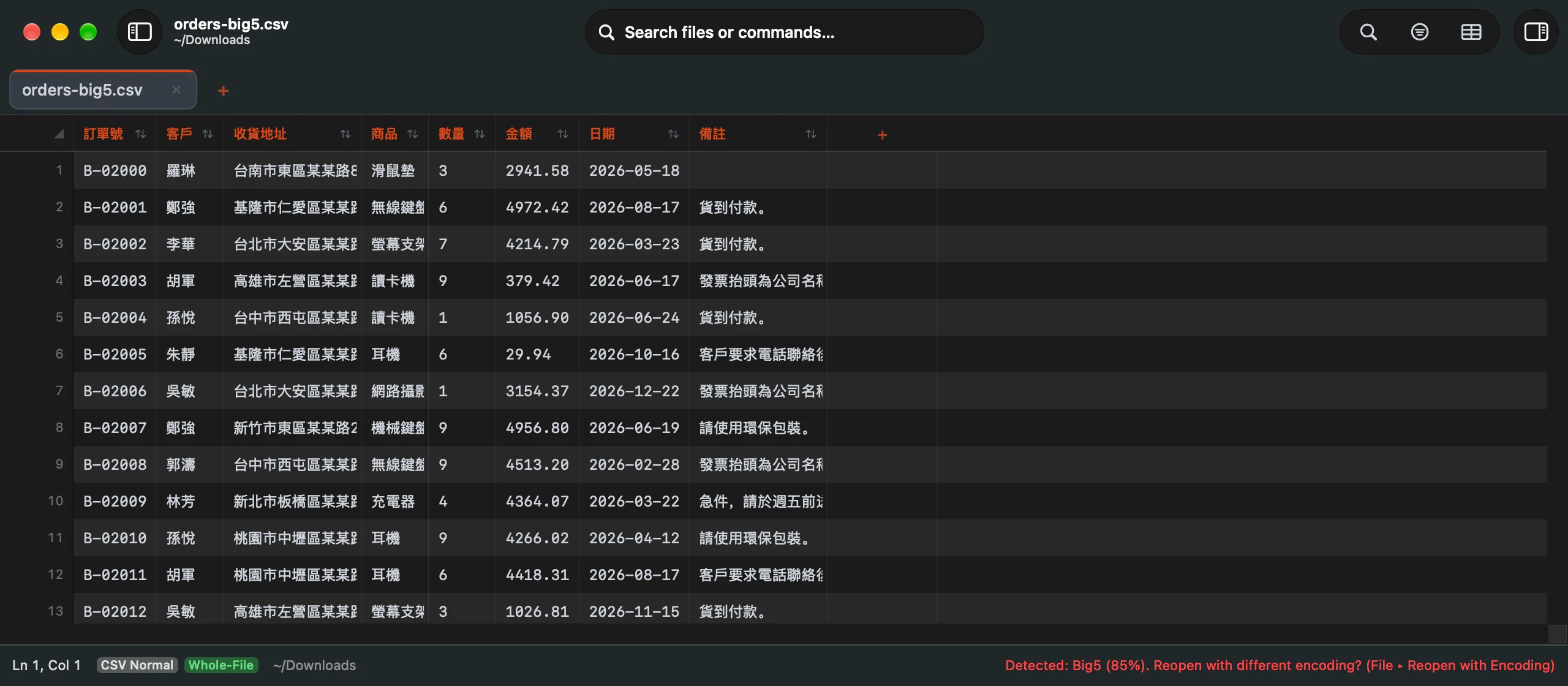
The 400-row Big5 sample in Caxton 2.1.0 as it opens: detected as Big5, the names and cities readable, and the status bar naming the detection and offering File ▸ Reopen with Encoding in case it is wrong.
3. Full-width characters in the grid and in fixed-width files
In the grid a cell is a cell: a column of Chinese names lines up with the columns beside it regardless of how wide each character draws, and sorting, filtering and the Column Profile read the decoded text. Fixed-width files are different. CSV ▸ Convert Fixed-Width to Columns… splits every line at the character widths you give, and it counts characters, not bytes. A Chinese export padded by byte count, which many older systems produce, does not split at its byte widths: a field of three characters that the exporter padded to twelve bytes is six characters wide here, so give the widths in characters, or convert the file with iconv first and measure the result.
4. Edit, then save in the file's encoding, or as UTF-8
A file opened in an encoding other than UTF-8 is converted to UTF-8 while you work on it, and ⌘S converts it back, so the file keeps its encoding and its byte order mark. When your edits contain characters the file's encoding cannot represent, Save stops and asks: Save as UTF-8 changes the file's encoding on disk and saves, and Cancel leaves the file as it was. A file reopened with Reopen with Encoding is written as UTF-8 on File ▸ Save As, and the panel says so before you click, which is the conversion to UTF-8 when that is what you want. Saving and Save As are Caxton Pro.
Open the garbled file. Read the banner, reopen if it needs it, and save it back.
Download Caxton for Free7-day free trial of Caxton Pro, every feature, no card. After it, Caxton Free keeps opening, searching and filtering at any size.
Which approach fits which job?
| Approach | Good for | Breaks when |
|---|---|---|
file -I | Confirming a file is not UTF-8, free | You need the Chinese encoding named; it reported a Latin charset on the samples |
iconv | A UTF-8 copy in one command when you know the encoding, free | You do not know it, or the file must go back in its own encoding |
| Caxton | GB18030, GBK and Big5 detected on open, editing in place, Save in the file's encoding or Save As in UTF-8 | A very short file, or Japanese with no kana, is left on the detected encoding without a look at the banner |
For the general case of a file in the wrong encoding, with the Windows-1252 and Cyrillic examples, see fixing garbled text and the wrong encoding.
Frequently asked questions
Why does my GBK or Big5 file show garbage on a Mac?
The bytes are a two-byte Chinese encoding and the program reading them assumed UTF-8 or Windows-1252, so each byte pair became accented letters, symbols or replacement characters. The file itself is intact. Reading it under its own encoding, with iconv or with Caxton's Reopen with Encoding, restores the characters; saving the garbled version back is what would lose them.
What is the difference between GBK and GB18030?
GB18030 is the current Chinese national standard and a superset of GBK: every GBK file is a valid GB18030 file and reads correctly under that label, which is why Caxton lists GB18030 and reads GBK files as it. On the sample files, a GB18030 CSV and the same rows saved as GBK both opened as GB18030 in Caxton 2.1.0.
Why did my Big5 file open as GB18030?
A Big5 file decoded as GB18030 produces characters, only the wrong ones, and earlier versions of Caxton did not tell the two apart. Caxton 2.1.0 scores each table by the script the decoded text reads as and by the byte ranges the file uses, and the 400-row Big5 sample opens as Big5. If a very short file still lands on another CJK encoding, the banner offers File ▸ Reopen with Encoding, and Big5 is one choice away.
How do I convert a GB18030 or Big5 file to UTF-8?
On the command line, iconv -f GB18030 -t UTF-8 in.csv > out.csv, or BIG5 as the source, writes a UTF-8 copy. In Caxton, a file reopened with Reopen with Encoding is written as UTF-8 by File ▸ Save As, and the panel says so first; plain Save keeps the file's original encoding, and asks before switching to UTF-8 only when an edit cannot be represented in it. Save and Save As are Caxton Pro.
Sources
- file(1), the manual page shipped with macOS (
man file): the-Ioption - iconv(1), the manual page shipped with macOS (
man iconv), andiconv -lfor the encodings it names - Caxton manual: Encodings, detection, Reopen with Encoding, and saving
- Caxton manual: CSV Workbench, Convert Fixed-Width to Columns