Download Caxton for Free · 7 days, no card · 7 MB · macOS 13.0+
How do I filter a log to just the errors right now?
Terminal, zero installs. One of these is usually the whole job:
grep -n "ERROR" app.log > errors.txt          # every match, with its original line number
grep -n -C 3 "ERROR" app.log > errors.txt     # matches plus three lines of context each
grep "ERROR" app.log | grep -v "healthcheck"  # match, then throw out the noise
awk -F, '$3 == "ERROR"' events.csv            # a field condition, for delimited logs
grep "ERROR" app.log | less -S                # page through matches, no temp file
If you know the condition in advance and the excerpt is the deliverable, grep into a new file is the right tool and this page is over. -n stamps each line with its number in the original, -C carries context, and -v is subtraction. The excerpt opens in anything.
One assumption worth naming: all of this is for a log you can already read. If the file is so large that opening it is the problem, that is a different question with its own answer: open a 10 GB log file on a Mac.
Why is grep not enough for this log?
Because the first condition is rarely the last. The ERROR extract turns out to be two-thirds health-check noise, so you add a -v; then you need the WARN lines from one subsystem too, and the pipeline grows another stage; then someone asks whether the spike started before or after the deploy, and the honest answer is in lines your excerpt threw away. Each guess means another full pass over the file and another temp file to keep straight.
Line numbers quietly stop meaning anything, too. grep -n numbers whatever stream it reads, so once a second stage sits in front of it, the numbers describe the pipeline, not the file. And the excerpt is dead text: fixing a malformed line inside errors.txt fixes nothing.
Combining conditions readably is the last straw. Two conditions joined with OR is grep -E and an alternation; three conditions where one is an exclusion is a pipeline you will not want to reconstruct at 3 a.m. This is the moment for a filter you can see and adjust in place. (If your instinct is to open the log in a code editor and use its search instead, check what that editor was designed for first; the survey is its own guide: large file text editors on a Mac.)
How do I filter the log and keep it editable?
In Caxton, press ⇧⌘L, type ERROR, press Return. On the published 10 GB benchmark log, the view narrows from 80,610,954 lines to the 1,613,344 matching ones in 1.0 s (measured on an M1 Max with 64 GB RAM; methodology and the full table on the benchmarks page). The gutter keeps the original line numbers, and what remains is not an excerpt: it is the document, filtered, still scrollable, searchable, and editable.
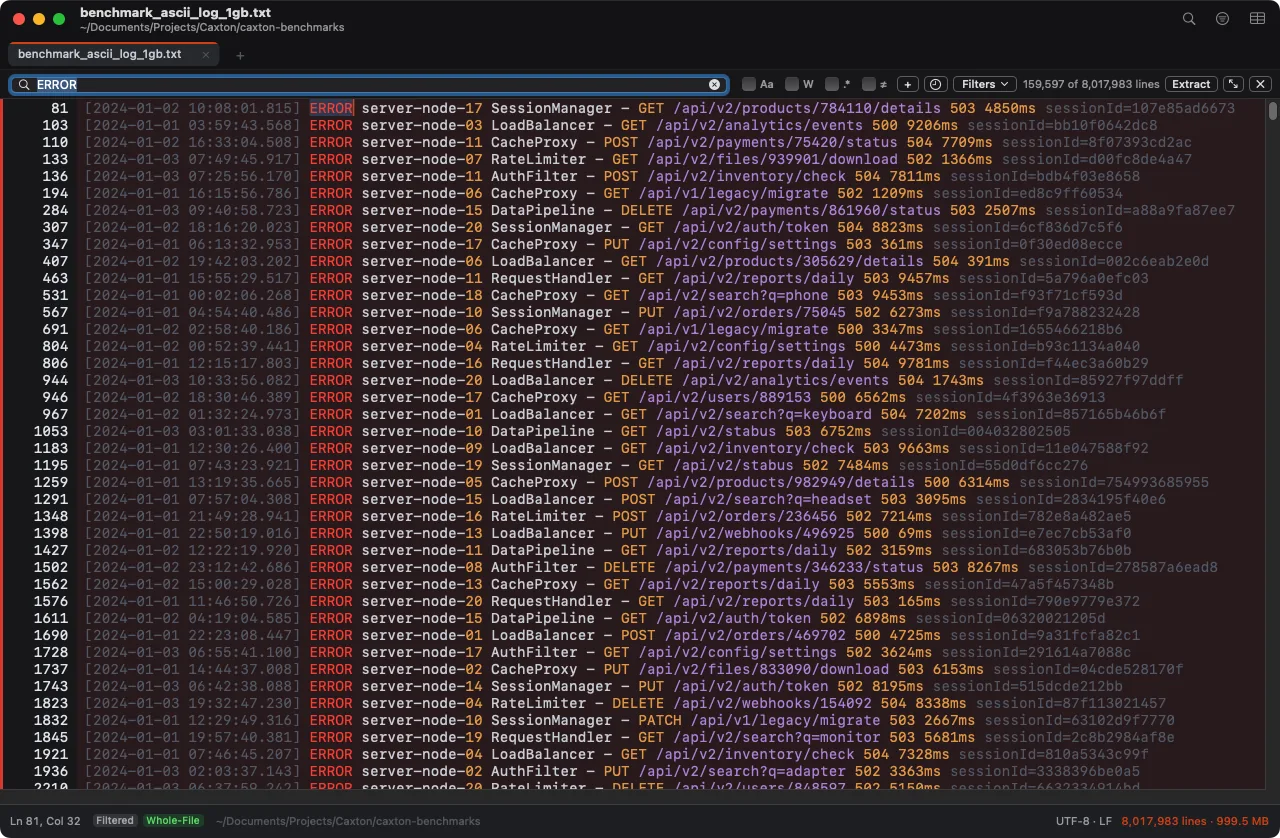
The 1 GB benchmark log filtered to its ERROR lines: 159,597 of 8,017,983 remain, original line numbers in the gutter.
Each condition has its own case, whole-word, and regex toggles, plus ≠ to exclude matches instead: that one toggle is the whole grep -v stage. Click + and the Filter Lines panel chains conditions with per-row AND/OR joiners (AND binds tighter), so "ERROR or WARN, but never healthcheck" reads the way you would say it. A two-condition OR over the same 10 GB file applies in 1.8 s, a two-condition AND in 2.1 s, and changing your mind is editing a row, not rebuilding a pipeline. Save a chain as a named preset and it is waiting for the next incident.
The workflow runs in both directions. A search can become the filter (Filter to Matches hands the query to the filter bar in one click), and the filtered view can become a file: Extract All copies every matching line to a new document, and Export writes grep-style numbered lines when a teammate wants the excerpt after all. On a log that is still growing, turn on Follow in the status bar and the view pins to the end while the filter keeps working: tail -f, with scrollback.
Editing while filtered works, which matters the day the log itself needs fixing. If a change makes the result stale, a Refresh chip appears instead of the view churning under you. For changing the matched lines wholesale rather than reading them, that is replacement, not filtering: find and replace in a huge file on a Mac.
The errors are three keystrokes away from the noise.
Download Caxton for Free7 days free, no credit card · 7 MB · macOS 13.0+ · notarized
Which approach fits which job?
| Approach | Good for | Breaks when |
|---|---|---|
grep -n into a file | One known condition, excerpt as the deliverable, free | The condition keeps changing, or the excerpt needs editing |
grep -v pipelines | Subtracting known noise in one pass | The chain grows past what you can re-read, and line numbers describe the stream |
awk | Field conditions on delimited logs, by design | The condition is textual and iterative rather than positional |
less with &pattern | A quick matching-lines view inside the pager, free | You need multiple conditions, editing, or the result as a document |
| Caxton | Iterating on conditions over the whole log, editable result, original numbers | You want aggregation across many hosts, not a file |
Frequently asked questions
How do I filter a log file to just the errors on a Mac?
In Terminal, grep -n "ERROR" app.log > errors.txt writes every matching line, numbered, into a file you can open anywhere, free. In Caxton, press ⇧⌘L, type ERROR, press Return: on the published 10 GB benchmark, the view narrows to the 1,613,344 matching lines of 80,610,954 in 1.0 s, and the result is still the document, not a copy.
Can I filter a log without the terminal?
Yes. Caxton's filter bar takes a plain text condition with per-condition case, whole-word, regex, and exclude toggles; a panel chains conditions with AND and OR. Presets save a condition chain by name, so the filter you build during one incident is a click away in the next.
How do I keep line numbers when filtering a log?
grep -n stamps each match with its original number, but the numbers are text inside a new file, and a second pipeline stage numbers the stream it sees rather than the file. Caxton's filtered view keeps the real line numbers in the gutter, and Export writes grep-style numbered lines to a new document when you need the excerpt.
Can I edit a filtered log file?
A grep excerpt is a copy; editing it changes nothing in the original. Caxton's filter is a live view of the document itself: edits apply to the real file, a Refresh chip appears if a change makes the result stale, and saving writes the same file back.
The pager already went off. Download Caxton for Free and have the log down to what matters before the bridge call starts: 7 days free, no card.