Every menu command is rebindable: Caxton ▸ Keyboard Shortcuts… ⌘, opens the Keyboard Shortcuts window, which lists every menu command outside the Caxton menu with its binding. The Caxton menu (About, Keyboard Shortcuts…, License…, Hide, Hide Others, Quit), Services and Open Recent are not listed and keep their keys. Keys the editor handles itself, such as clicks and drags, Tab, Home, End, PgUp and PgDn, and the Compare window's buttons are marked fixed below; they are not menu commands and cannot be rebound. Select a command, Record Shortcut, press the keys; conflicts are named and confirmed before reassigning, and Clear Override returns a command to its default. Before 2.0.1 the menu item was named Preferences.
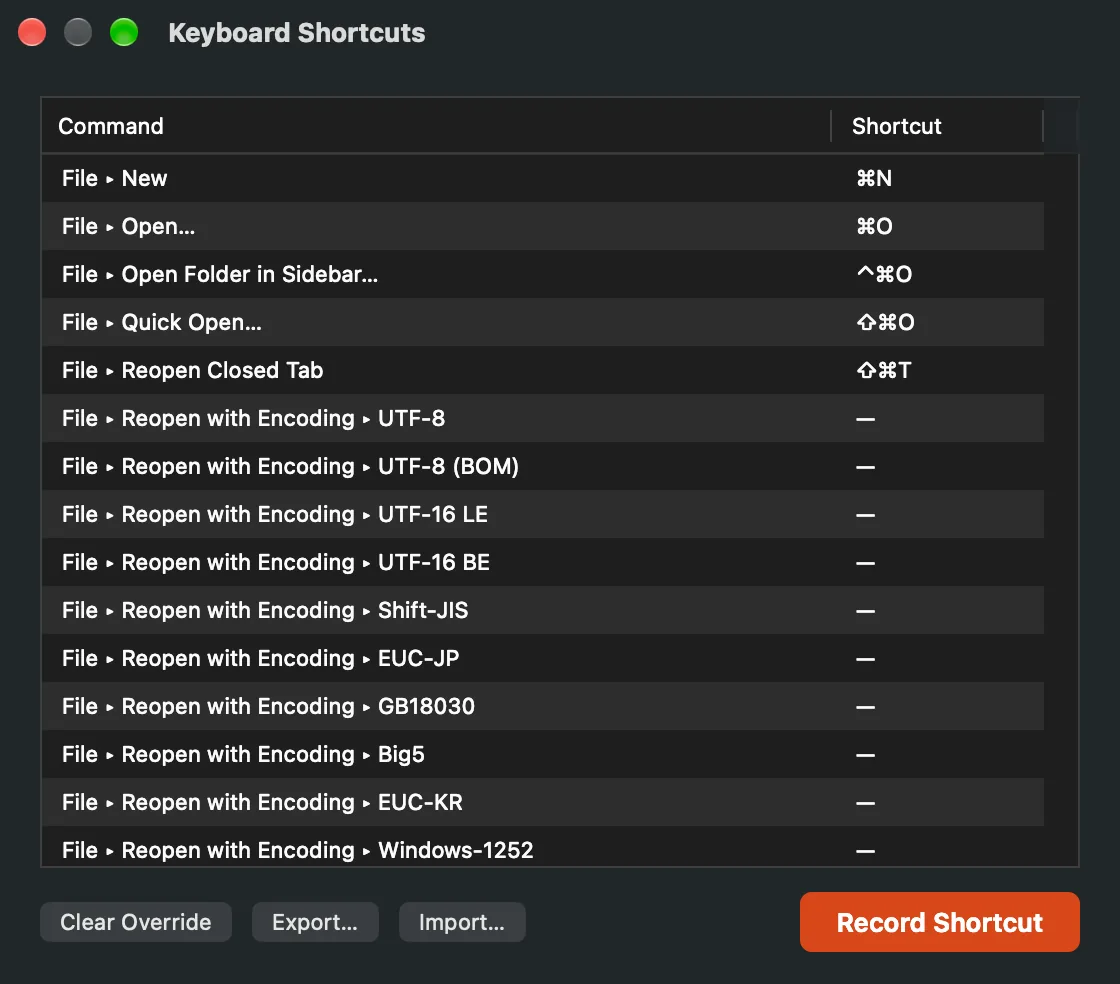
Every menu command with its binding; select one and record a new key.
Find & filter
| Action | Shortcut |
|---|
| Find | ⌘F |
| Find and Replace | ⌥⌘F |
| Find Next / Previous | ⌘G / ⇧⌘G |
| Use Selection for Find | ⌘E |
| Jump to Selection | ⌘J |
| Filter Lines | ⇧⌘L |
| Find in Files | ⇧⌘F |
| Select All Occurrences | ⌃⌘G |
Editing
| Action | Shortcut |
|---|
| Undo / Redo | ⌘Z / ⇧⌘Z |
| Add cursor (fixed) | ⌥Click |
| Rectangular (column) selection (fixed) | ⌥Drag |
| Sweep cursors to clicked line (fixed) | ⌥⇧Click |
| Expand / Contract Selection | ⌃⇧⌘→ / ⌃⇧⌘← |
| Select Next Occurrence | ⌘D |
| Toggle Line Comment | ⌘/ |
| Toggle Block Comment | ⌥⌘/ |
| Jump to Matching Bracket | ⌃⌘B |
| Select Surrounding Pair | ⌃⇧⌘B |
| Clipboard History | ⇧⌘V |
| Paste Special… (CSV grid) | ⌃⌥⌘V |
| Complete Word | ⌥⎋ |
| Expand Snippet / Next Stop (fixed) | ⇥ |
| Move by word (fixed) | ⌥← / ⌥→ |
| Delete word back / forward (fixed) | ⌥⌫ / ⌥fn⌫ |
| Delete to start / end of row (fixed) | ⌘⌫ / ⌘fn⌫ |
Text toolbox
| Action | Shortcut |
|---|
| Duplicate Line | ⇧⌘D |
| Delete Line | ⇧⌘K |
| Move Line Up / Down | ⌥⌘↑ / ⌥⌘↓ |
| Join Lines | ⌃J |
| Indent / Outdent | ⌘] / ⌘[ |
| Indent / Outdent selection (fixed) | Tab / ⇧Tab |
| Line start / end (fixed) | Home / End |
| Document start / end (fixed) | ⌘Home / ⌘End |
| Move cursor by page (fixed) | PgUp / PgDn |
| Rectangular selection (start or grow) (fixed) | ⌥⇧↑↓ |
| Rectangular selection (widen / by page) (fixed) | ⌥⇧←→ · ⌥⇧PgUp/PgDn |
Navigation
| Action | Shortcut |
|---|
Go to Line (Go to Cell in the grid: row or row:col) | ⌘L |
| Go to Time (timestamped logs) | ⌥⌘L |
| Toggle Bookmark | ⇧⌘B |
| Bookmarks panel (in the sidebar) | ⌥⌘M · ⌃⌘3 |
| Next / Previous Bookmark | ⌥⌘B / ⌥⇧⌘B |
| Markers | ⇧⌘M |
| Quick Open (Search Files or Commands, on files) | ⇧⌘O |
| Command Palette (Search Files or Commands, on commands) | ⇧⌘P |
| Go Back / Go Forward | ⌃⌘← / ⌃⌘→ |
| Next / Previous Change | ⌃⌘↓ / ⌃⌘↑ |
View
| Action | Shortcut |
|---|
| Word Wrap | ⌥⌘W |
| Split View | ⌘\ |
| Fold Current Region / Unfold | ⌥⌘← / ⌥⌘→ |
| Fold All / Unfold All | ⌥⇧⌘← / ⌥⇧⌘→ |
| Next Difference (Compare window) (fixed) | ⌘↓ |
| Previous Difference (Compare window) (fixed) | ⌘↑ |
| CSV Grid View | ⇧⌘C |
| Show Sidebar | ⌃⌘S |
| Sidebar panels: File Browser … Column Profile | ⌃⌘1 … ⌃⌘7 |
| Show Inspector | ⌥⌘I |
| Operations panel | ⌥⇧⌘J |
| Show Toolbar | ⌥⌘T |
| Zoom In / Out / Actual Size | ⌘+ / ⌘− / ⌘0 |
| Enter Full Screen | ⌃⌘F |
Files and tabs
| Action | Shortcut |
|---|
| New / Open / Close | ⌘N / ⌘O / ⌘W |
| Save / Save As | ⌘S / ⇧⌘S |
| Open Folder in Sidebar | ⌃⌘O |
| Reopen Closed Tab | ⇧⌘T |
| Show Previous Tab / Show Next Tab | ⇧⌃Tab / ⌃Tab · ⇧⌘[ / ⇧⌘] |
| Print (Page Setup has no shortcut) | ⌘P |
| Keyboard Shortcuts window (fixed) | ⌘, |
CSV Grid
| Action | Shortcut |
|---|
| Fill Down | ⌘D |
| Fill Right | ⌘R |
| Transform Cells | ⌥⇧⌘T |
| Paste Special… | ⌃⌥⌘V |
Standard macOS
The keys macOS gives every app. The Caxton menu's keys are fixed; the rest are menu commands and can be rebound like any other.
| Action | Shortcut |
|---|
| Hide Caxton / Hide Others (fixed) | ⌘H / ⌥⌘H |
| Quit Caxton (fixed) | ⌘Q |
| Cut / Copy / Paste | ⌘X / ⌘C / ⌘V |
| Paste and Match Style | ⌥⇧⌘V |
| Select All | ⌘A |
| Show Spelling and Grammar / Check Document Now | ⌘: / ⌘; |
| Show Fonts | ⌘T |
| Bold / Italic / Underline | ⌘B / ⌘I / ⌘U |
| Copy Style / Paste Style | ⌥⌘C / ⌥⌘V |
| Align Left / Center / Align Right | ⌘{ / ⌘| / ⌘} |
| Copy Ruler / Paste Ruler | ⌃⌘C / ⌃⌘V |
| Minimize | ⌘M |
| Caxton Help | ⌘? |
The Format menu's font and ruler items are the standard macOS ones and never embed formatting in your files; see the Menu Reference.