Progressive indexing
When a file opens, the line index builds in the background and the status bar shows its progress. Everything works during the build; the editor renders and edits against whatever has been indexed so far and streams in the rest.
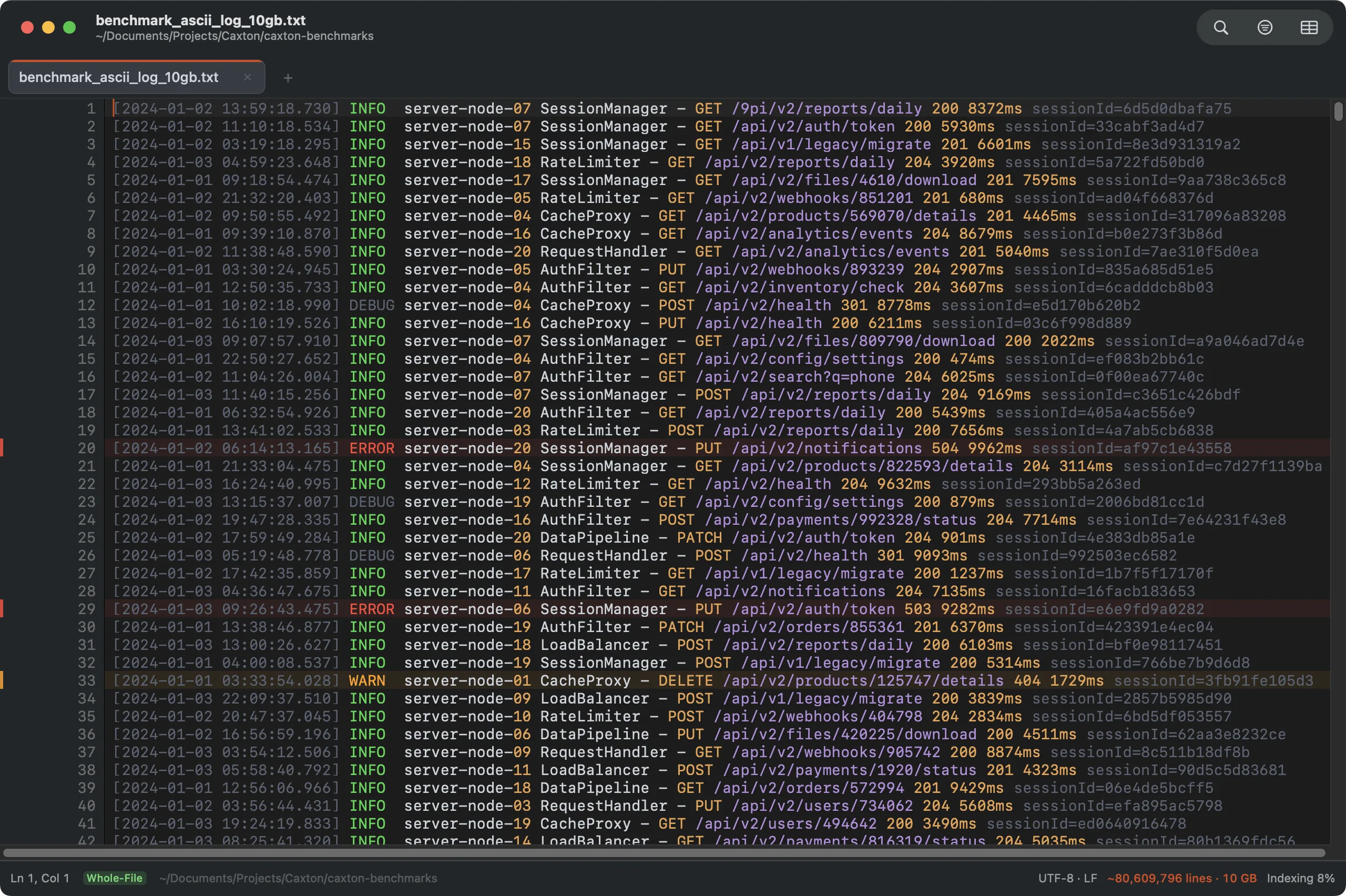
Mid-index on the 10 GB benchmark log. The document is already scrollable and editable; the status bar tracks the background scan.
- 10 GB / 80.6M lines: fully indexed in 3.7 s (measured, M1 Max).
- Memory footprint stays under 160 MB through every measured operation on the 50 GB log: the file itself is memory-mapped, not resident.
The Large File Controller
A file of 300 MB or more opens with the Open Large File dialog. It names the file (a streamed result by the name it will open under) and its size and offers four modes under Open as; click a mode's card to choose it, then Open, or Cancel to leave the file closed. The dialog asks every time you open a file that size, and it appears on the screen that holds your window.
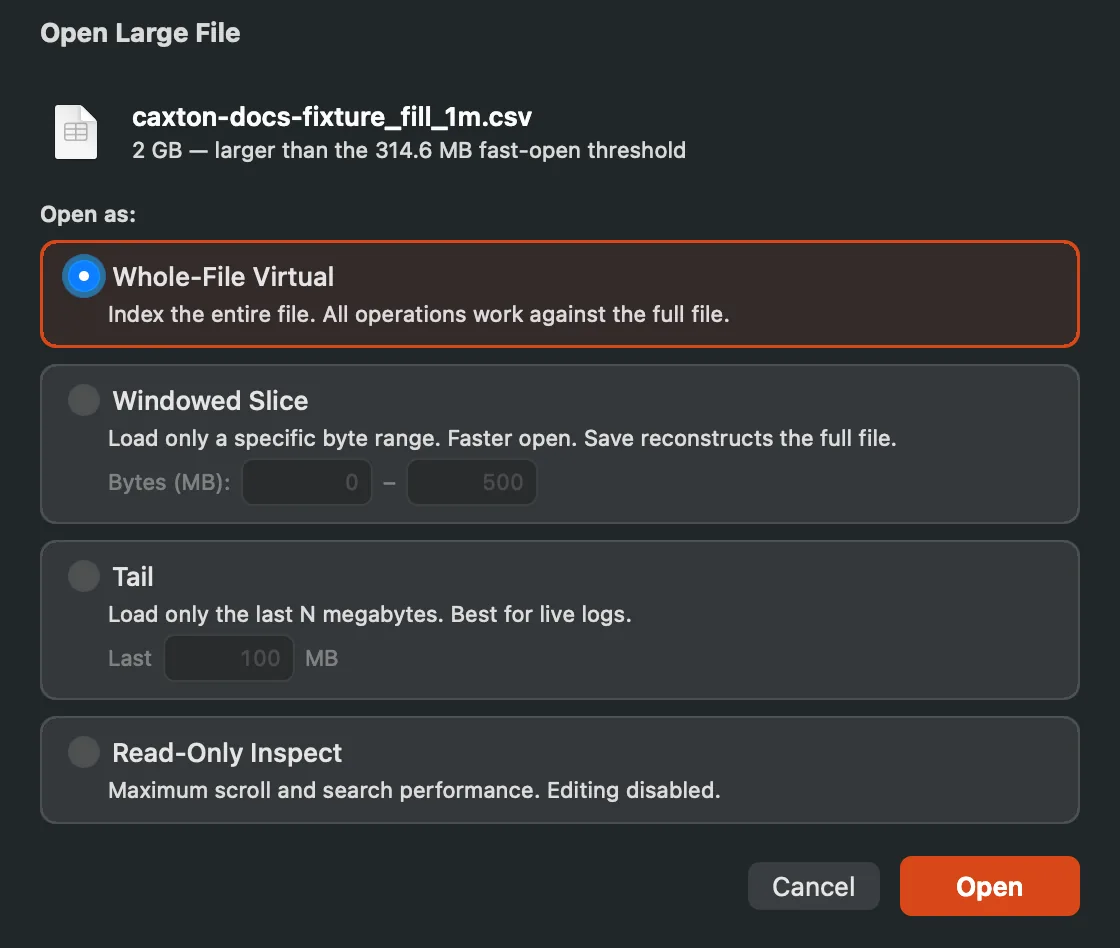
The Open Large File dialog for a 2 GB CSV file, with Whole-File Virtual chosen.
| Mode | What it opens | Fields |
|---|---|---|
| Whole-File Virtual | The default. The entire file is indexed, and every operation works against the full file. This is the right choice almost always. | None. |
| Windowed Slice | Only a byte range of the file, so it opens faster. Save writes the full file back with your edits in the range. | Bytes (MB): the start and end of the range, in megabytes. The start is 0 and the end is the file's size, up to 500. |
| Tail | Only the end of the file. Best for live logs. | Last N MB: how many megabytes from the end to load, 100 to start with. |
| Read-Only Inspect | The entire file with editing turned off, for the fastest scrolling and search. | None. |
The fields are checked when you click Open. The dialog stays open and says what is wrong when the slice's end is not greater than its start, when the start is past the end of the file, or when the tail is less than 1 MB.
A slice or a tail shows its loaded window in the status bar, and searches and filters label themselves with the slice scope. Filters offer an Entire File toggle that scans beyond the loaded slice. Scroll to the top edge of a slice or a tail and a Load previous 10 MB button appears; at the bottom edge of a slice, Load next 10 MB. Clicking a filter result outside a slice loads a 20 MB slice around that line. With unsaved edits it asks first (Load a different slice?): Load Slice reloads from disk and discards your edits, Cancel keeps them. In a tail, a result before the loaded part points you to Load previous instead.
In Tail mode, a file that has grown since you opened it cannot be saved over, because the save would drop the new lines. Save asks instead (This file is being appended to) and offers Save As… to write your edits to a new file.
In Read-Only Inspect, editing commands do not run: the status bar says the command is unavailable because the document is read-only, and the inspector gives the reason as Opened read-only to inspect. To edit, close the window and open the file again in another mode.
When a file cannot be opened at all, Caxton says why (Could not open “file”). When the cause is bytes that do not decode in the detected encoding, the alert offers Open as Windows-1252, which reads every byte, and you can choose the right encoding afterward with File ▸ Reopen with Encoding.
Growing logs: watching and follow-tail
Caxton watches open files for external changes. A whole-file document reloads when another process rewrites it, and a deleted, renamed, or unmounted file is reported in every mode. In tail mode, appended lines stream in while Follow is on; turn on Follow in the toolbar to pin the view to the end of the file as it grows: tail -f, but with search, filters, and full scrollback. Follow starts from the bytes already loaded, so nothing written between the open and the first poll is skipped. Follow works on reopened (non-UTF-8) files too; appended bytes are transcoded as they arrive. When a file grows faster than one poll absorbs, the Following pill says how far behind it is and the read size adapts; past half a gigabyte of backlog Caxton catches up by reloading the last 64 MB and names the byte range left outside the window, which View ▸ Log ▸ Open Skipped Range as Slice opens in its own window. View ▸ Log ▸ Catch Up to Live does the same on demand; with unsaved edits it asks first, and the automatic catch-up pauses Follow instead of discarding them. On a reopened file the automatic catch-up is off (it reloads the whole file), so the menu item is the way, and Open Skipped Range as Slice is disabled there. A rotation prompt names any bytes of the old file that had not been read yet, and a read error pauses Follow with the reason. After a rotation the follower restarts on the new file, and no byte of the old file lands in it. A Catch Up that cannot reload leaves the follower where it was and says so.
Single-line monsters
A 500 MB minified bundle on one line is a worst case that Caxton treats as a first-class citizen. The renderer draws only the visible segment of the line, so you can jump 267 MB deep into a single line and land instantly, and finding text in it takes under a second.
Encodings
UTF-8 is detected and displayed with the line-ending style in the status bar. When a file opens as UTF-8 at low confidence and some bytes look like a legacy encoding, the banner names it (Some bytes look like Windows-1252. Reopen with that encoding?) and File ▸ Reopen with Encoding preselects that encoding, marked (suggested). A Windows-1252 file with only a few accented characters opens as Windows-1252. Cyrillic text in Windows-1251, KOI8-R, or ISO-8859-5 and Central European text in Windows-1250 or ISO-8859-2 is detected the same way. Windows-1254 (Turkish) and Windows-1257 (Baltic) are not detected; choose them from the Reopen with Encoding menu. Mixed international text (CJK, emoji, combining marks) renders and edits correctly, with caret movement that respects grapheme clusters rather than bytes.
Guessed wrong or working with legacy data? File ▸ Reopen with Encoding reinterprets the file as UTF-8 (with or without BOM), UTF-16 LE/BE, Shift-JIS, EUC-JP, GB18030, Big5, EUC-KR, Windows-1252, ISO-8859-1, Windows-1251, KOI8-R, ISO-8859-5, Windows-1250, ISO-8859-2, Windows-1254, or Windows-1257, listed in that order. A file reopened this way is written as UTF-8 on Save As, and the panel says so. UTF-32 LE and BE files open when they start with a byte order mark; the Encodings page has the full list.
File pattern rules
Edit ▸ File Pattern Rules… holds an ordered list of glob rules that apply at open, session restore, workspaces, and Reopen Closed Tab included: a plain pattern (*.log) matches file names, one with a slash (*/exports/*.csv) matches the whole path. Each rule can set word wrap, tab width, encoding, or syntax and leave the rest inherited; rules read top to bottom and the first match wins for each setting. The encoding rule applies exactly like Reopen with Encoding, just automatically, so the vendor who ships Shift-JIS every Tuesday stops being a ritual.
A rule can also read matching files as a table: it names the delimiter and whether the first row is a header, and a matching file opens in the grid with that profile.
The caxton command
Caxton ▸ Install Command Line Tool… puts a caxton command on your PATH: a link at /usr/local/bin/caxton to the helper inside the app. Install asks for an administrator password, and Copy Command puts the equivalent Terminal command on the clipboard instead. Homebrew installs the command with the app. If the shell does not find caxton after you install it, /usr/local/bin is not on its PATH.
The link points at the app where it is now. When Caxton is running from the temporary location macOS gives an app opened where it was unzipped, the item asks you to move Caxton to the Applications folder first, open it from there, and install the command again. When Caxton runs from a folder outside Applications, the dialog says that moving the app later means installing the command again.
caxton file.log opens a file, and several paths open several files. caxton ., or any folder path, shows the folder in the sidebar's File Browser. The command talks to the running Caxton and launches it when it is not running, and it prints nothing when it succeeds.
| Option | What it does |
|---|---|
-l, --line <n> | Puts the caret on line n. --line=100 works too. |
-t, --table | Opens the file in the CSV grid. |
-s, --search <term> | Opens the find bar with the term and jumps to the first match. --search=term works too. |
-n, --new | Opens an untitled window. caxton --new needs no path. |
--print-url | Prints the caxton:// URLs the command would open, one per path, and exits without opening anything. |
--version | Prints the version and build of the installed app, also when the command runs through your PATH. |
-h, --help | Prints the usage summary. |
-- | Ends the options: everything after it is a path, even a name that starts with a dash. |
The line, the grid and the search apply to files, not folders. caxton big.log --line 100 on a file of 300 MB or more waits for your choice in the Open Large File dialog, then goes to the line; a line past the part indexed so far is reached when the index gets there. If you cancel the dialog, nothing is applied.
The exit code says how it went: 0 the request was handed to Caxton, 1 a usage error (an unknown option, an option without its value, a line that is not a positive number, or nothing to open), 2 a path does not exist, 3 Caxton was not found. Errors print to standard error.
The command works by opening caxton:// URLs, and scripts and other apps can open them too. caxton://open?path= takes an absolute path, percent-encoded, and opens that file; add &line=100, &table=1 or &search= with a percent-encoded term. With a folder's path, or with &folder=1, it shows the folder in the File Browser. caxton://open?new=1 opens an untitled window. Flags take 1, true or yes. A path that does not exist, or folder=1 on a file, is refused with a message in the status bar, and any other caxton:// URL is ignored with a beep. For example, open "caxton://open?path=%2FUsers%2Fyou%2Fapp.log&line=100" in a Terminal opens app.log at line 100; caxton --print-url shows the URL for any command.
Comparing files
File ▸ Compare With… diffs the current document against another file: aligned side-by-side differences, at large-file scale (up to 256 MB per side; beyond the edit-distance budget, distant changes collapse into a single "files differ here" block rather than an unbounded search).
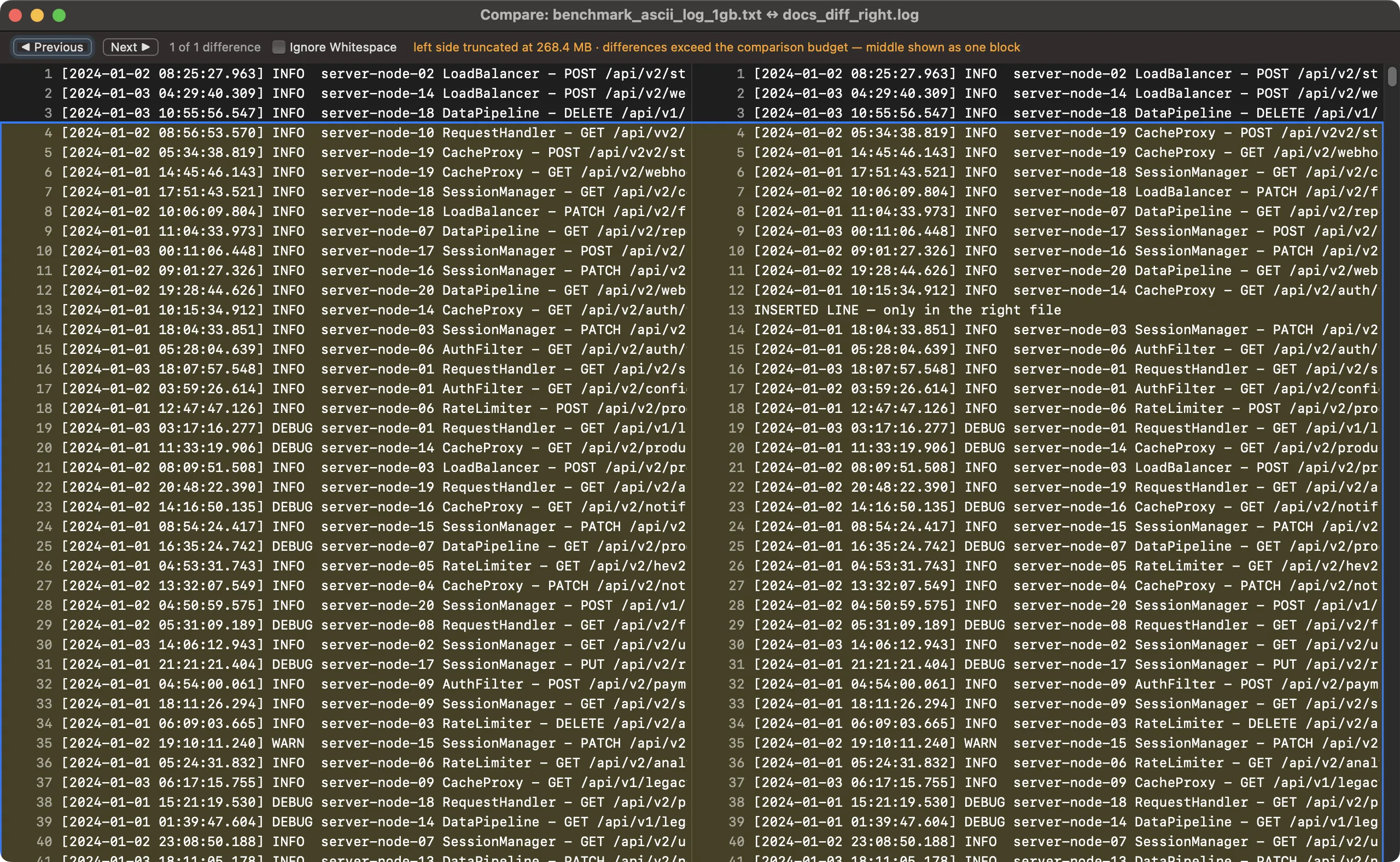
Side-by-side comparison: walk the differences with Previous/Next, toggle whitespace sensitivity, and jump straight to any change.