Download Caxton for Free · 7-day free trial of Caxton Pro, no credit card required · 7 MB · macOS 13.0+
The short answer
Numbers, which comes with a Mac, and Excel, if you already have it, give you formulas and charts, and TextEdit shows the raw text free. Caxton edits the CSV file itself as a table, with leading zeros, long IDs and dates left exactly as the file has them, from an ordinary export to millions of rows.
Other tools' details were last checked against their vendor documentation in August 2026 and may have changed since. Caxton's figures come from the benchmarks page, which gives the machine, the build and the method behind them.
The short version, by job:
- Excel: formulas, pivots, and modeling on data under its documented 1,048,576-row grid.
- Numbers: free on every Mac and comfortable under its documented 1,000,000-row table limit.
- DuckDB: scripted SQL over CSV files from Terminal, free.
- Dedicated CSV utilities: quick column-level edits on files that fit comfortably in memory.
- Caxton: direct CSV editing, cleanup, and text and table views, from small exports to multi-gigabyte files.
Is Numbers a good CSV editor?
For everyday exports, yes, and it is the free answer that comes with the machine. Numbers imports a CSV into a spreadsheet, which buys you formulas, formatting, and charts on top of the data, and its documents live comfortably in iCloud.
The design tradeoff is the import itself. Each table holds up to 1,000,000 rows and 1,000 columns, the data becomes a Numbers document rather than the CSV on disk, and getting a CSV back out is an export step. A file past those ceilings is its own guide.
Should I just use Excel?
If your team already lives in it, that is a real argument: Excel is the file format colleagues send back, and pivot tables and Power Query have no equivalent in anything else on this page. It opens CSVs directly and can save them back as CSV.
Excel is paid, via Microsoft 365. Its worksheet grid is documented at 1,048,576 rows by 16,384 columns, so any CSV past that arrives truncated; what to do then is covered in CSV too big for Excel.
What about dedicated CSV utilities?
There is a class of focused table editors built for CSV and nothing else, and for ordinary-size files they are pleasant tools. Modern CSV describes itself as a CSV file editor/viewer for Windows, Mac, and Linux, with a free tier and paid Premium features. On the Mac App Store, Easy CSV Editor is a paid CSV/TSV editor, and Table Tool ("a simple CSV editor for OS X," in its own words) is free and open source.
What defines the class is the deliberate absence of a spreadsheet layer: no formulas, no charts, just the table. If your files are modest and your edits are occasional, one of these may be all you need.
Can I skip the GUI entirely?
If the work is repeatable, yes, and the standard tools are free. DuckDB, an in-process SQL database released under the MIT license, queries a CSV directly with no import step:
duckdb -c "SELECT status, COUNT(*) FROM 'data.csv' GROUP BY status"csvkit describes itself as a suite of command-line tools for converting to and working with CSV: csvcut, csvgrep, csvstat, and friends compose into pipelines. Neither edits the file in place; both write transformed output, which is exactly right for scripted work and wrong for "fix the value in row 80,000."
VisiData is the interactive one. It calls itself "an interactive multitool for tabular data" that "combines the clarity of a spreadsheet, the efficiency of the terminal, and the power of Python," says it "can handle millions of rows with ease," and is free under GPLv3. It browses, sorts, and filters a CSV inside Terminal, and its documentation covers editing cell contents and saving the sheet. If you live in a terminal and the file fits its documented range, it is a good answer.
Which CSV editor fits which job?
| Tool | Free? | Documented limits | Edits the CSV directly? | Best for |
|---|---|---|---|---|
| Numbers | Free with every Mac | 1,000,000 rows × 1,000 columns per table | No, imports then exports a copy | Formulas and charts on everyday exports |
| Excel | Paid (Microsoft 365) | 1,048,576 rows × 16,384 columns | Yes, within its grid | Teams that live in Excel; pivot tables |
| CSV utilities (Modern CSV, Easy CSV Editor, Table Tool) | Free tiers and paid | Varies by app | Yes | Occasional edits to ordinary-size files |
| DuckDB / csvkit | Free (MIT) | No grid caps | No, writes transformed output | Repeatable queries and pipelines |
| Caxton | Caxton Free to open, view, search and filter; Caxton Pro to edit, save and extract, 7-day free trial of Caxton Pro | No row cap; measured to 50 GB as text and 10 million rows as a grid | Yes, saves the same file back | Everyday CSV editing, keeping IDs and leading zeros intact, column cleanup, and very large files. |
When is Caxton the right CSV editor?
When the file is the point. Caxton opens a CSV as the text file it is, backed by a memory-mapped document model, no import, no conversion, and presents it as a grid with typed columns, a frozen header, and one-click sorting on any header.
The rescue capability is a ceiling, not a requirement. An ordinary 2 MB export opens into the same grid with the same typed sorts, fill series, and cell editing, and plenty of people run Caxton as their everyday CSV editor on files a spreadsheet opens fine; the size headroom just means the day a file outgrows the spreadsheet, nothing about the workflow changes.
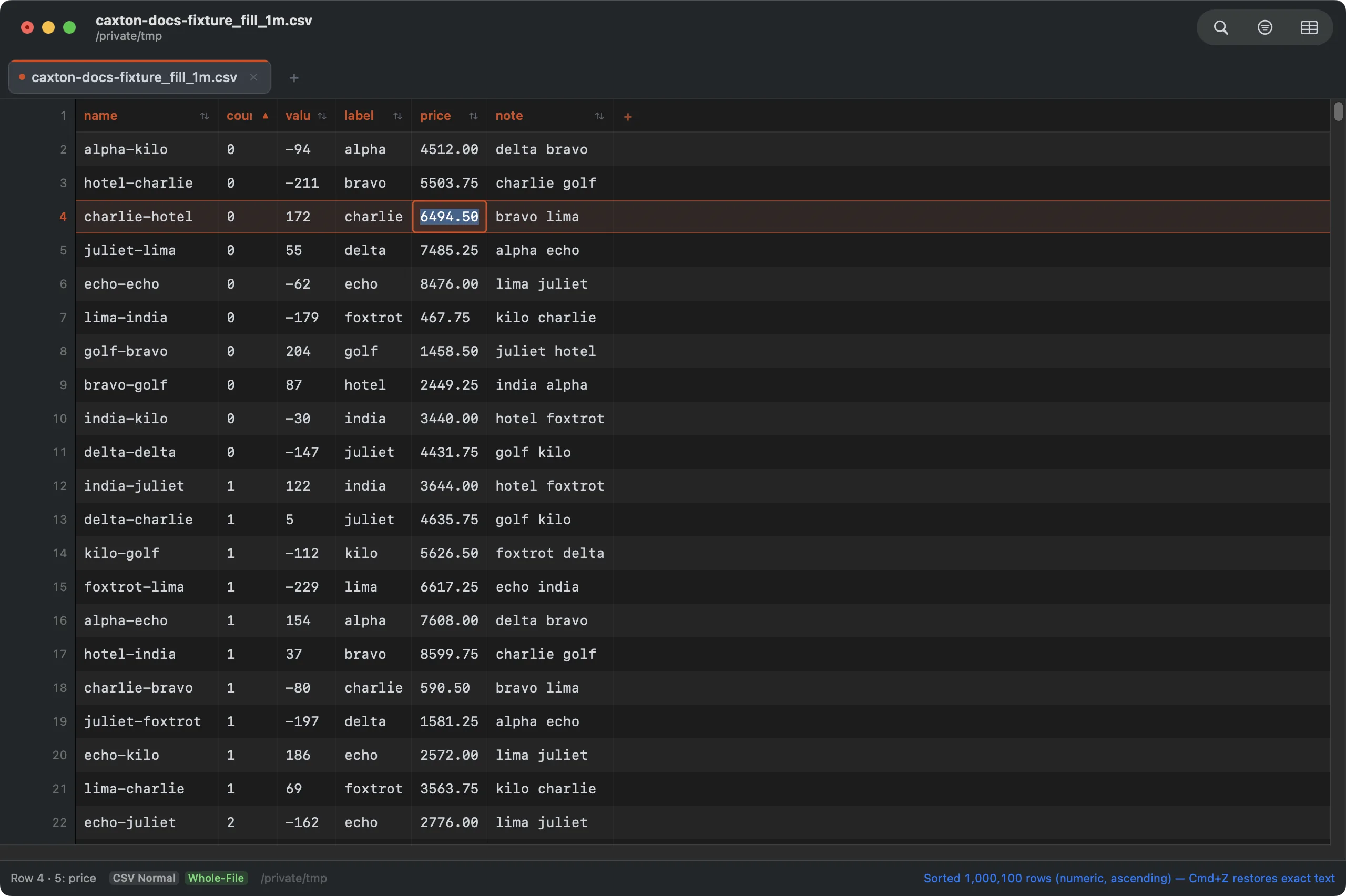
In-place cell editing on a CSV of just over one million rows. Esc cancels; Return commits; save writes the same CSV back.
The measured numbers, on an M1 Max with 64 GB RAM (full table on the benchmarks page): a 1 GB CSV of 2,022,947 rows × 50 columns parses to a working grid in 2.3 s, and a numeric sort of those 2 million rows takes 4.4 s. The sort itself, and what changes when the file is far larger than that, is the subject of sorting a large CSV on a Mac. The same engine holds at log scale: a 10 GB file opens immediately, and Replace All rewrites 1,613,344 sites in 1.7 s as one undo step.
The CSV Workbench is built for cleanup: split a column at a separator or combine two, delete duplicate rows by any column subset, convert delimiters, insert sequential numbers, drag a fill handle to continue a series, and edit any cell in place. Edits in the current document go into its undo history. Large sorts and duplicate removals create a new document instead and leave the original alone; the preview tells you which will happen. Saving writes the same CSV back to disk.
Caxton is not a spreadsheet: there are no formulas, charts, or pivot tables. It pairs with one: filter the oversized export down in Caxton, save the slice, and hand it to Numbers or Excel for the math. And if your large files are logs or JSON rather than tables, that survey is large file text editors on a Mac.
Open the file, fix it, save it back. No import step.
Download Caxton for Free7-day free trial of Caxton Pro, no credit card required · 7 MB · macOS 13.0+ · notarized
Frequently asked questions
Is there a free CSV editor for the Mac?
Numbers, which comes with a Mac, and Excel, if you already have it, give you formulas and charts, and TextEdit shows the raw text free. Caxton edits the CSV file itself as a table, with leading zeros, long IDs and dates left exactly as the file has them, from an ordinary export to millions of rows.
Is there a free CSV viewer for Mac?
Several. Quick Look previews a CSV straight from Finder with the spacebar, which covers the fast glance; Numbers is free and comfortable within its documented limits; and the Mac App Store carries free viewer utilities for read-only browsing. A paid editor earns its place when the file is huge or needs editing and saving back as the same CSV.
How big a CSV can Numbers or Excel open?
Numbers holds up to 1,000,000 rows and 1,000 columns per table; Excel's worksheet grid is documented at 1,048,576 rows by 16,384 columns. Those are grid limits, not file-size limits; a file that is large in megabytes rather than rows is a separate problem.
Can I edit a CSV with more than 1,048,576 rows?
Yes, in an editor that works on the file instead of a worksheet grid. Caxton has no fixed worksheet row limit, benchmarked here at 2,022,947 rows: that CSV parses to an editable grid in 2.3 s.
What is the difference between a CSV editor and a spreadsheet?
A spreadsheet imports the data into its own document model (formulas, formatting, charts) and exports a copy when you are done. A CSV editor edits the file itself: what you save is the same CSV, every row included.
Sources
- Microsoft: Excel specifications and limits
- Apple Support: row, column, and cell limits in Numbers
- DuckDB documentation
- VisiData: site and documentation
- Caxton benchmark methodology and results
The file is already a CSV. Download Caxton for Free and edit it as one. 7-day free trial of Caxton Pro, no credit card required.