Download Caxton for Free · 7-day free trial of Caxton Pro, no credit card required · 7 MB · macOS 13.0+
The short answer
There is no EmEditor for Mac; for free read-only viewing of a huge file, less in Terminal opens any size. Caxton is the native Mac editor built for the same huge-file workload: it opens multi-gigabyte text and CSV files immediately, searches and filters them, and edits them in place.
Other tools' details were last checked against their vendor documentation in August 2026 and may have changed since. Caxton's figures come from the benchmarks page, which gives the machine, the build and the method behind them.
Is there a Mac version of EmEditor?
No. EmEditor is the category's reference tool on Windows, positioned specifically for very large files, with documentation stating support for files up to 16 TB, and Emurasoft's site describes a Windows product only.
Running it on a Mac would mean a Windows virtual machine and a Windows license, an arrangement neither vendor documents for this editor. If a huge-file editor is part of your daily work on a Mac, the practical path is a native tool. Coming from UltraEdit rather than EmEditor? That comparison has its own page, UltraEdit alternatives for Mac, and so does Notepad++.
What replaces the EmEditor workflow on a Mac?
The workload EmEditor's documentation describes (opening huge files, searching and replacing across them, filtering, and CSV work in a column-aware mode) is the workload Caxton was built for natively. The measured numbers below are Caxton's own, recorded on an M1 Max with 64 GB RAM; methodology and the full table are on the benchmarks page.
| You did this in EmEditor | On a Mac, in Caxton |
|---|---|
| Open a multi-GB log | A 10 GB, 80,610,954-line log opens immediately; the background index finishes in 3.7 s |
| Search across a huge file | A literal search over that 10 GB file returns 1,613,344 matches in 1.0 s, with an exact counter |
| Replace across a huge file | Replace All rewrites all 1,613,344 sites in 1.7 s, as a single undo step |
| Filter to matching lines | Filtering the 10 GB log takes 1.0 s, keeping original line numbers |
| CSV mode with sorting | A 1 GB CSV (2,022,947 rows × 50 columns) parses to a typed grid in 2.3 s; a numeric sort of those rows takes 4.4 s |
| Keep memory sane while doing it | Memory stays under 160 MB through every measured operation on the 50 GB log That memory figure is the 50 GB text benchmark on macOS 15.7; CSV grids and other macOS versions use more. |
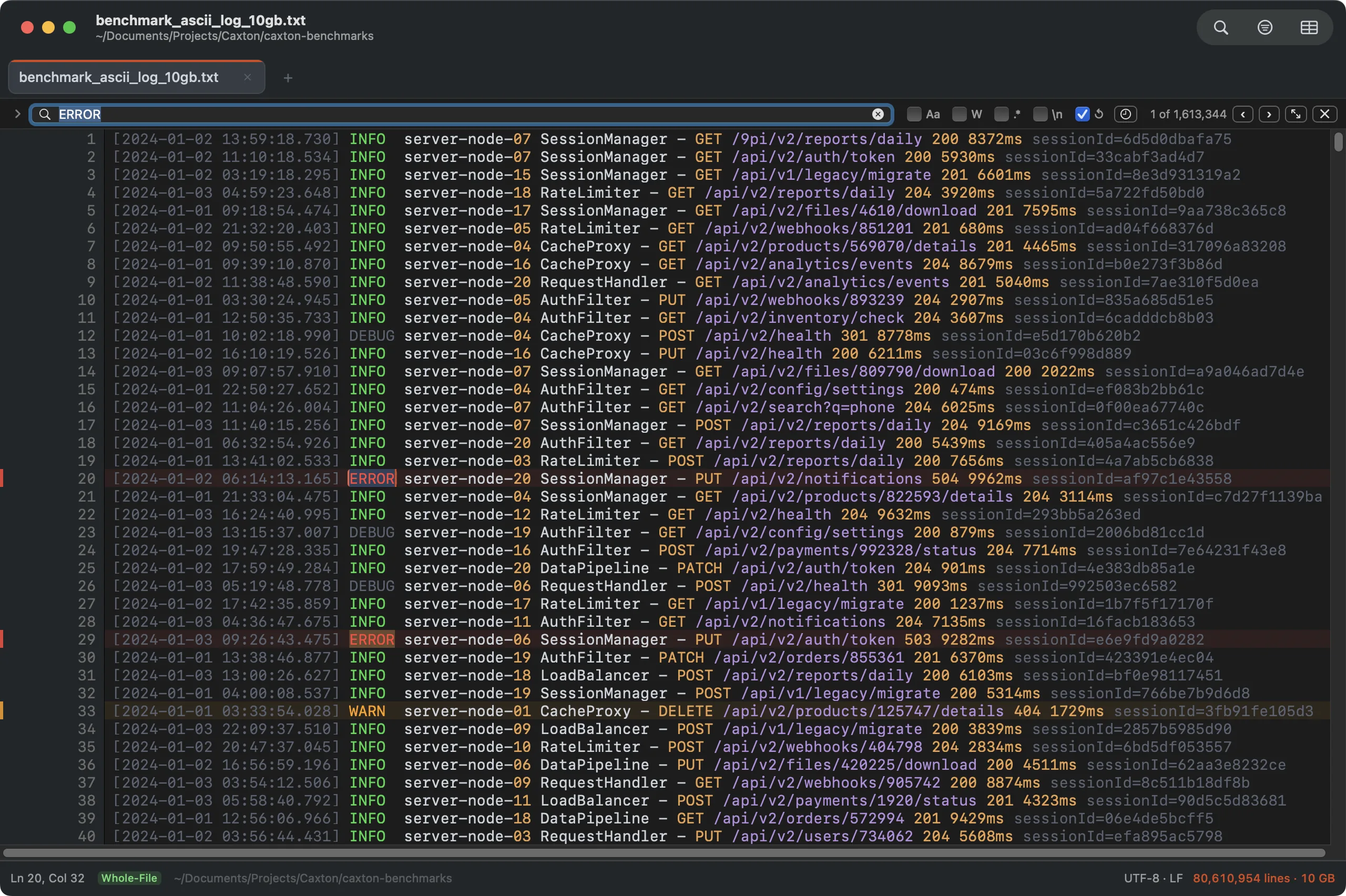
1,613,344 matches across a 10 GB log in 1.0 s. The counter is exact, not an estimate.
The multi-condition filtering EmEditor users lean on has a direct counterpart: Caxton's advanced filter chains conditions with and/or in the text view, and in the grid each condition can target the whole line, any column, or one specific column. Column-aware CSV editing (sorting, dedupe by chosen columns, split and combine, delimiter conversion) is the strongest surface in the app.
What does EmEditor have that Caxton doesn't?
Real things, and an EmEditor power user should read this list before buying anything.
- Macros and scripting. EmEditor documents recorded macros and JavaScript/VBScript automation against the editor's object model. Caxton has no scripting today. If your workflow depends on macros, that dependency does not transfer.
- A plugin ecosystem. EmEditor documents a plug-in API and ships an ecosystem of extensions. Caxton has none.
- The documented ceiling. EmEditor's documentation states support for files up to 16 TB. Caxton does not impose a file-size ceiling of its own, and it is measured to 50 GB and 403,046,288 lines; it claims exactly what it has measured, and nothing past it.
- Years of surface area. EmEditor has accumulated decades of features and configuration. Caxton is younger and deliberately narrower: large text files and CSV, done natively.
What's different about the Mac version of this workflow?
Caxton is a native AppKit application (not a port, not Electron), notarized by Apple and built Mac-first: real macOS windows and tabs, system appearance, Services, native file dialogs. The workflow is the same; the application belongs to the platform you moved to.
How the two compare
| Capability | EmEditor (documented) | Caxton (measured / documented) | Notes |
|---|---|---|---|
| Platform | Windows | macOS 13.0+, native AppKit | No macOS version of EmEditor exists |
| Huge-file opening | Documents files up to 16 TB | Measured to 50 GB / 403,046,288 lines; opens immediately, index in 22 s | Documented ceiling vs. measured workload |
| Search & replace | Documented large-file search, batch and bulk replace lists | 1,613,344 matches in 1.0 s; Replace All in 1.7 s, one undo step; Batch Replace runs lists of pairs with CSV/TSV import | The find and replace guide covers the whole surface |
| Filtering | Documented filter feature | 10 GB filter in 1.0 s; multi-condition with and/or | Original line numbers preserved |
| CSV mode | Documented CSV/column mode with sorting | 2,022,947 × 50 grid in 2.3 s; numeric sort 4.4 s; fill series, dedupe, split/combine | Both treat the file as text underneath |
| Automation | Documented macros, JavaScript/VBScript, plug-ins | None | The honest gap; see above |
| Memory on huge files | n/a | Under 160 MB through every measured operation on the 50 GB log | Caxton's measured number; no claim made for EmEditor |
The migration test is your own biggest file.
Download Caxton for Free7-day free trial of Caxton Pro, no credit card required · 7 MB · macOS 13.0+ · notarized
Frequently asked questions
Is there an EmEditor for Mac?
There is no EmEditor for Mac; for free read-only viewing of a huge file, less in Terminal opens any size. Caxton is the native Mac editor built for the same huge-file workload: it opens multi-gigabyte text and CSV files immediately, searches and filters them, and edits them in place.
Does EmEditor work on a Mac with Wine or a VM?
There is no macOS build to run natively. Windows software can be run inside a Windows virtual machine on a Mac, which requires a Windows license and a VM; neither vendor documents that arrangement for this editor. For a daily driver, the practical answer is a native tool.
What is the closest Mac equivalent to EmEditor?
Caxton, a native macOS editor built for the same workload: very large text files and CSV. Its published benchmarks: a 10 GB, 80,610,954-line log opens immediately, search returns 1,613,344 matches in 1.0 s, and a 2,022,947-row CSV parses to a typed grid in 2.3 s. The wider tool landscape is in large file text editors on a Mac.
Can Caxton open files as large as EmEditor?
EmEditor's documentation states support for files up to 16 TB. Caxton does not impose a file-size ceiling of its own, and it is measured to a 50 GB file of 403,046,288 lines; it makes no claims beyond what it has measured and published. One number is a documented ceiling, the other a measured workload.
Sources
Your files came to the Mac with you. Download Caxton for Free and open them. 7-day free trial of Caxton Pro, no credit card required.