Download Caxton for Free · 7 days, no card · 7 MB · macOS 13.0+
What is actually in a .sql file?
Text, and nothing but. A dump from mysqldump or pg_dump in plain format is a script: table definitions, then data as INSERT statements, in the order a server would replay them. PostgreSQL's documentation describes pg_dump's plain format as exactly that, a script of SQL commands. Nothing about the format needs a database installed to read it.
What makes the file awkward is a documented default. mysqldump writes extended INSERT statements, many rows per statement, which its manual documents as producing a smaller dump file and faster inserts on reload. Good for the server, hard on editors: a few thousand rows per statement means single lines measured in megabytes, and a tool that assumes lines are short stalls laying out the very first screen. A large JSON export fails the same way for the same reason, and has its own page: opening a large JSON file on a Mac. If the text itself is garbled, accented names showing as é or Cyrillic as rows of Ð, the dump was read in the wrong encoding, not damaged: see fixing garbled text and the wrong encoding.
What can I do free, right now?
Terminal answers the first questions at any size:
head -c 2000 dump.sql              # what dialect, what charset, what shape
grep -n 'CREATE TABLE' dump.sql    # every table, with its line number
grep -c 'INSERT INTO' dump.sql     # how much data follows
less dump.sql                      # page through it, free
And if the point is querying the data, do the real thing: restore it locally, free, with the vendor's own tools.
mysql -u root -p mydb < dump.sql   # MySQL / MariaDB
psql -d mydb -f dump.sql           # PostgreSQL
That is the honest free path, and for a clean dump it is the whole answer. It stops being the answer when the restore fails partway: a DEFINER clause naming an account that does not exist on your machine, a charset line from a different server, a table you never wanted in a file you cannot open to remove it. Now the job is reading and editing the dump itself, and less can only show it to you one screen at a time.
How do I open and edit the dump itself?
Caxton opens the file memory-mapped, so a multi-gigabyte dump opens immediately and size is bounded by your disk, not your RAM. Long lines are the reason this page exists, and they are a first-class case: lines are rendered in segments, so a megabyte-long INSERT scrolls like any other text, and on the published benchmark (measured on an M1 Max with 64 GB RAM; methodology on the benchmarks page) a literal find in a 500 MB single-line file returns in 0.5 s. Search at log scale is measured on the 10 GB log corpus: 1,613,344 matches in 1.0 s, counted exactly.
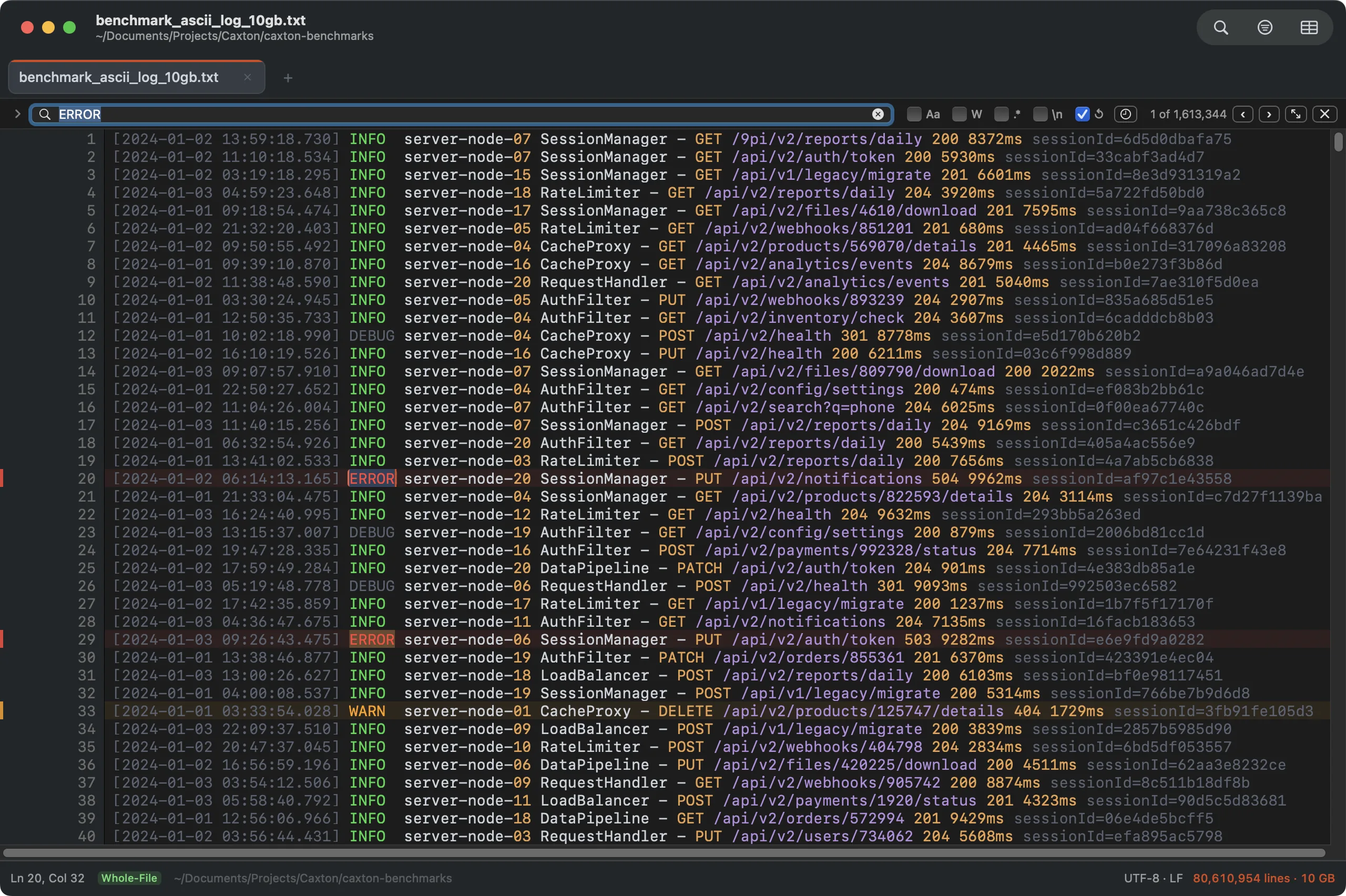
Search at dump scale: the 10 GB benchmark log with 1,613,344 matches counted in 1.0 s. The counter is exact, not an estimate.
The pre-restore edits are ordinary text edits here: search DEFINER and delete the clauses, fix the SET NAMES line, select a table's block and cut it. Find and replace shows the match count before anything is touched, and a whole mapping of renames can run as one Batch Replace pass. When you save, the write is atomic: the dump on disk is never left half-written, which matters for the file you are about to feed a database.
Megabyte-long INSERT lines, opened like any other file.
Download Caxton for Free7 days free, no credit card · 7 MB · macOS 13.0+ · notarized
Which approach fits which job?
| Approach | Good for | Breaks when |
|---|---|---|
head / grep / less | First look, finding tables, counting statements, free | You need to read or change a megabyte-long line, not just locate it |
Restore locally (mysql, psql) | Actually querying the data, with the vendor's own free tools | The restore fails partway and the fix is an edit to the dump itself |
| Caxton | Reading, searching, and editing the dump as a file, long lines included | You want to run SQL against the data (restore it; that is what a dump is for) |
Frequently asked questions
Can I open a .sql dump without installing MySQL?
Yes. A dump is plain SQL text, so any tool that can handle the file's size reads it: less pages through it free in Terminal, and Caxton opens it memory-mapped for searching and editing. A database server is only needed to run queries against the data, and for that a local restore is the right answer.
Why does my editor freeze on a SQL dump smaller than my RAM?
Usually the lines, not the megabytes. mysqldump packs many rows into each INSERT statement by default, which its manual documents as producing a smaller dump and faster reloads, so a modest dump can contain single lines that run to megabytes. Editors that assume short lines stall laying them out. Caxton renders long lines in segments; its published benchmark finds text in a 500 MB single-line file in 0.5 s.
Can I edit a SQL dump before restoring it?
Yes, it is text, and pre-restore edits are routine: removing a DEFINER clause that names an account your machine does not have, adjusting a charset or collation line, or cutting a table you do not want. Caxton edits the file directly and saves atomically, so the dump is never left half-written.
How do I find one table in a multi-gigabyte dump?
Free: grep -n 'CREATE TABLE' dump.sql prints every table with its line number, and less jumps to a line with the g command. In Caxton the same search is live in the editor: on the published 10 GB log benchmark, a literal search returns 1,613,344 matches in 1.0 s with an exact count, and each match is clickable in place.
Sources
- MySQL Reference Manual: mysqldump
- PostgreSQL documentation: pg_dump
- Greenwood Software: less home page and manual
- Caxton benchmark methodology and results
If the restore just failed at line four million, the fix is a text edit. Download Caxton for Free, make it, and run the restore again: 7 days free, no card.