Notepad++ alternatives for a Mac: what actually fits
Notepad++ does not run on a Mac. Its own site describes it as "running in the MS Windows environment," and its manual calls it an editor "for use under Microsoft Windows." What replaces it depends on what you used it for, and for most of those jobs the answer on a Mac is free. One job is the exception: the file large enough to make Notepad++ stop responding. That case is at the end.
Download Caxton for Free · 7 days, no card · 5 MB · macOS 13.0+
Is there a Mac version of Notepad++?
Not from the Notepad++ project. Its site says it is "based on the powerful editing component Scintilla" and "written in C++ and uses pure Win32 API and STL," and the user manual covers Windows installers only. Neither mentions macOS.
There is a separate project worth knowing about. Nextpad++ describes itself as "a full open-source community port of Notepad++ to Mac and Linux," and is explicit that "the project is independent of the upstream Notepad++ project." By its own documentation it is free and open source under GPL v3, ships as a universal binary for Apple Silicon and Intel on macOS 11 and later, is code-signed and notarized, and runs natively: it "does not require Wine, Porting Kit, CrossOver, Flatpak or any other compatibility layer." Plugins are "ported individually by the community," so check the one you depend on. We have not tested it, and we list it because a port of the editor you already know is the most direct answer to the question.
What do Notepad++ users miss, and what covers it for free?
People who ask for Notepad++ on a Mac are usually asking for five things: tabs, column mode, macros, plugins, and an editor that opens instantly and stays out of the way. Four native or free editors cover them between them. Everything below is from each product's own documentation.
CotEditor, for lightness
CotEditor calls itself "The Plain-Text Editor for macOS." Its site states that it is free, and it is developed as an open-source project, for the Mac only. Its site lists syntax highlighting for "more than 60 pre-installed major languages," find and replace on "the ICU regular expression engine," a split editor, an outline menu, and a character inspector. For macros its answer is scripting: "Make your own macro in your favorite language, whether it is Python, Ruby, Perl, PHP, UNIX shell, AppleScript or JavaScript." If what you valued in Notepad++ was a small, fast, no-ceremony editor, this is the closest match.
BBEdit in free mode, for column mode and multi-file search
BBEdit has a documented free mode. Bare Bones' comparison chart says that after the 30-day evaluation "some of its exclusive advanced features remain available," and it marks these as available without a license: "Open multiple documents per window," "Rectangular/columnar text selections," "Powerful multi-file search and replace," "Flexible 'grep' style pattern-based search," and AppleScript support that is "scriptable, recordable, and attachable." Recordable scripting is the nearest thing here to the Notepad++ macro recorder.
TextMate, for macros and bundles
TextMate is "developed as open source" for macOS. Its site lists multiple carets, and describes macros in terms a Notepad++ user will recognize: "Repetitive work can be eliminated with macros. Either save them for repeated use or record a scratch macro for immediate replay." Its extension system is bundles: "TextMate uses bundles for customization and supports a countless number of different languages, markup systems, workflows, and more."
VS Code, for the plugin habit
If plugins were the point, Visual Studio Code has the largest catalog: its site invites you to "View 80k+ extensions in the Extension Marketplace." It calls itself "The open source AI code editor" and offers a macOS download. Its editing documentation covers the rest of the list: "VS Code supports multiple cursors for fast, simultaneous edits," and column (box) selection works by holding Shift and Alt while dragging. It is an Electron application rather than a native one, and heavier than Notepad++ ever was; whether that matters is yours to decide.
| What you miss | Free answer on a Mac | Documented as |
|---|---|---|
| Tabs, many files open | BBEdit free mode, VS Code | "Open multiple documents per window" (Bare Bones) |
| Column mode | BBEdit free mode, VS Code | "Rectangular/columnar text selections" (Bare Bones); column (box) selection (VS Code) |
| Macros | TextMate, CotEditor, BBEdit free mode | "record a scratch macro for immediate replay" (TextMate); scripted macros (CotEditor); recordable AppleScript (Bare Bones) |
| Plugins | VS Code, TextMate, Nextpad++ | "80k+ extensions" (VS Code); bundles (TextMate); community-ported plugins (Nextpad++) |
| Lightness | CotEditor | "The Plain-Text Editor for macOS" (CotEditor) |
What about the file that made Notepad++ stop responding?
This is the one thing most of that list does not cover, and Notepad++ says why in its own manual. Its Performance preferences include a Large File Restriction, explained this way: "Some features may slow performance in large files. These features can be auto-disabled on opening a large file." Word wrap, auto-completion, smart highlighting, brace matching, clickable links, and syntax highlighting are on the list. That is an honest description of an editor that loads the document into memory, and the general-purpose Mac editors above are built the same way. Their documented designs are compared in large file text editors on a Mac.
The free answer for looking at such a file is the Terminal: less opens a file of any length without loading it. For searching, filtering, and editing one, Caxton is built on a different design. It memory maps the file instead of loading it, so the cost of opening does not grow with the file. The published numbers, measured on an M1 Max with 64 GB of memory (methodology on the benchmarks page):
- A 10 GB log of 80,610,954 lines opens immediately, and the background line index finishes in 19.5 s.
- A literal search across it returns 1,613,344 matches in 1.3 s, counted exactly, and Replace All rewrites every one in 1.7 s as a single undo step.
- Caxton does not impose a file-size ceiling of its own. It is measured to 50 GB and 403,046,288 lines, where memory stays under 160 MB through every measured operation.
- A CSV of 2,022,947 rows parses to a typed grid in 2.6 s.
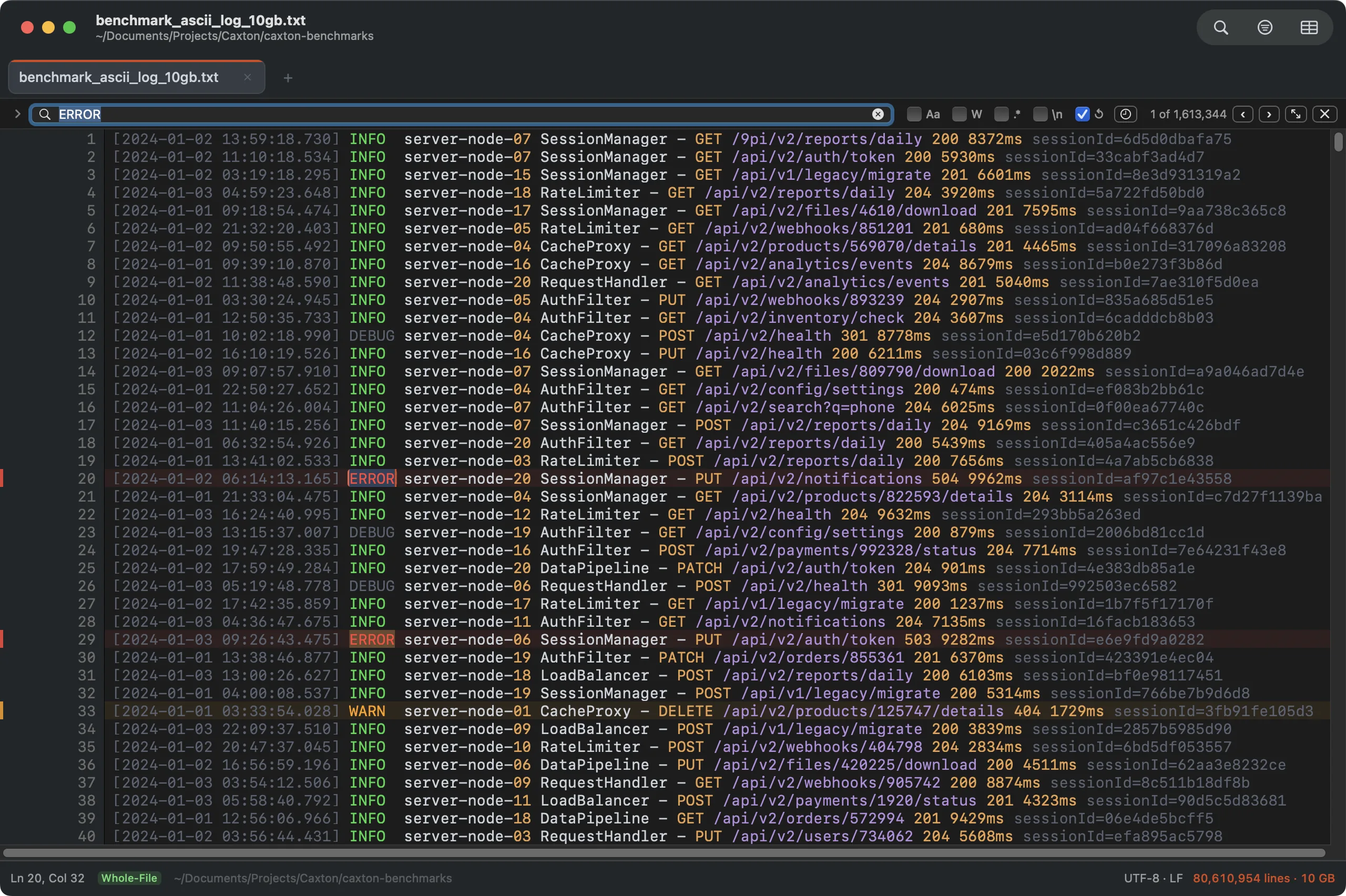
The 10 GB benchmark log with a literal search across every line, counted exactly.
Where it overlaps the Notepad++ list: it has tabs, rectangular (column) selection, and multiple cursors. Where it does not: there is no plugin system and no macro recorder, and it is not an IDE. It is a native Mac editor for the large text file and the large CSV, and it sits beside a general editor rather than replacing one. After the 7-day trial, opening, searching, filtering, and copying stay free; editing and saving need a license.
If you came from a different Windows editor, the same question has its own pages: EmEditor for Mac and UltraEdit alternatives for a Mac.
Open the file that made the other editor stop responding.
Download Caxton for Free7 days free, no credit card · 5 MB · macOS 13.0+ · notarized
Frequently asked questions
Is there a Mac version of Notepad++?
Not from the Notepad++ project. Its site describes it as "running in the MS Windows environment," and its manual covers Windows installers only. A separate project, Nextpad++, describes itself as "a full open-source community port of Notepad++ to Mac and Linux" and states that it "is independent of the upstream Notepad++ project."
What is the closest free equivalent on a Mac?
It depends on what you used. For a light, quick plain-text editor, CotEditor, which is free and open source. For column selection and multi-file search, BBEdit, whose free mode keeps both after the evaluation ends. For recordable macros and bundles, TextMate, which is open source. For a large plugin catalog, Visual Studio Code.
Can I run Notepad++ on a Mac with Wine?
Wine is a compatibility layer for running Windows programs on other systems, and it is the usual route people try. The Notepad++ documentation covers Windows only and mentions neither Wine nor macOS, so the project does not support it. Nextpad++ exists partly to avoid that route: its site says it "does not require Wine, Porting Kit, CrossOver, Flatpak or any other compatibility layer." We have not tested either one.
Which one handles very large files?
None of the general editors is designed for multi-gigabyte files, and Notepad++ itself documents a Large File Restriction that switches features off "on opening a large file." For reading, less in Terminal is free and opens a file of any length. For searching and editing, Caxton memory maps the file: a 10 GB log of 80,610,954 lines opens immediately and a search across it returns 1,613,344 matches in 1.3 s, and it is measured to 50 GB.
Most of what Notepad++ did has a free home on a Mac. For the file none of them will open, download Caxton for free.