How to fix garbled text and the wrong encoding on a Mac
Text that shows é where é should be, or a row of Ð and Ñ where Cyrillic should be, is not damaged. The bytes are fine. The program read them with the wrong table, and the fix is to read them again with the right one. After that you can convert the file to UTF-8 so it stops happening. The Terminal does both for free, and the commands are below.
Download Caxton for Free · 7 days, no card · 5 MB · macOS 13.0+
What is mojibake?
A text file is bytes, and an encoding is the table that turns bytes into characters. The file does not say which table it was written with. When a program guesses the wrong one, every byte still maps to something, so nothing fails: the text just comes out as the wrong characters. The Japanese word for that result, mojibake, is the one that stuck.
The patterns repeat, which makes them readable once you have seen them:
| What it should say | What you see | What happened |
|---|---|---|
| é | é | UTF-8 text read as Windows-1252. One accented letter is two bytes in UTF-8, and each byte became its own character. |
| Привет | Привет | UTF-8 Russian read as Windows-1252. Every Russian letter in UTF-8 starts with one of two bytes, which Windows-1252 shows as Ð and Ñ. |
| Наименование | Íàèìåíîâàíèå | Windows-1251 text read as Windows-1252. One byte per letter in both, so the length is right and every letter is wrong. |
Why does detection get it wrong?
Because for most legacy encodings there is nothing to detect. Three cases account for nearly all of it.
- Single-byte encodings all look valid. Windows-1252 (Western European) and Windows-1251 (Cyrillic) both give a meaning to nearly every byte. The byte E9 is é in one and й in the other, and both are perfectly legal. A detector cannot test validity; it can only decode the text each way and score which result reads more like a language. On a file that is mostly numbers and IDs, there is not much to score.
- UTF-16 without a byte order mark. The Unicode FAQ describes the BOM as a signature "defining the byte order and encoding form," and says unmarked UTF-16 "uses big-endian byte serialization by default." Windows tools commonly write it little-endian, with or without the mark, so a reader has to infer the order from where the zero bytes fall.
- ASCII-heavy heads. A log or a CSV can be plain ASCII for its first million lines. A detector that samples the start of the file sees valid UTF-8, because ASCII is valid UTF-8, and the one customer name with an accent is far below where it looked.
What are the free routes on a Mac?
Two commands that ship with macOS. file -I identifies, and iconv converts.
file -I export.csvThe manual page describes -I this way: "Causes the file command to output mime type strings rather than the more traditional human readable ones." The output includes a charset. Treat that charset as a hint. For this guide we made a Windows-1251 CSV and asked: file answered charset=iso-8859-1. It can tell that the bytes are not UTF-8. It cannot tell which single-byte encoding they are, for the reason above.
iconv -f WINDOWS-1251 -t UTF-8 export.csv > export-utf8.csv
iconv -l
iconv "converts the codeset of file" from the one you name with -f to the one you name with -t, and iconv -l lists the names it accepts. The working method is to try a candidate, look at the first lines of the result, and try the next one if it still reads wrong. Where the file came from narrows it quickly: a Windows system in Western Europe or the Americas usually means Windows-1252, a Russian one Windows-1251, a Japanese one Shift-JIS.
Where do the free routes stop?
At seeing. Each guess is a new copy of the file, and you judge it from a few lines in a terminal. iconv converts what you tell it to; it has no opinion about whether you were right. For a file you need to read, check, and then edit, the loop of convert, inspect, and delete gets slow.
How does Caxton handle it?
What detection does when a file opens
A byte order mark is definitive. Without one, the file is checked as UTF-8, and the check samples windows through the file plus its tail rather than only the head, so the accented name on line 400,000 gets a vote. Only a window that is not valid UTF-8 brings the legacy encodings in, and then the candidates are scored by how the decoded text reads. Western European, Cyrillic, Central European, Japanese, Chinese, and Korean encodings are detected this way. A single stray bad byte in an otherwise UTF-8 file is treated as damage, not as a reason to reread the whole file.
A legacy detection never claims to be certain, so the hint stays visible. When a file opens as UTF-8 and some bytes look like something else, the banner names the candidate ("Some bytes look like Windows-1252. Reopen with that encoding?") and the menu preselects it.
Reopen with Encoding
File ▸ Reopen with Encoding reinterprets the file in any of the 18 encodings Caxton reads: UTF-8 with or without a BOM, UTF-16 in both byte orders, Shift-JIS, EUC-JP, GB18030, Big5, EUC-KR, Windows-1252, ISO-8859-1, Windows-1251, KOI8-R, ISO-8859-5, Windows-1250, ISO-8859-2, Windows-1254, and Windows-1257. The last two, Turkish and Baltic, are in the menu but are not detected; choose them when you know. A forced encoding wins over the byte order mark, which matters for the file that carries a BOM it does not deserve. Transcoding runs in the background with progress and a cancel, and one undecodable byte does not fail the open: only the bytes that cannot be decoded become replacement characters.
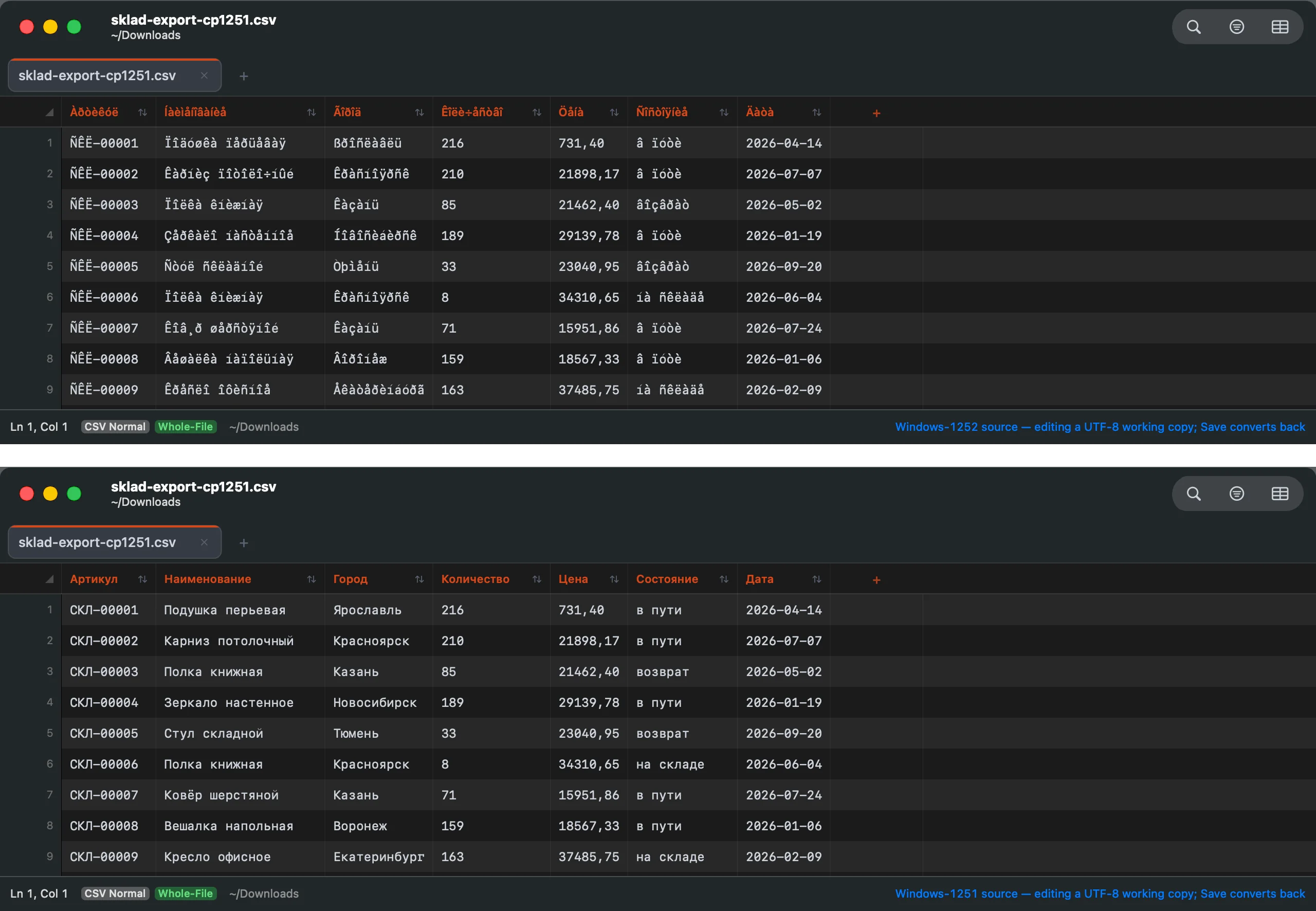
One file, read two ways. Above, a Windows-1251 CSV read as Windows-1252. Below, the same bytes after Reopen with Encoding. The file is synthetic: a made-up warehouse export, every value invented.
European CSVs
The file in the picture is also the other common European shape: semicolons between fields and decimal commas in the prices. Caxton's delimiter detection does not count a comma that mostly sits between digits, so that file opens as the seven columns it has. If a file still reads wrong, CSV ▸ Delimiter sets how it is read without changing it, and structural problems past that are in the guide to repairing a malformed CSV.
Saving, and converting to UTF-8
Reopening does not touch the file. You are reading the same bytes through a different table, and the status bar says so: the source encoding, and that you are editing a UTF-8 working copy. ⌘S converts back and writes the file in its original encoding, so a Windows-1251 file stays one for the system that expects it. If you have typed a character that encoding cannot hold, Caxton stops and offers to save as UTF-8 instead of writing something lossy. Save As is the conversion: it writes UTF-8, and the panel says so before you click.
The file that arrives every week
A file pattern rule can set the encoding for a glob, so the vendor export that is always Shift-JIS opens correctly without the menu.
Open the garbled file. Reopen it with the right encoding. Read it.
Download Caxton for Free7 days free, no credit card · 5 MB · macOS 13.0+ · notarized
Which approach fits which job?
| Approach | Good for | Breaks when |
|---|---|---|
file -I | Telling UTF-8 and UTF-16 from everything else, in a second, free | You need to know which single-byte encoding it is |
iconv | Converting a file whose encoding you already know, in scripts and pipelines | You are guessing, and each guess is another copy to inspect |
| Caxton | Seeing the text under each encoding, then editing and saving, or converting with Save As | The conversion is a recurring batch job; script that one with iconv |
Garbled text often turns up inside a database export; opening a SQL dump on a Mac covers reading those files whole.
Frequently asked questions
Why does my file show é or Рcharacters?
Because UTF-8 text is being read as Windows-1252. In UTF-8 an accented letter is two bytes, and a reader that assumes one byte per character shows each byte separately: é becomes é, and Russian, where every letter starts with one of two lead bytes, becomes a row of Ð and Ñ. Nothing is lost. Reading the same bytes as UTF-8 brings the text back.
How do I know which encoding a file is?
For UTF-8 and UTF-16 a tool can tell you: file -I in Terminal reports the charset. For single-byte encodings nothing can be certain, because every byte is valid in all of them, so the practical answer is where the file came from, then trying the likely candidates and reading the result. Caxton scores the candidates by how the decoded text reads and names its best guess in a banner, and you confirm it with your eyes.
Can I convert a file to UTF-8 on a Mac?
Yes, for free: iconv -f WINDOWS-1251 -t UTF-8 in.csv > out.csv, with the source encoding you identified after -f. In Caxton, reopen the file with the right encoding and use Save As, which writes UTF-8 and says so in the panel.
Does Caxton change the bytes when it reopens with a different encoding?
No. Reopening changes how the bytes are read, not the bytes. Caxton decodes them into a UTF-8 working copy and the file on disk is untouched until you save. Save writes it back in its original encoding, and Save As writes UTF-8.
The text is still in there. Download Caxton for Free and read it the right way.
Sources
- Unicode Consortium: UTF-8, UTF-16, UTF-32 and BOM FAQ
file(1)andiconv(1)manual pages, macOS 26- Caxton manual: Encodings and the Caxton changelog, the encoding entries from 1.6.1 onward