M1 Max, 64 GB. Every number on this page is on the benchmarks page with the methodology to reproduce it.
Open anything, instantly
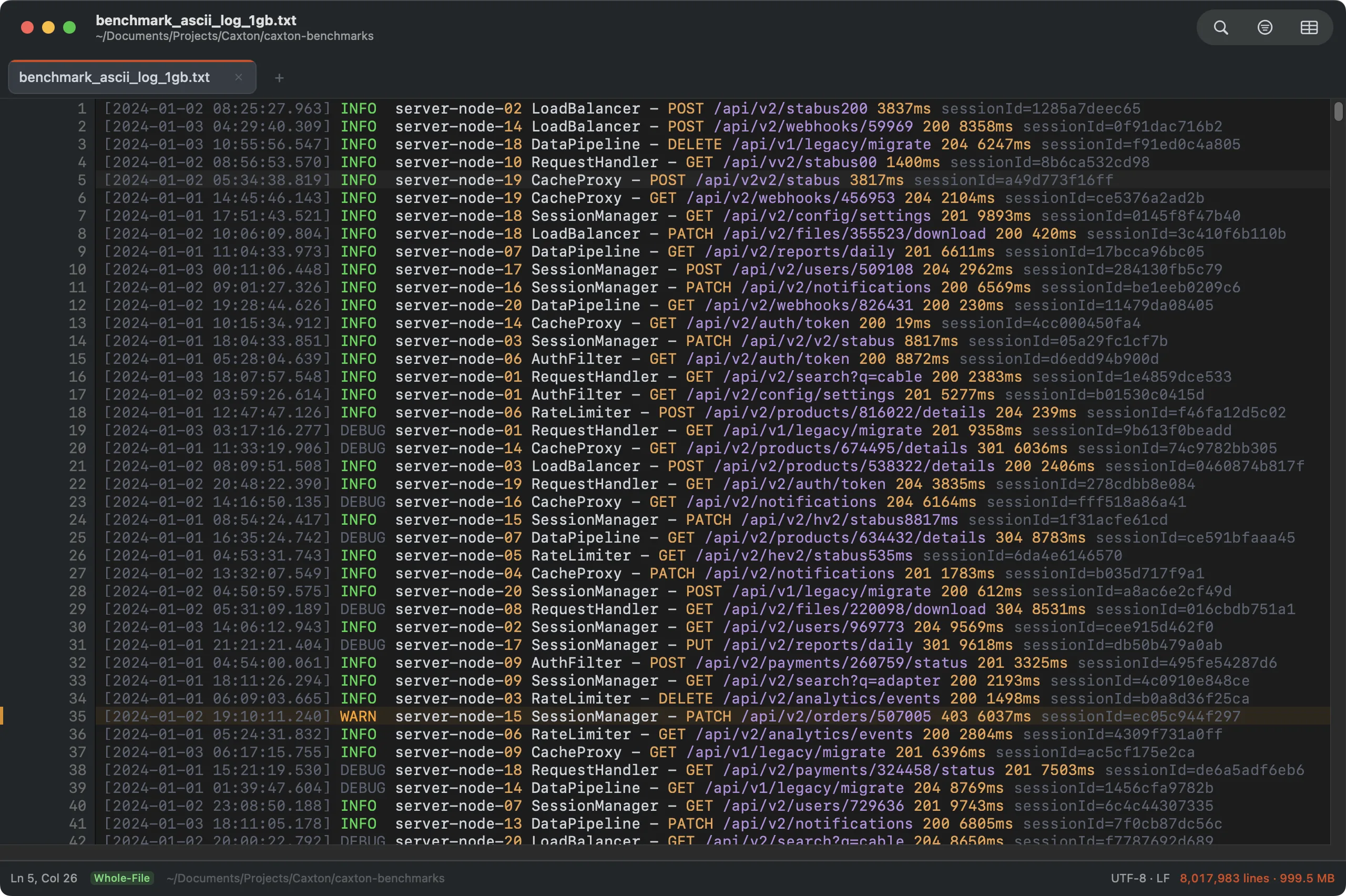
Drag a 10 GB production log onto the Dock and it's scrollable, searchable, and editable before you let go of the mouse. Indexing streams in the background (80.6 million lines in 3.7 s) and nothing waits for it. A 50 GB log of 403 million lines opens the same way, indexes in 22 s, and stays under 200 MB of memory through every measured operation. A sequential pass asks the disk for the next stretch of the file before it needs it, so the first index of a 10 GB log from a cold disk takes about a quarter of the time it did.
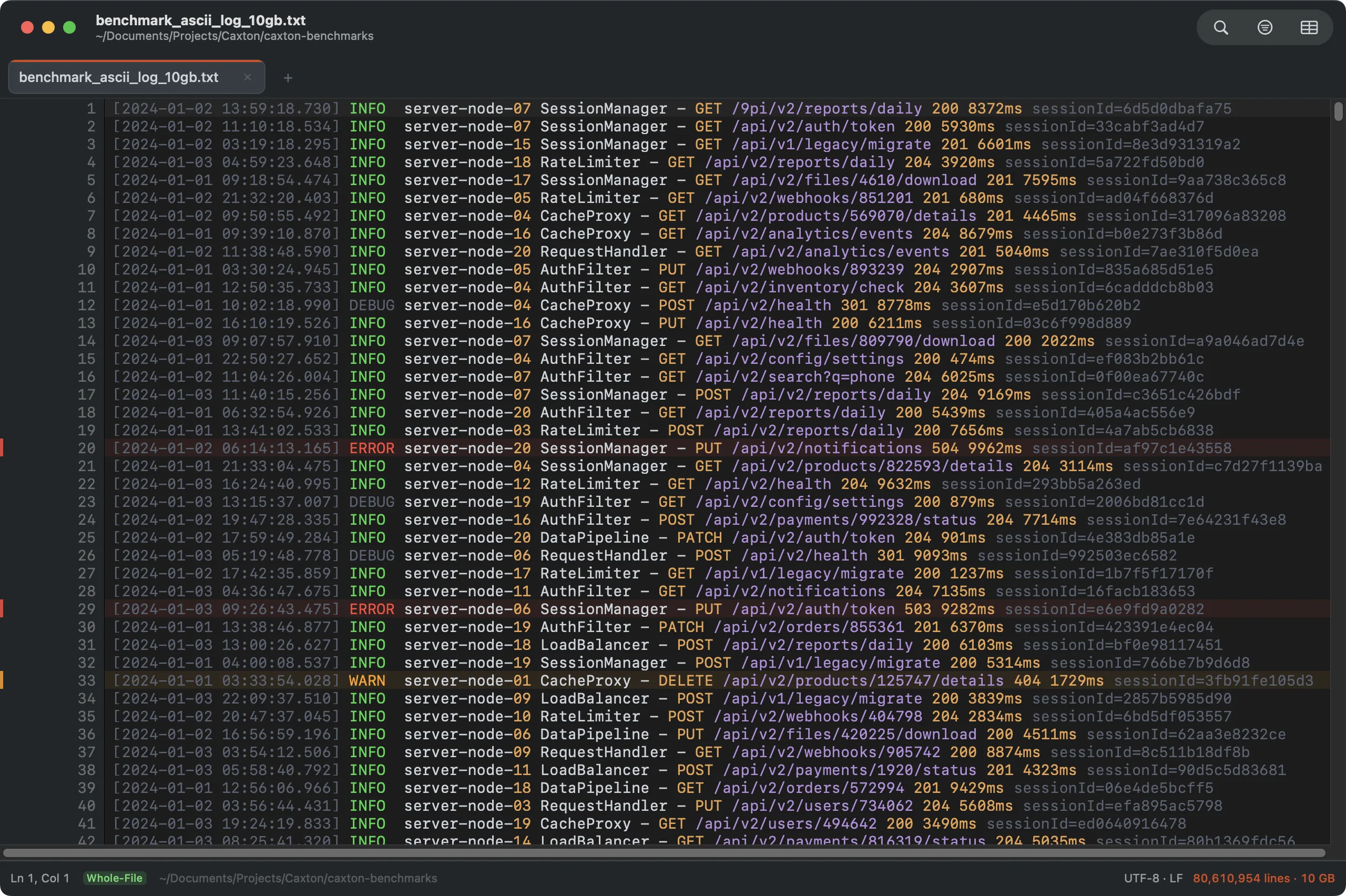
The real 10 GB benchmark log: 80,610,954 lines, syntax-colored, fully indexed.
- Open modes for the truly enormous: whole-file by default, byte-range slice and tail modes when you want them.
- Follow-tail: pin the view to a growing log; appends absorb about once a second with full scrollback, search, and filters.
- Single-line monsters: a 500 MB minified bundle on one line scrolls like a config file; find runs in 0.5 s.
The workbench
Around the editor sit the places a long session needs: a sidebar of panels, one search field for files and commands, and an inspector that answers what the file is without a dialog. The sidebar remembers its width and its panel per window; the inspector remembers its width and which sections you collapsed.
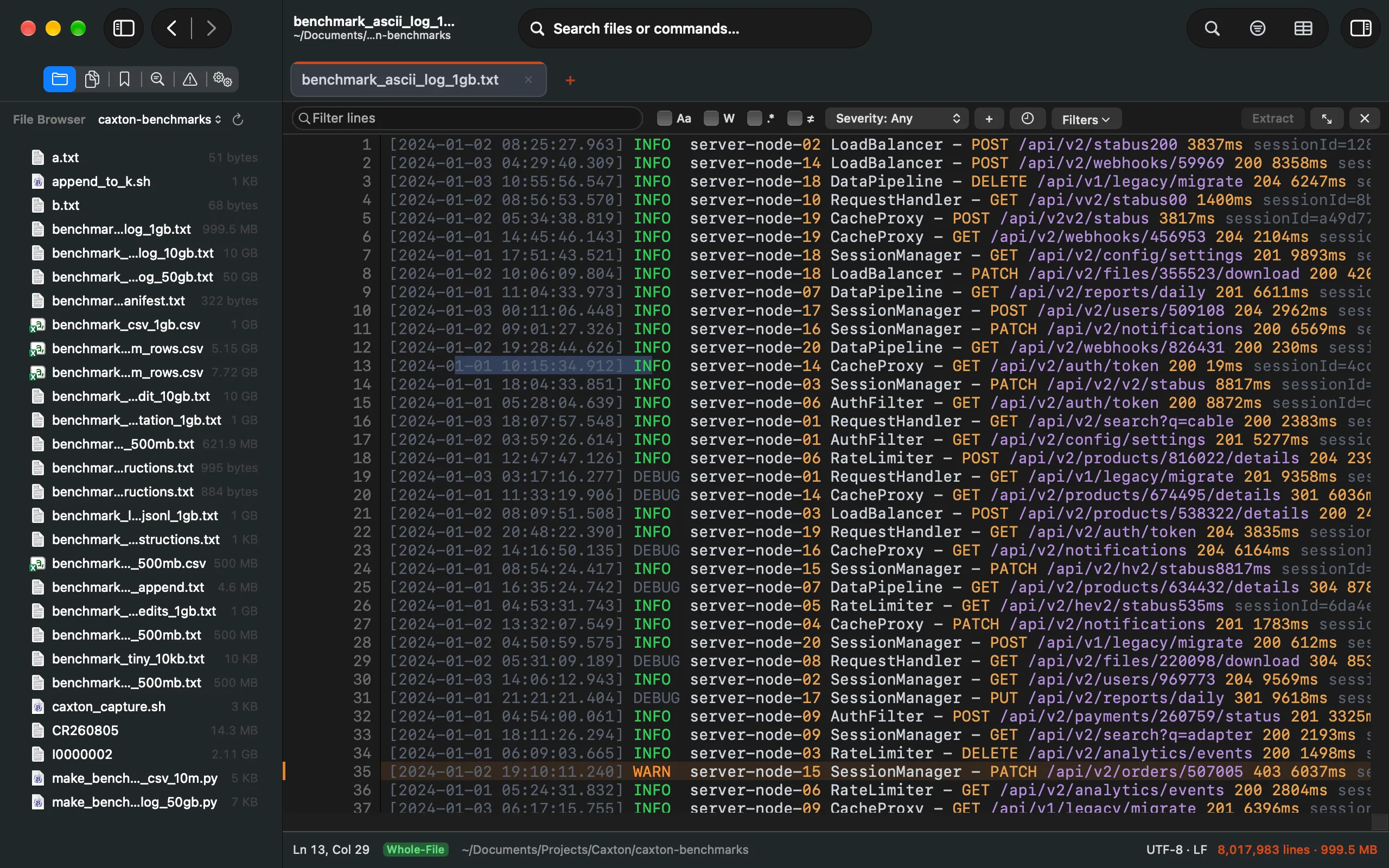
The File Browser over the benchmark folder, the 1 GB log beside it. The buttons above the panel are the seven panels; ⌃⌘1 through ⌃⌘7 switch them.
- The sidebar (
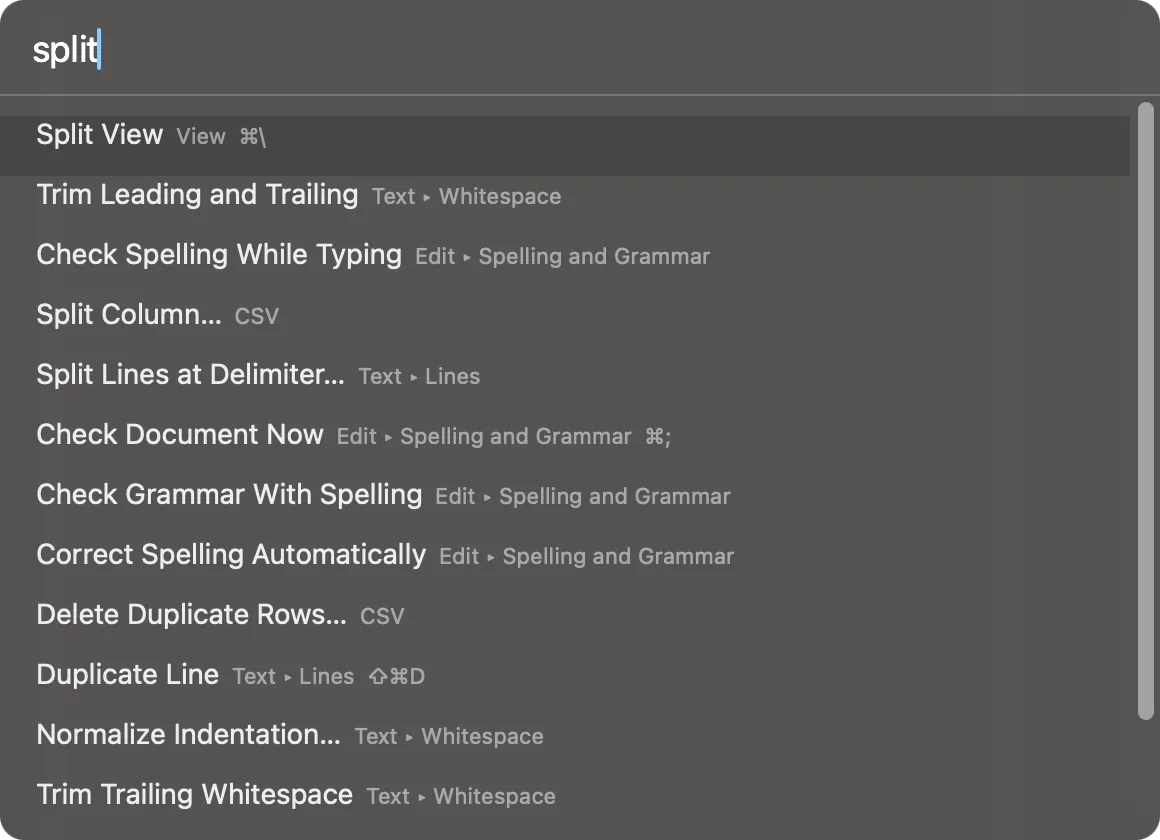
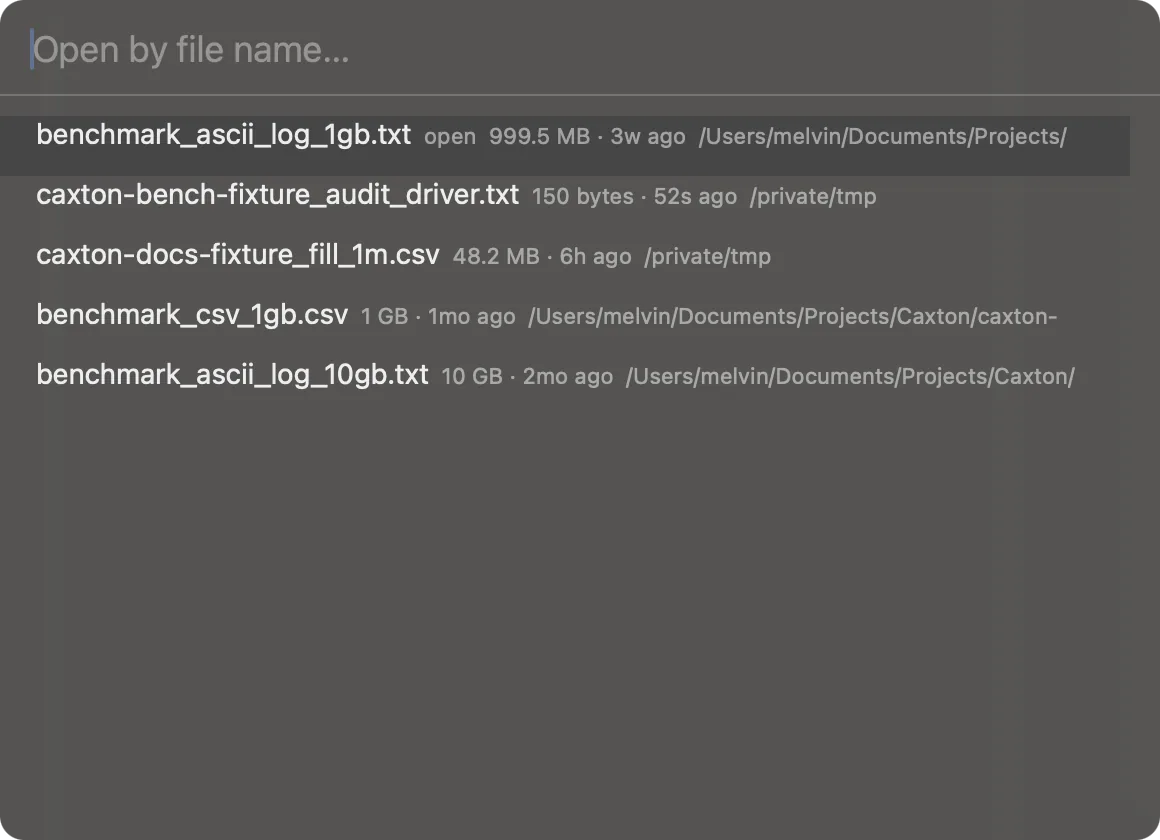
⌃⌘S): seven panels, one showing at a time. File Browser, Open Documents, Bookmarks, Search Results, Problems, Operations, and, in the grid, Column Profile;⌃⌘1through⌃⌘7switch between them and open the sidebar when it is closed. Bookmarks and Jobs moved in from their floating panels, Find All results moved in from the bottom of the window, and a panel you never use comes off the row from the panel switcher's context menu. - Search files or commands: the field at the top of every window. Type part of a name to open a file or switch to an open document,
>and a command's name to run it, or:and a number to go to a line or row.⇧⌘Ofocuses it for files and⇧⌘Pfor commands. Every menu command is there with its key beside it. - The inspector (
⌥⌘I): the encoding and the detector's confidence, whether a BOM leads the file, the line endings, the size, the open mode, the delimiter or the timestamp format, and what is selected. In the grid, the selected cell's parsed value comes with a Raw row that gives the field's size in bytes on disk, whether it was quoted, and the length it decodes to, so a quoted field or a padded number shows what the column sees and how much the file holds for it. Every value is selectable. - Back and Forward (
⌃⌘←/⌃⌘→): Go to Line, a problem, a bookmark or a match from a panel is a jump you can walk back from and forward again, in the text or in the grid, with two buttons beside the sidebar toggle while the sidebar is open. - The
caxtoncommand:caxton file.logopens a file,caxton data.csv --tableopens it in the grid,caxton file.log --line 100opens at a line, andcaxton .opens the folder in the File Browser. Caxton ▸ Install Command Line Tool… puts it on your PATH, and Homebrew installs it with the app.
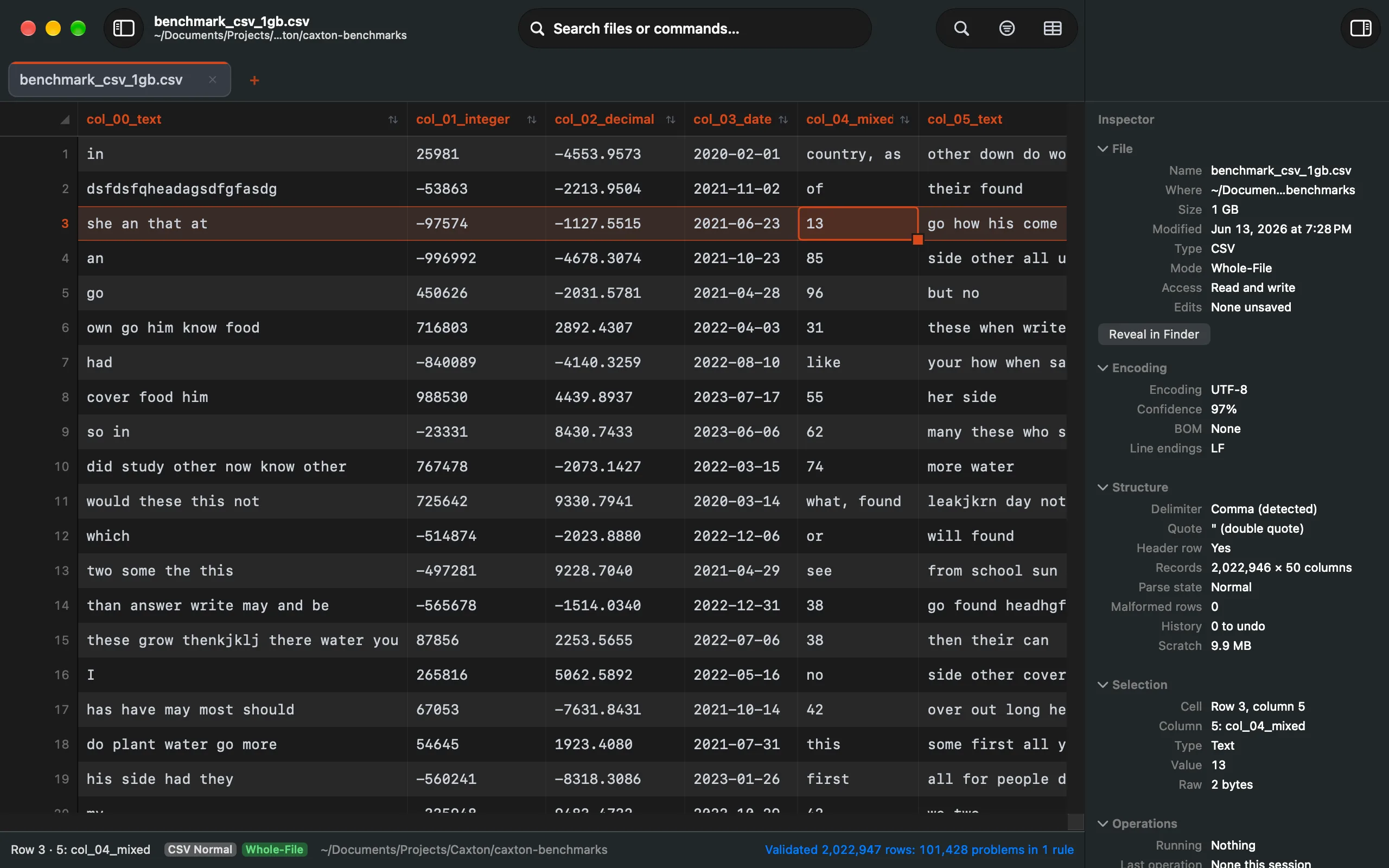
The inspector on a CSV: encoding with its confidence, line endings, the detected delimiter, the parse state, and the selected cell's parsed value with its Raw row: the byte count, whether it was quoted, and the decoded length.
Read the manual: The Sidebar → · Search Files or Commands → · The Inspector →
A CSV workbench, not a viewer
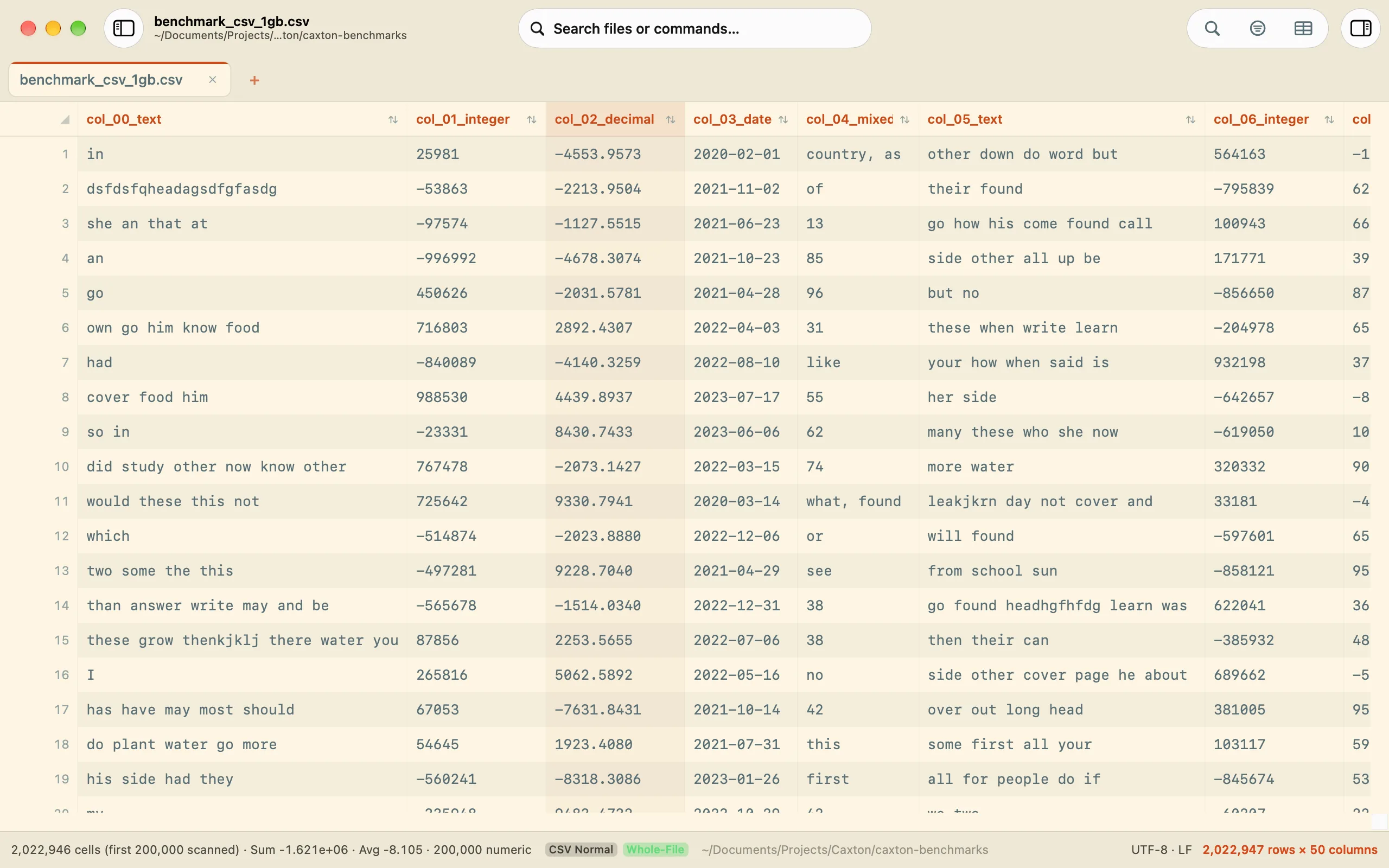
Delimited files get a real grid: frozen headers, typed columns, in-place editing. Ten million rows, 5.1 GB, parse to the grid in 4.4 s. A find across them counts 2,146,318 matches in 0.8 s, and a filter to the 1.93 million matching rows takes 1.0 s. The file never stops being plain text: switch to the text view at any time, edit in either, and saving writes the same CSV back out with no export step.
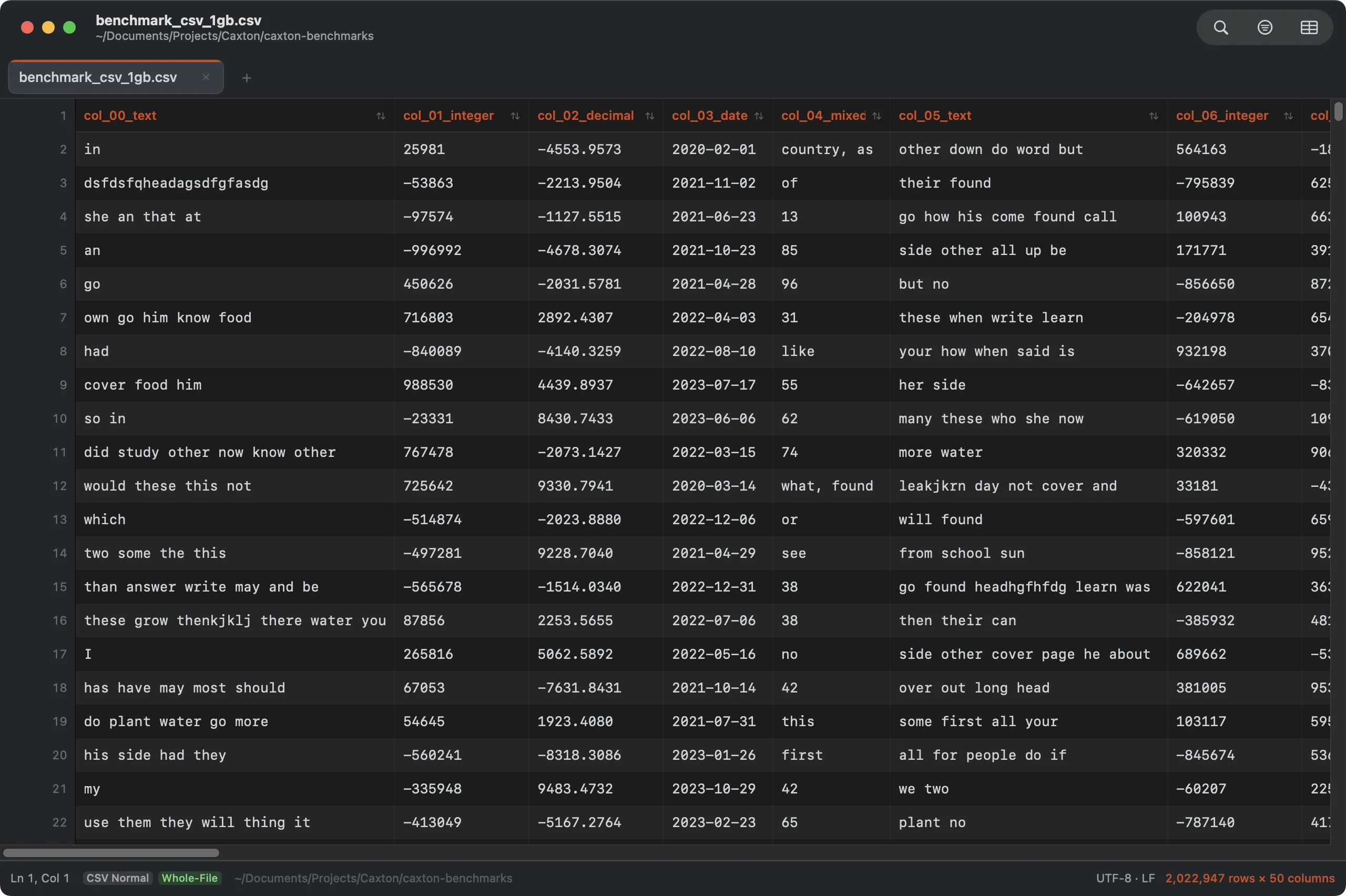
2,022,947 rows × 50 typed columns. Click a header to sort; double-click a cell to edit.
Any delimited file, read the way you say
- Detection by structure, not extension. A file with real table structure opens in the grid whatever it is called, so a tab-delimited
.txtlands there like a.tsv. Logs and prose stay text. - Decimal commas do not make a column. A comma that mostly sits between digits forfeits its vote, so semicolon and tab files with European decimals detect correctly.
- CSV ▸ Delimiter. Auto-detect, Comma, Tab, Semicolon, Pipe, or Custom…: change how the current file is read without changing a byte of it. The choice is kept with the session. Convert Delimiter remains the command that rewrites the file.
- A blank sheet that works. Toggle the grid on an empty document and a fresh three-column sheet appears. Empty
.csv,.tsv, and.psvfiles open straight to a sheet, raw delimited lines pasted into a blank sheet become the table, and typing past the last column or row adds one.
Spreadsheet editing, at file scale
- Select ranges by drag or ⇧-click; paste blocks straight from Excel or Sheets; clear, delete, or overwrite: each operation is one undo step. The status bar shows count, sum, and average for any selection.
- Drag rows and columns to reorder them, drag header borders to resize (double-click auto-fits), double-click a header to rename it. Hide columns you don't need, freeze the leading ones for wide files, auto-fit everything. The data is never touched.
- Edit any cell in place on a two-million-row file: Return commits, Esc cancels, Tab walks the row. Multiline and long values open in a full-value editor with a Raw mode that shows the stored bytes exactly. ⌘L jumps to any cell (
5000:12).
Sorting that knows what a number is
- Click a header to sort, click again to flip. The Sort Rows dialog goes further: any column compared as Text, case-sensitive bytes, Natural (
file2beforefile10), Numeric, Currency, or Date, ascending or descending, with a secondary “Then by” column for ties, and named presets for the sorts you run every week. - Sorts are stable, keep the header in place, and move rows verbatim; content is never reformatted. Sorts run in place up to 256 MB, as one undo step, and stream the sorted rows to a new document past that, source unchanged.
- Two million rows sort by a numeric column in 4.4 s, streamed to a new document with the source unchanged.
- Ten million rows, 5.1 GB, sort in 25 s, streamed to a new document.
- Type choices stick for the session: a column you sorted as dates stays a date column, and currency columns are detected on their own.
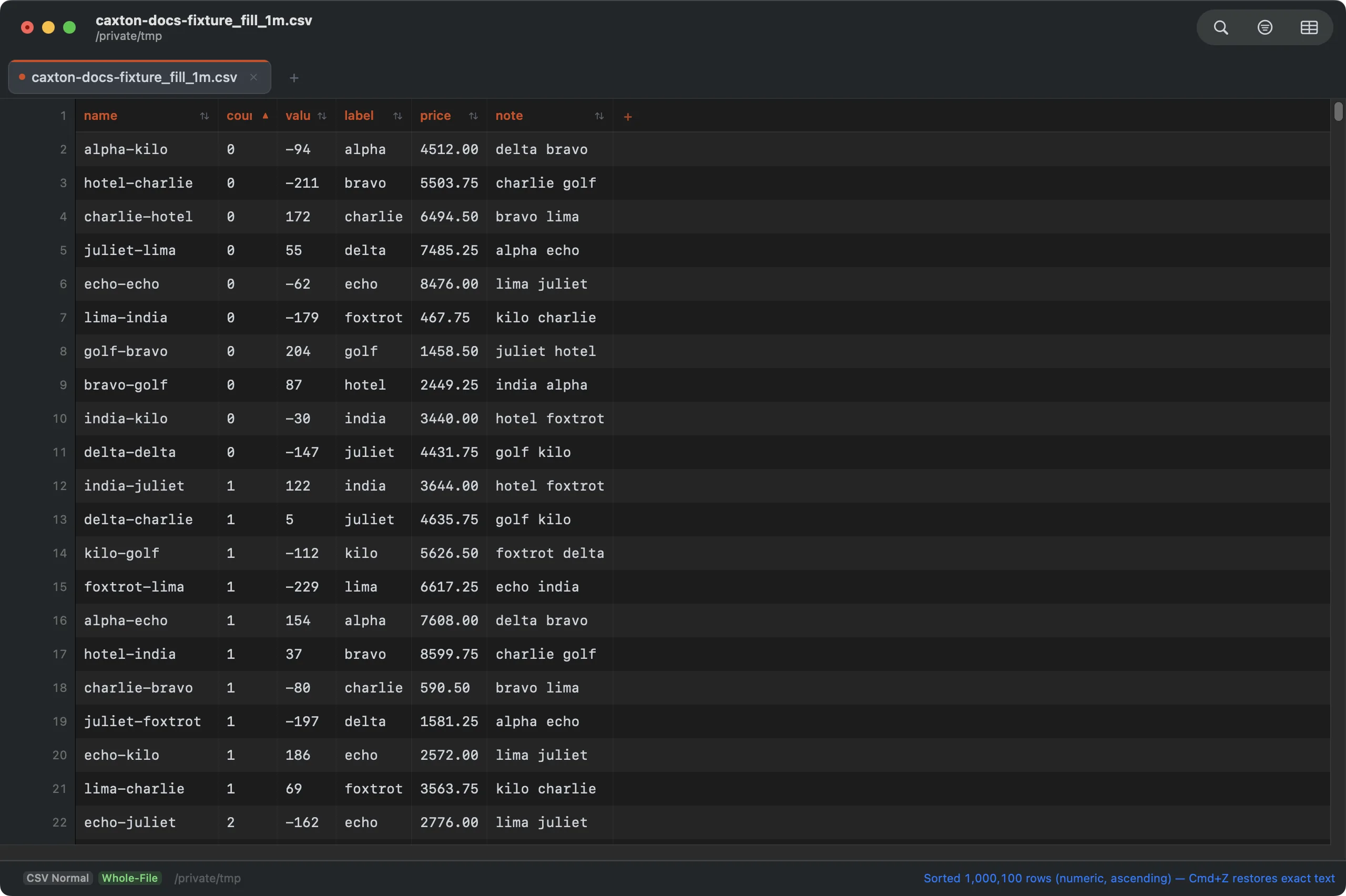
Sorted by a numeric column: stable, rows moved verbatim, one undo step.
Fill and Fill Series
- Drag the fill handle in any direction with a live preview of what will be written. A single number copies, two extend the series, and
Item01counts up without losing its padding. - The Fill Series dialog does the rest: linear and growth series; dates by day, weekday, week, month, quarter, or year with month-ends and leap days handled correctly; text-plus-number patterns; weekday and month name lists, terminated by selection, count, or stop value, optionally filling only empty cells.
- Decimal math is exact:
0.1, 0.2continues0.3, never0.30000000000000004. ⌘D fills down, ⌘R fills right.
Clean and reshape
- Dedupe with real choices: match on all columns or a chosen subset; keep the first occurrence, the last, none, the earliest or latest date in a column, or the largest or smallest number in a column; remove the rows, bookmark them instead, or export the groups to a new document, with a report of the groups before anything is removed.
- Frequency counts for any column; an Advanced Row Filter (multiple conditions chained with and/or, each targeting the whole line, any column, or one column, with Contains/Does Not Contain/Equals/Greater/Less Than); Filter by Column Values, the checkbox filter over every distinct value with counts; and one-click filters from any cell's right-click menu.
- Split a column at a separator or character position, combine adjacent columns, extract a column to its own document, transpose rows and columns, and insert sequential numbering.
- Convert the delimiter (CSV, TSV, pipe, semicolon, or custom) and flatten multi-line cells with Remove Embedded Newlines. Rows and columns insert, delete, and move from the menu or by drag. Quote All Cells, Remove Unnecessary Quotes, and Normalize Column Count keep messy exports honest; Convert Fixed-Width to Columns turns column-aligned text into a real delimited file, and classic-Mac CR-only files open in the grid too.
- No header row? A frozen numbered band (1, 2, 3…) keeps column identity: click it to select columns, sort, and resize exactly like a real header, or generate Column1…N placeholder names with one command. Whole-column selection enables every column operation directly, and short rows show their missing cells dimmed until you fill them.
Read the manual: CSV Workbench →
Transform cells
- CSV ▸ Transform Cells… (
⌥⌘T): forty-eight kinds in eight families, over a cell, the selection, a column or several, the rows a filter shows, or the whole table. Whitespace; case; add and replace (prefix, suffix, text or regex replace, regex remove and extract); slice (substring, first or last N, text before, after or between delimiters); characters (reverse, Unicode normalization, diacritics, ASCII transliteration, control characters, quotes and dashes); numbers (parse, arithmetic, percentage, rounding, absolute value, clamp, leading zeros, thousands and decimal separators); dates and times (reformat, ISO 8601, Unix time, Excel serials, shift, time zones, UTC); booleans and nulls. The header row is never transformed. - The sheet shows how many cells will change and the first rows before and after. A value it cannot parse is left as it was and counted, never guessed. Apply writes every changed cell as one bulk edit and one undo step, and a transform with its options keeps as a named preset.
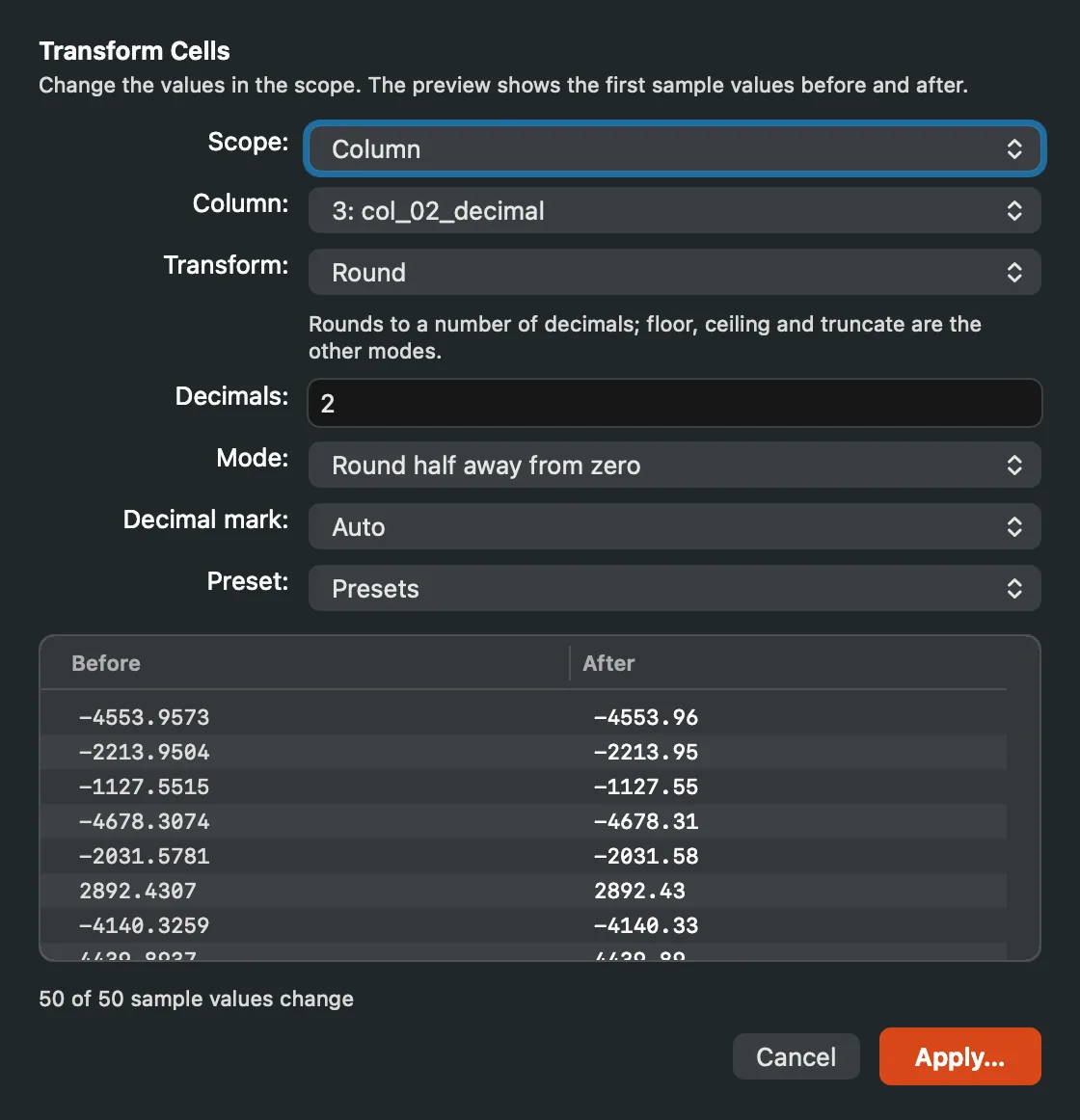
Round on a decimal column: the scope, the options, and sample values before and after. Nothing changes until Apply.
Read the manual: Transform Cells →
Validate and repair
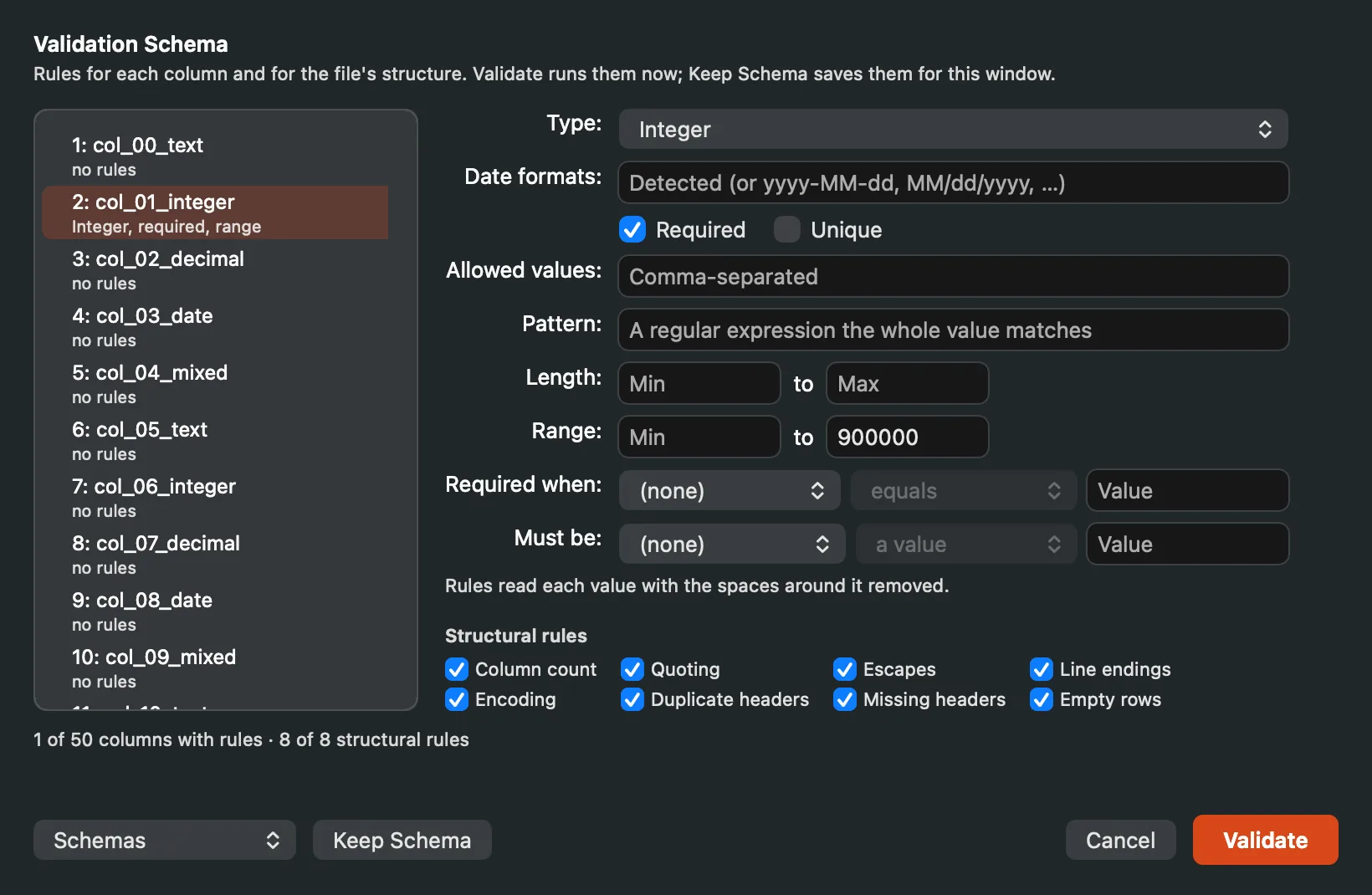
- Rules you keep as a schema. CSV ▸ Validation Schema… holds the structural rules (column count, quoting and escapes, termination, encoding, duplicate and missing headers, empty records) and a rule per column: a type (Number, Integer, Date, Boolean, UUID, IP, Email, URL), required, unique, allowed values, a pattern, a length range, a value range, and required when another column matches a condition. Validate runs them as a job over every row and never changes a byte.
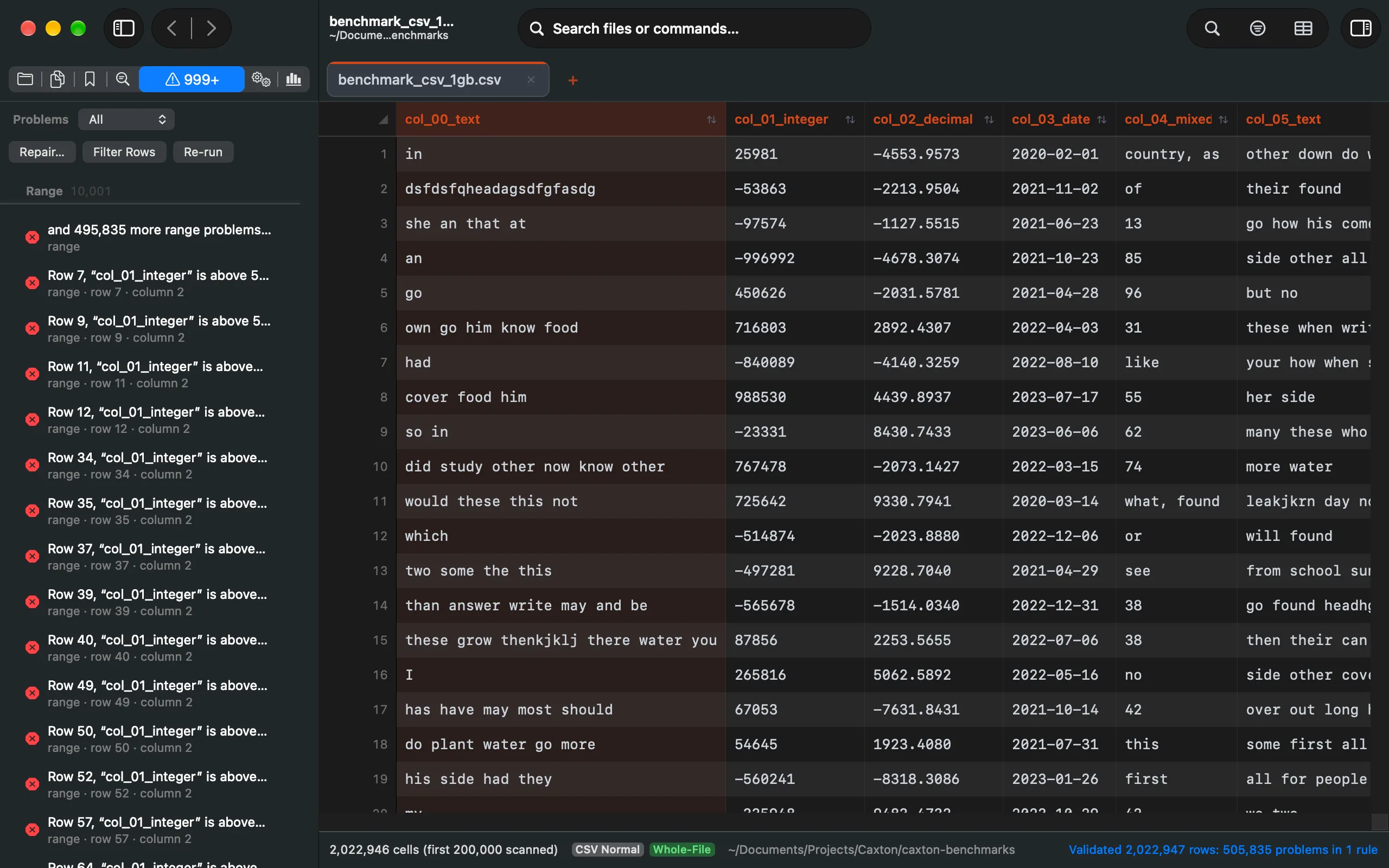
- The Problems panel lists every finding with its row, column, rule and message, and a Repair button that offers the repairs for its rule. Narrow the list by severity, Show Raw for the bytes behind a problem, Filter to Problems to narrow the grid to the rows that have one, and Re-run after an edit.
- Nine repairs, each previewed. Pad Missing Fields, Merge Overflow Fields, Remove Extra Fields, Repair Quotes, Normalize Delimiters, Normalize Line Endings, Remove Blank Rows, Replace Invalid Bytes, and Rename Headers show exact examples before they apply, and each is one undo step. Quarantine Problem Rows… writes the rows that cannot be fixed to their own document, with the rule, the message and the original row number on each, then offers to remove them from this file.
Read the manual: Validate & Repair →
Column profiles
- The sidebar's Column Profile (
⌃⌘7) profiles the selected column and follows you as you move between columns: rows, empty cells, distinct values, and the type distribution with the majority and its share. A column with values that do not fit its type lists up to eight of them with their counts, so a stray letter in a numeric column is found in seconds. - Numbers get minimum, maximum, sum, mean, median, percentiles, standard deviation and outliers; text gets lengths, stray whitespace, non-ASCII and control characters, and common prefixes and suffixes; dates get the formats seen with their counts, the earliest and latest, and how many carry a time zone.
- A frequency table of the distinct values, up to a million of them, each with its count, its percentage and the cumulative percentage. Search it, sort it by count or by value, export it to a new document, or filter the grid to a value from it. A column with a million distinct values keeps its table in scratch space, not memory.
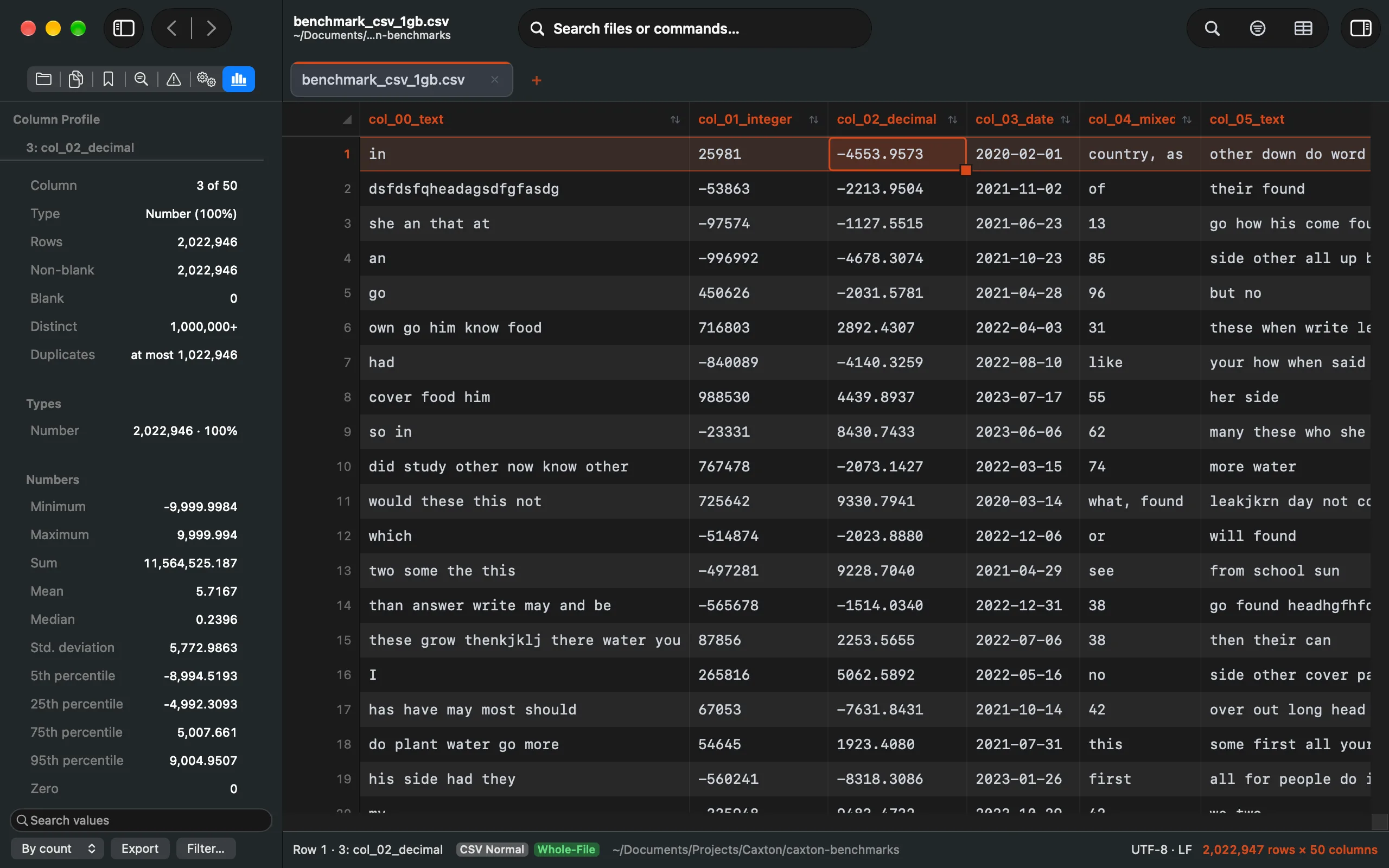
A numeric column's profile: the summary, the types, the numbers, and the search, sort, Export and Filter controls of the values table below.
Read the manual: Column Profiles →
Sort and duplicates at any size
- A sort shows its phases in the Operations panel and the status bar: building keys, then writing runs and merging them when the keys outgrow their memory budget. It checks the scratch volume before it writes a run and refuses up front when the disk is short, with nothing written. Before it applies it previews how many rows move, the first of them before and after, and whether ⌘Z reverses it.
- CSV ▸ Delete Duplicate Rows… reports the groups first: how many, how many rows beyond the first of each, how many the keep rule removes, the largest group with its key, and the size distribution, before anything is removed. Exported groups carry each row's group number, the group's size, whether the rule keeps it, its row number in the file and its whole key. The removal is one undo step and, past the in-place limit, streams to a new document like a sort; a 50-million-row scan keeps its tables in pages the system takes back, so nothing is left behind after the file closes.
- Every writer keeps your bytes. A transform, a repair, a dedupe or a quarantine changes only what it was asked to: a BOM, CRLF endings, quoted line breaks and doubled quotes come through untouched, and undo restores the file byte for byte.
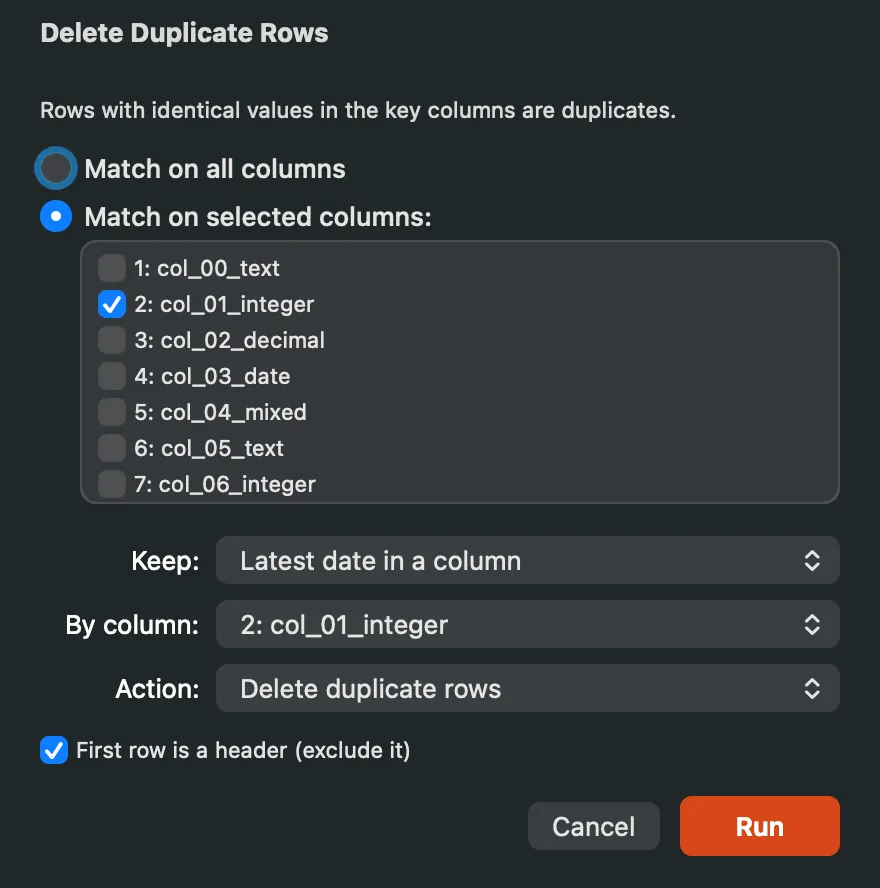
Key columns, the keep rule with its column, and the action: remove the rows, bookmark them, or export the groups.
Filter: grep you can scroll
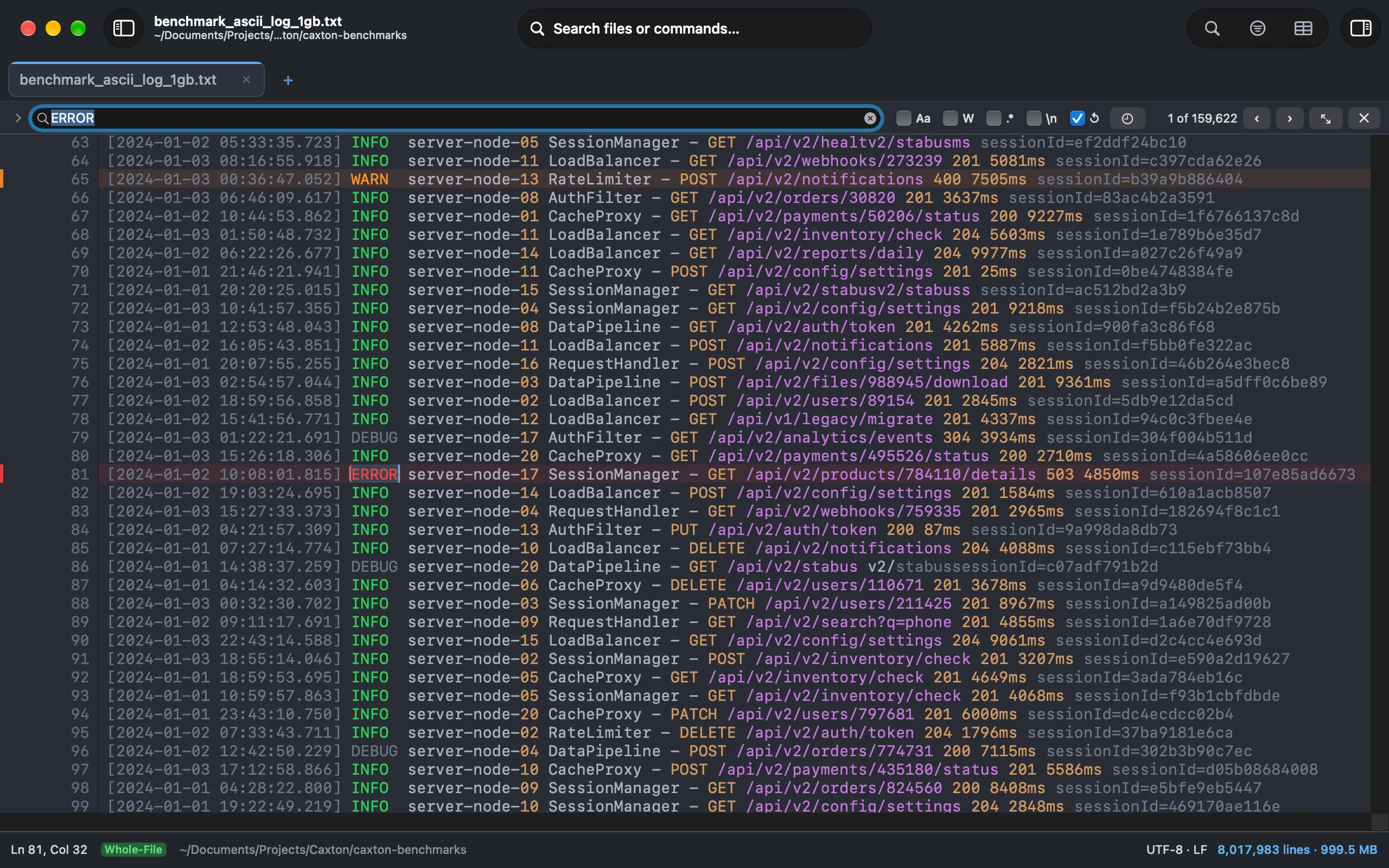
Show only matching lines, with original line numbers, full editing, and the rest of the app still working. 80.6M lines filter in 1.0 s. Chain conditions with AND/OR and per-condition negate; save presets; extract every match to a new document.
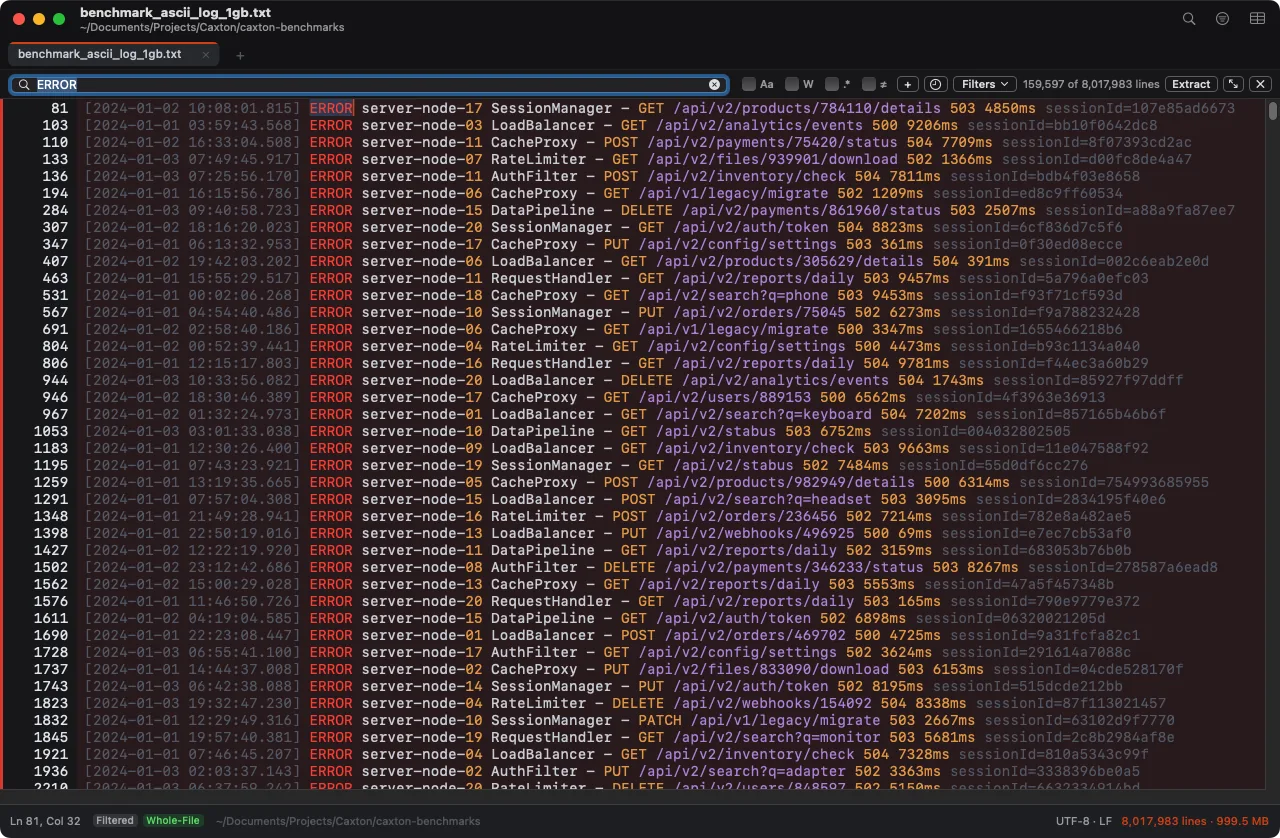
The 1 GB log filtered to its 159,597 ERROR lines, original line numbers kept.
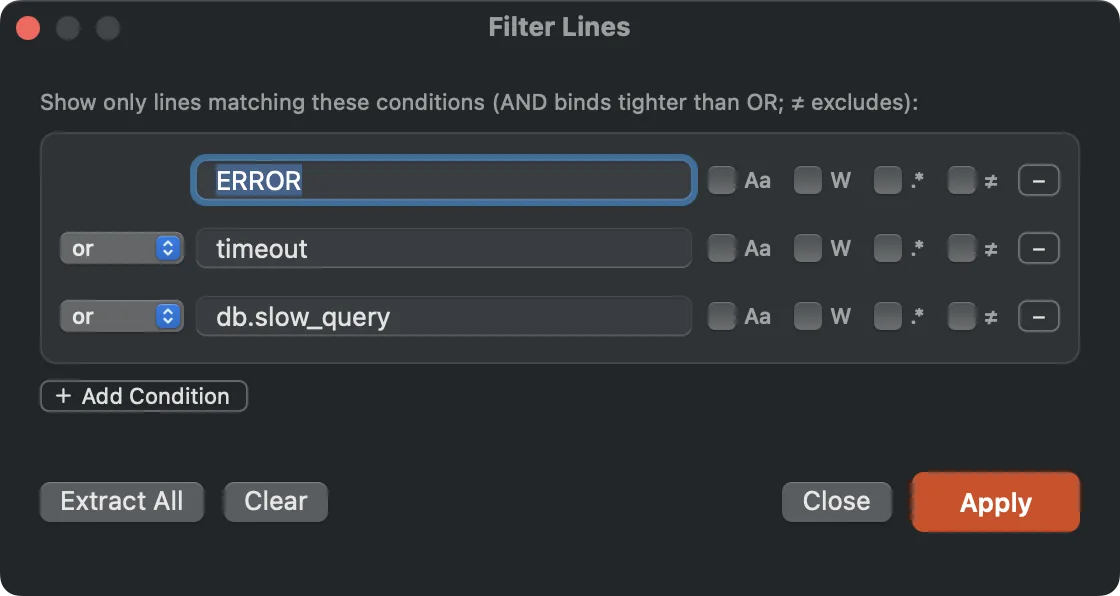
Multi-condition chains live in the Filter Lines panel. The bar stays one line tall no matter how many you stack.
Log Mode
A log is a first-class view: jump by time, filter by severity, note the incident, extract the window around it, and follow a file that grows faster than you can read.
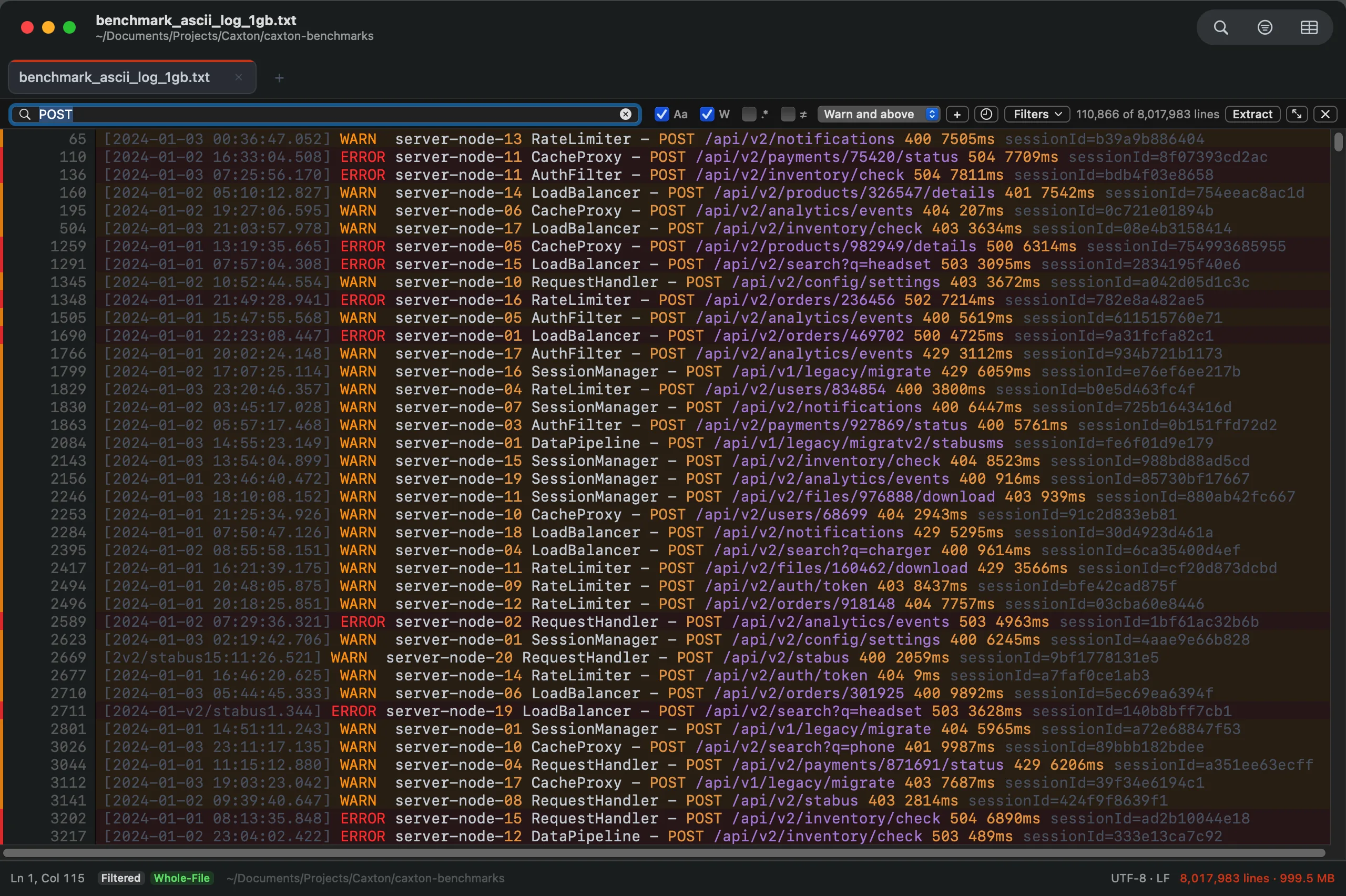
Severity tint on the rows and the Severity popup in the filter bar, driven by one vocabulary.
- Go to Time (
⌥⌘L): type14:03,2026-09-04 14:03, or+5mfrom the caret line and land on the first line at or after it. It probes a few dozen lines through the index instead of scanning the file, and the banner names the line and time it landed on. - Timestamp formats recognized: ISO 8601, syslog, Apache and nginx, Go's log package, Unix epoch in seconds or milliseconds, and slash-dated forms. Caxton votes the format from the first lines; Timestamp Format… overrides the vote, the zone, and the year syslog lines lack.
- Severity filter and tint: Warn and above, Error and above, Fatal only. Error and warning rows carry a tinted band, the minimap carries a translucent band across the same rows, and your own words or regexes extend the vocabulary. Stack traces stay with their record.
- Notes on bookmarks: a note on any line, shown as a ring in the gutter. Notes move with their line, go when it goes, and survive relaunch.
- The Bookmarks panel (
⌥⌘M, or⌃⌘3in the sidebar): every bookmark with its timestamp, severity, text, and note, editable in place. Copy as Incident Notes puts the table on the clipboard for a ticket. - Extract Incident Window: the lines around every bookmark, N lines or N seconds by record time, overlapping windows merged, written to a new document with a header naming each block's source span.
- Follow, with Catch Up to Live: when a file grows faster than one poll absorbs, the Following pill says how far behind it is. Past half a gigabyte of backlog Caxton reloads the last 64 MB and names the byte range it skipped, which opens as its own slice. Nothing is dropped silently.
Soft wrap that survives huge files
⌥⌘W wraps at the window edge or a fixed column (80/100/120, with a guide line), with continuation markers in the gutter and visual indent on wrapped rows. Multi-gigabyte documents wrap responsively; a pathologically long line opts out per line instead of stalling the window. Navigation, selection, syntax color, and every overlay work in visual rows.
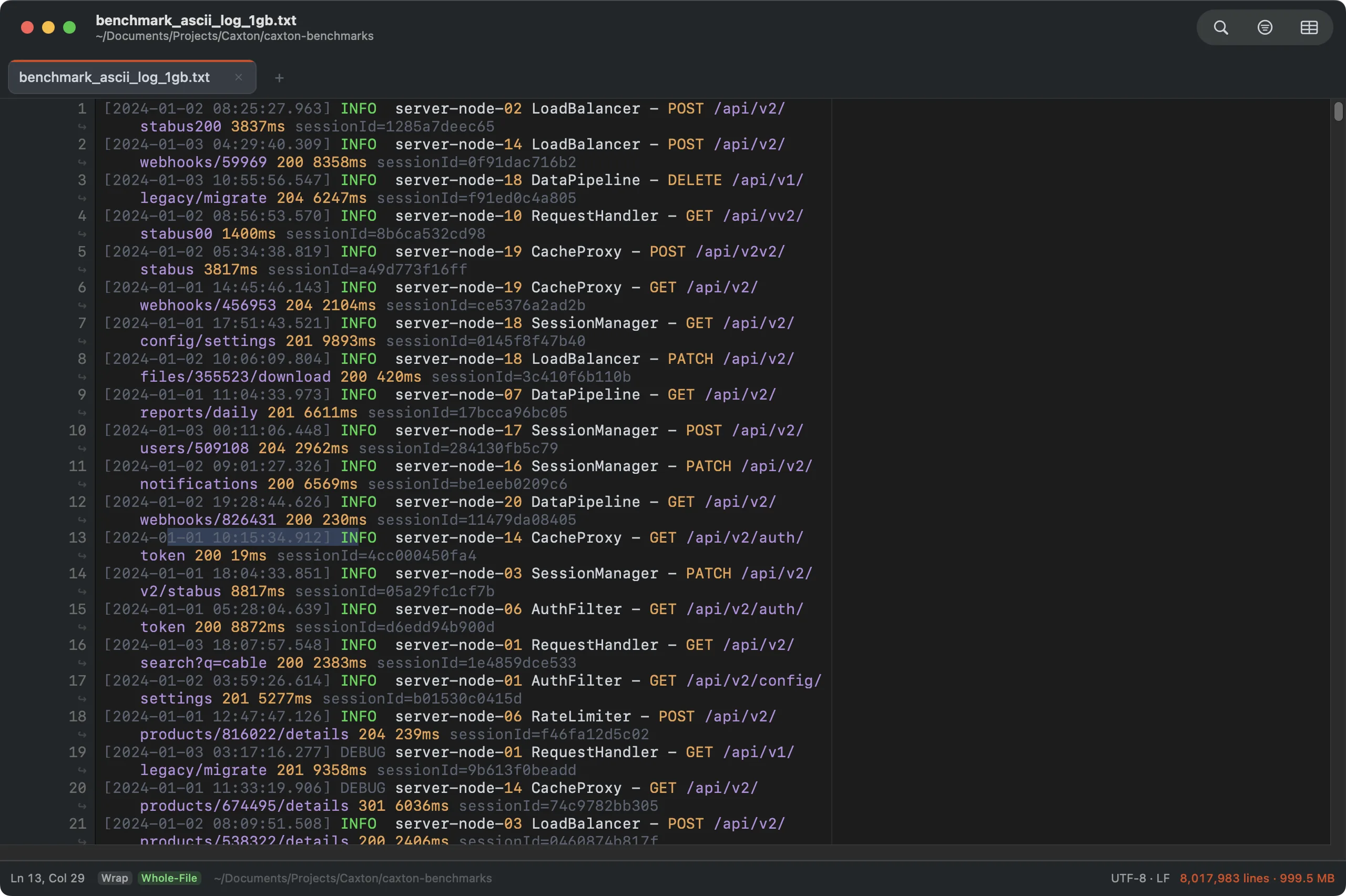
Wrap At 80 on a 1 GB log. The guide marks the measure.
Split view, eight themes, an honest status bar
⌘\ splits the window into two independent viewports of the same document. View ▸ Theme lists a curated set of eight palettes: Dark and Light as they were, Solarized Dark and Solarized Light, One Dark, Gruvbox Dark, and a High Contrast pair at 7:1 or better with wider separators and no glass. Every surface takes the palette at once, from the text and the grid to the sidebar and the status bar, and every palette holds a contrast floor for text, syntax colors and line numbers. Follow System Appearance is its own switch: keep one palette for dark and one for light and Caxton follows macOS between them, or uncheck it and pin one. Export Theme… writes a palette as a JSON file another Mac imports.
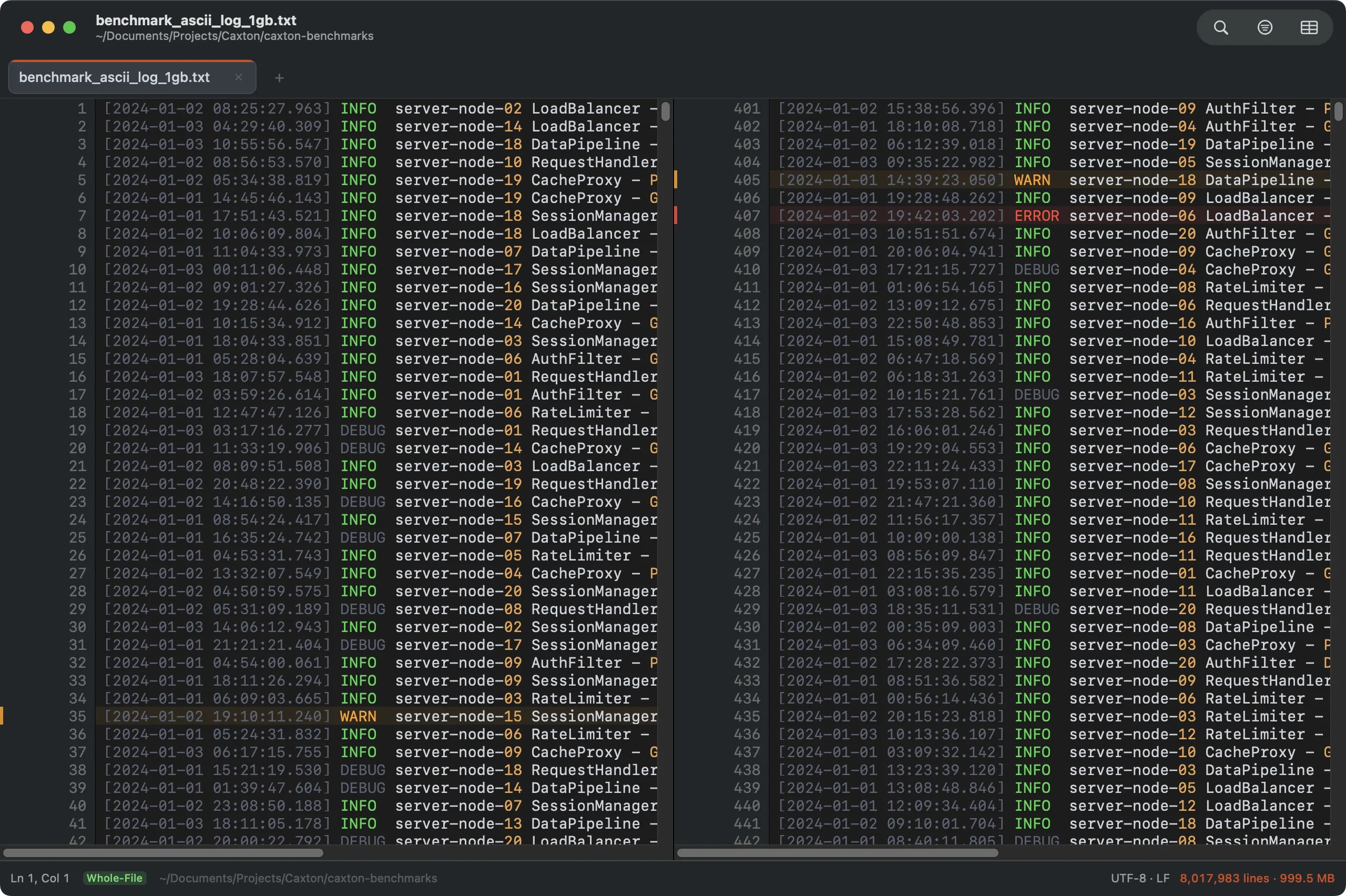
One document, two places at once. Highlights and edits mirror, scrolling doesn't.
Find & Replace that keeps up
A byte-level scanning engine covers ten gigabytes in about a second: 1.61 million matches found, counted exactly, highlighted live. Replace All is a single pass with a single undo step: all 1.61M replacements in 1.7 s. With a filter active, Replace All works in the filtered lines and says so; the whole file is one click away.
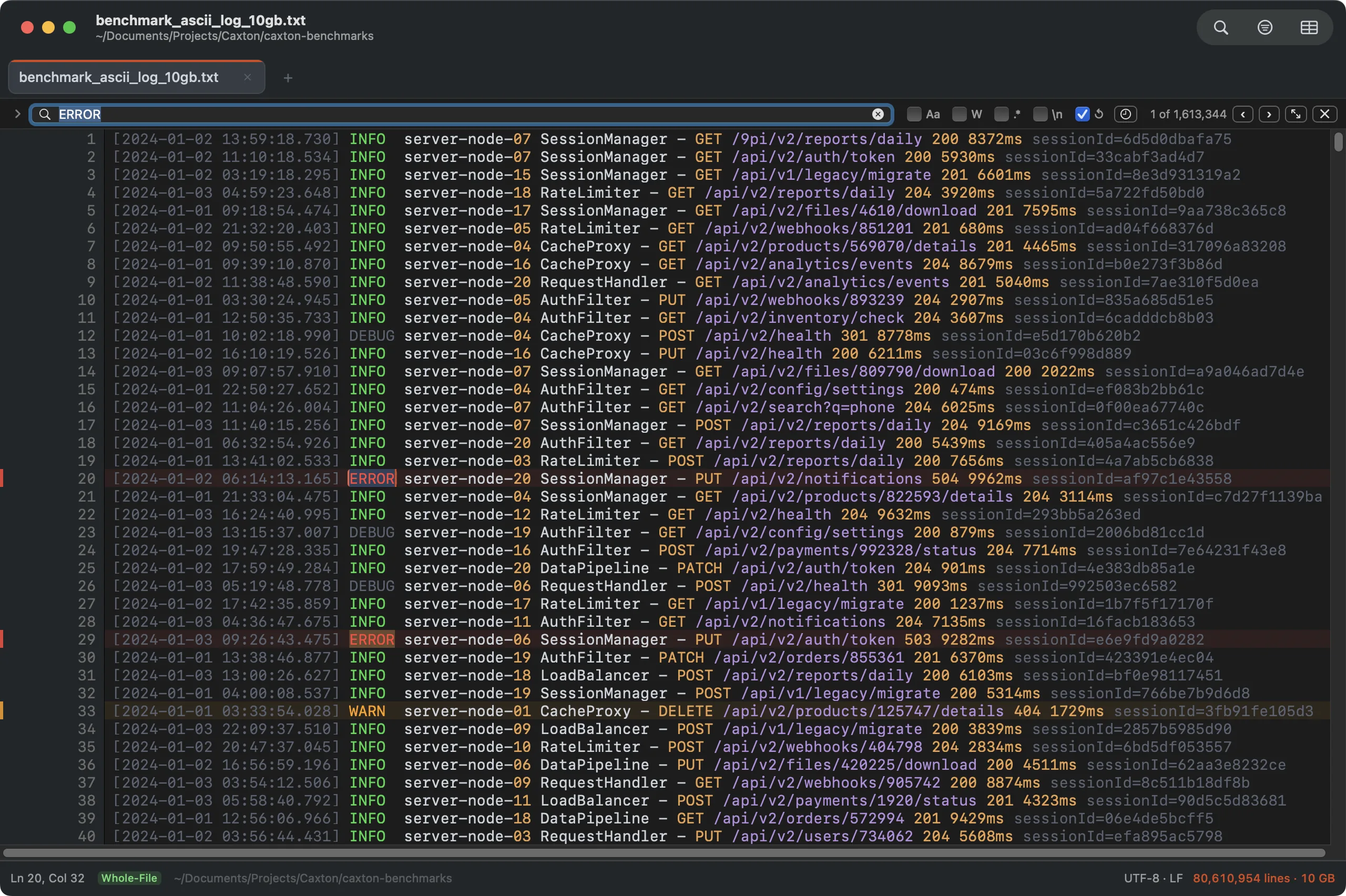
1,613,344 matches at 10 GB in 1.0 s. The counter is exact, not an estimate.
- Case, whole-word, ICU regex, and escape sequences (
\n,\t,\xHH,\uHHHH) for cross-line searches. - Live highlights that track your edits: change a found word and its highlight retires instantly.
- Count, Find All, Bookmark All, search history, and named search presets with JSON import/export.
- Batch Replace: hundreds of find/replace pairs in one run, one pass or in order, per-pair results, pair lists as CSV/TSV.
- Find in Files across a folder or every open document: filename patterns, an honest skip report, and replace-across-files with previews, .bak backups, and a report.
- Find All results you can work: group by capture value or CSV column, sort by match text, filter to matches, export to a new document.
- The Advanced Find panel widens the bar into a full form; Find All lists every match in the sidebar's Search Results panel, and the editor follows as you arrow through them.
Editing at scale
Keystrokes apply in about a millisecond on a 10 GB document. Multi-cursor editing runs to 1,000 simultaneous carets: a keystroke across all of them lands in under 120 ms, as one undo step. Option-drag sweeps a rectangular selection; Option-Shift-click sweeps one from the caret to the click. Expand Selection grows through word, token, quoted string, brackets, line, and paragraph, and contracts back exactly.
Type once, edit everywhere. Selections merge, overlaps dedupe, undo is a single step.
Compare
File ▸ Compare With… shows what changed between two files, side by side, aligned line by line and scrolled as one.
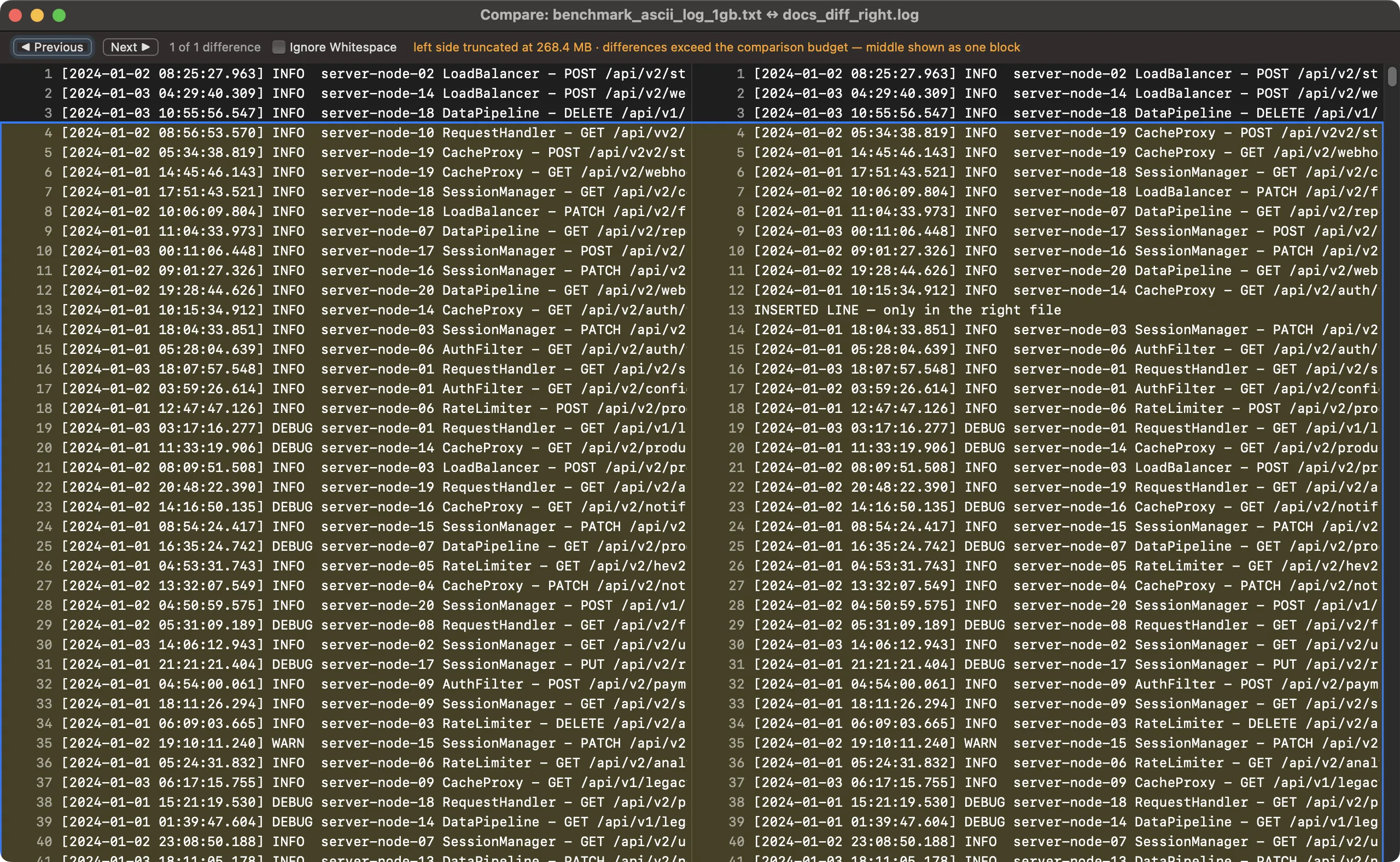
Aligned rows, tinted changes, the current difference outlined. ⌘↓ and ⌘↑ walk the differences.
- Copy changes across: click a difference, then copy it left or right. A file that is open in Caxton compares as its live text, unsaved edits included and labeled, and a copy lands in its buffer as one undo step.
- Ignore Case and Ignore Whitespace, separately or together. Differing line endings are noted rather than reported as changes.
- Saved reports: Save Report writes the differences as plain text, with line numbers and minus and plus lines, one hunk per change.
- Limits, stated: copy works only on fully captured sides and refuses a block over 64 MB. Each side is compared up to 256 MB, and the window says so when a file is larger.
Power editing
The everyday depth of an editor you live in, all of it working at any file size.
- Comments:
⌘/toggles line comments across the selection as one undo step, language aware, markers in a straight column;⌥⌘/wraps a block comment. - Brackets: pairs close as you type and the closer types over; the matching bracket highlights at the caret; jump to, select, delete, or change the surrounding pair.
- Snippets with tab stops: placeholders with defaults, mirrors that type in two places at once, date and filename variables. Type the abbreviation, press Tab, and walk the stops.
- Document completion:
⌥⎋lists identifiers from the file itself, most frequent first. No dictionary, and the scan is bounded, so it behaves the same in a multi-gigabyte log. - Clipboard history:
⇧⌘Vshows everything cut or copied in Caxton, searchable, with pins that survive relaunch. It never reads the system pasteboard, and copies from files that look like secrets (.env, key material) are never recorded. - Per-file rules by glob: patterns set wrap, tab width, encoding, and syntax at open, first match wins per setting, so
*.logopens unwrapped as a log and the weekly Shift-JIS export just opens right.
A full text toolbox
Everyday text surgery without leaving Caxton: every operation one undo step, at engine speed on files of any size.
- Lines: duplicate, delete, move, join, split at a delimiter, shuffle, remove empty, keep duplicates, indent/outdent, number, prefix/suffix, plus sort, reverse, dedupe, and pattern deletes. Byte-exact even around invalid UTF-8.
- Paragraphs: hard wrap to a column, reflow, unwrap, with quote and comment prefixes preserved on every line.
- Case: upper, lower, title, sentence, toggle, and all seven identifier casings (camelCase through CONSTANT_CASE), acronym-aware.
- Whitespace: trims, collapse repeated spaces, non-breaking-space conversion, column-aware tabs ↔ spaces, indentation normalize and detect, configurable tab width, and Show Invisibles with unusual whitespace highlighted.
- Numbers: increment, arithmetic, zero-padding that keeps its width, base conversion (2/8/10/16), sum with count and average.
- Escapes & hashes: HTML, XML, JSON strings, hex, Unicode escapes, ROT13, NFC/NFD/NFKC/NFKD normalization; SHA-256/512, SHA-1, MD5 in a copyable panel.
- Statistics: bytes through reading time, for the document or the selection, with an indentation report.
Your work survives everything
Atomic saves that can't half-write. A crash-recovery journal every 30 seconds that never touches your original file. Session restore with scroll positions. External-change watching that reloads clean files and protects dirty ones. Closing a document gives its memory back: a 50-million-row CSV opens in the grid at about 750 MB and returns to under 130 MB when it closes. An undo entry over 100 MB keeps its bytes in a scratch file, and under memory pressure Caxton moves undo history to disk before it discards any of it.
…and the rest of the toolbox
- Encodings & formatters: Base64 and URL encode/decode, JSON and XML formatters, narrow-to-selection, locale-stable date/time insertion at every cursor.
- 18 encodings: UTF-8 with or without a BOM, UTF-16 LE and BE, Shift-JIS, EUC-JP, GB18030, Big5, EUC-KR, Windows-1252, ISO-8859-1, Windows-1251, KOI8-R, ISO-8859-5, Windows-1250, ISO-8859-2, Windows-1254, and Windows-1257. Sixteen are detected on open; the encodings page says which.
- Workspaces: reopen a named set of files in one step.
- Operations panel: every long operation with progress and Cancel, in the sidebar; never a beachball. Sorts, dedupes, splits, combines and their kind preview what they will change before they run, and the panel keeps each report: what it did, how many rows or cells it touched, and whether ⌘Z reverses it.
- Remappable shortcuts, spelling services, printing: the Mac-standard toolbox, all present.
The menu reference documents every command.
At every size
The scale numbers are the headline; the daily driving is the habit. An ordinary CSV opens into the same typed grid as a warehouse export: numeric, natural, currency, and date sorts, the value browser, fill series, and the full-value cell editor, with column edits that adjust the table in place instead of rebuilding it. The text toolbox (case tools, line surgery from dedupe to join and split, document statistics) treats a 40-line config with the same manners as a 10 GB log. Every feature, at ten-kilobyte scale too.
Private and native
AppKit and Swift top to bottom: no Electron, no web view. Your files never leave your Mac: no upload, no cloud processing, no telemetry of any kind. The only network calls are the update check and license activation, both disclosed.
Every download starts a 7-day free trial of Caxton Pro. No card, no account. After the trial you keep Caxton Free: opening, searching, filtering and copying at any size.
Download Caxton for Free