Download Caxton for Free · 7 days, no card · 7 MB · macOS 13.0+
Can I just use sed for a huge file?
For the simple case, yes, and here is the shape of it:
sed 's/staging\.internal/prod\.internal/g' app.conf > app.conf.new   # writes a NEW file
diff app.conf app.conf.new                                           # check your work
mv app.conf.new app.conf                                             # swap when satisfied

sed -i '' 's/foo/bar/g' notes.txt    # in-place on macOS (BSD sed): -i takes an argument
sed -i 's/foo/bar/g' notes.txt       # in-place on GNU sed only (Linux, or brew's gsed)
The three-line pattern at the top is genuinely fine: the original is untouched until you swap, diff is your preview, and keeping app.conf around is your undo. If the substitution is a single literal you understand completely, do that and move on.
The hazards live in -i. In-place editing has no preview and no undo beyond whatever backup you remembered to make, and macOS ships BSD sed, which reads the argument after -i as a backup extension: the flag usage every Linux answer shows misfires on a stock Mac. A regex with a capture group you got slightly wrong rewrites millions of lines just as willingly as one you got right, and the only count you get at the end is the shell prompt returning.
There is also the check-your-work problem. A diff of two multi-gigabyte files is itself a scrolling job, and if your editor cannot open the result to inspect it, you are verifying blind. (If opening the file at all is where things stand, start there: open a 10 GB log file on a Mac.)
How do I replace across a million sites without breaking the file?
Caxton opens the file memory-mapped and treats Replace All as a single bulk operation, not a loop over matches. On the published 10 GB benchmark (measured on an M1 Max with 64 GB RAM; methodology and the full table on the benchmarks page): a literal search finds 1,613,344 matches in 1.0 s, Replace All rewrites every one of them in 1.7 s as one undo step, and a regex alternation returns 5,643,688 matches in 1.8 s. Regex replacements take capture-group templates, so $1 reorders instead of splatters.
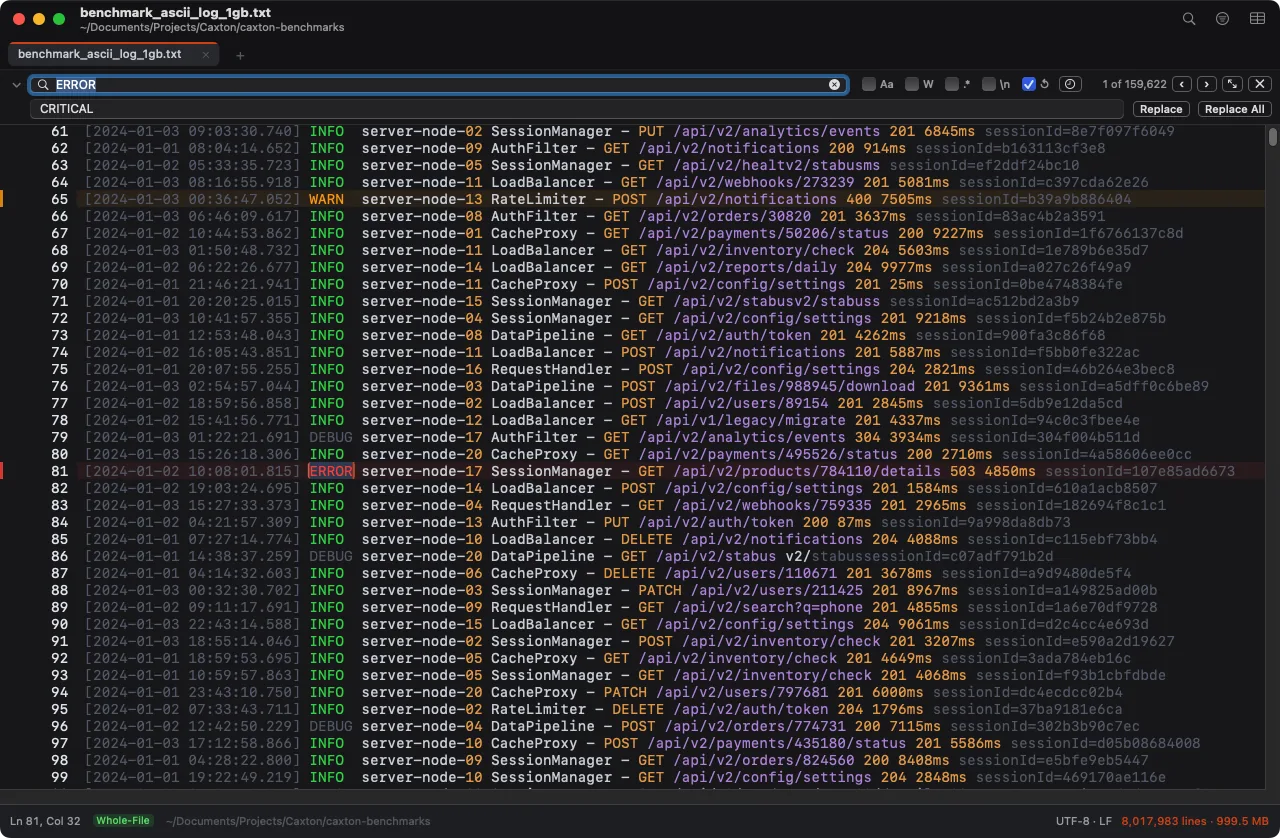
The 1 GB benchmark log with the replace row open: ERROR to CRITICAL, 159,622 matches counted before anything is touched.
The safety story is the point at this scale. The match count is in front of you before you commit. A site that cannot be re-verified at apply time is skipped and counted, never silently mangled. Undo restores byte-identical content, a property the published harness asserts by re-searching after every run. And batches around a million sites and up can exceed the undo-history memory cap, in which case Caxton tells you before the run instead of letting you find out after. When you save, the write is atomic: 11.3 s for the full 10 GB document, and the file is never left half-written.
If the goal is only to see fewer lines rather than change them, that is a different job with its own guide: filter a large log file on a Mac.
A million replacements, one undo step.
Download Caxton for Free7 days free, no credit card · 7 MB · macOS 13.0+ · notarized
How do I run hundreds of pairs, or a whole folder?
When the job is a mapping rather than a substitution (old hostnames to new ones, a hundred product codes, a redaction list), Batch Replace holds the whole pairs list, with per-pair case, whole-word, and regex options. The two modes are stated plainly in the panel: one pass, where every pair matches the original text, overlaps go to the earlier pair, and the entire run is one undo step; or in order, where each pair sees the previous pair's output, one undo step per pair. After a run, every row reports found, replaced, and dropped counts, and a bad regex in one pair never stops the others. Pair lists import and export as CSV or TSV, and presets keep the mapping, mode included, for next quarter's rename. It applies to one document or every open document.
For a folder of files, Find in Files (⇧⌘F) searches without opening anything: filename patterns like *.log; *.csv, and a skip report that lists files over the 50 MB scan cap, binary files, and unreadable files rather than silently omitting them. Replace across files is built around the same caution: a preview with per-file counts before anything is touched, .bak backups on by default, atomic writes, and a report covering every file skipped and why. Documents already open in Caxton are left to Batch Replace, so nothing is rewritten behind an unsaved window.
Which mainstream editors were designed for which file sizes, vendor documentation as the record, is a survey of its own: large file text editors on a Mac.
Which approach fits which job?
| Approach | Good for | Breaks when |
|---|---|---|
sed to a new file | One well-understood substitution, original kept until you swap, free | You need to inspect matches first, or verify a multi-gigabyte diff |
sed -i | Small files where the backup is trivial to keep | No preview, no undo, and BSD/GNU flag differences on a Mac |
| Caxton Replace All | Millions of sites in one file, counted first, one undo step | The job spans many files (that is the next two rows) |
| Caxton Batch Replace | Hundreds of pairs with per-pair counts, CSV/TSV import, presets | The files are not open and should not be (use Find in Files) |
| Caxton Find in Files | A folder, previewed per file, .bak backups, honest skip report | You want repo-wide refactoring with language awareness, not text replacement |
Frequently asked questions
How do I find and replace in a file too big for my editor?
Too big is an architecture problem, not a hardware one: most editors load the whole file before the first edit. sed streams a known substitution into a new file at any size, free. Caxton memory-maps the file instead of loading it, so find and replace works at full scale: the published benchmark rewrites 1,613,344 sites in a 10 GB log in 1.7 s, as one undo step.
Is sed safe for editing large files in place?
The safe sed pattern is writing to a new file, diffing it against the original, and swapping the two yourself. In-place mode gives you no preview and no undo beyond whatever backup you remembered to keep, and macOS ships BSD sed, which reads the argument after -i as a backup extension, so an -i command copied from a Linux answer misfires on a stock Mac.
Can I run hundreds of find and replace pairs at once on a Mac?
Caxton's Batch Replace holds a list of find/replace pairs with per-pair case, whole-word, and regex options, imported from CSV or TSV if you already keep the mapping in a spreadsheet. Two modes, stated plainly in the panel: one pass, where every pair matches the original text and the run is one undo step, or in order, where each pair sees the previous pair's output. Every row reports found, replaced, and dropped counts.
Can I undo a huge Replace All?
In Caxton, Replace All is a single bulk operation and one undo step: the published benchmark rewrites 1,613,344 sites in 1.7 s and undo restores byte-identical content, verified by re-searching in the same harness. Batches around a million sites and up can exceed the undo-history memory cap; Caxton tells you before the run rather than guessing.
If the command you are about to run has no undo, do not run it yet. Download Caxton for Free and make the same change with the count in front of you and one undo step behind it: 7 days free, no card.