Download Caxton for Free · 7-day free trial of Caxton Pro, no card · 7 MB · macOS 13.0+
What breaks an import?
The same handful of faults, in roughly this order of frequency.
- Ragged rows. A row with more or fewer fields than the header. A quoted comma that lost its quotes is the usual cause.
- Values of the wrong kind.
N/Ain an integer column,12/13/2026where the target wants2026-12-13, a space inside a number. - Empty required fields and duplicate keys. A primary key column with a blank or a repeat is rejected by the database, never by the file.
- Quotes and line breaks. A quote that opens and never closes swallows rows; a line break inside a cell splits one record into two.
- The wrong encoding or the wrong line ending. Bytes that are not valid UTF-8, or a file with both
CRLFandLF. - Headers. Two columns with the same name, or a missing name.
Free routes first
DuckDB keeps the rows it refuses. Its documentation on reading faulty CSV files lists the errors the reader detects: casting errors "when a column in the CSV file cannot be cast to the expected schema value," a line with fewer columns than expected, a line with more, an unquoted value ("if a quoted value remains quoted throughout, it will cause an error"), a line over the maximum size, and invalid encoding. With store_rejects "any errors in the file will be skipped and stored in the default rejects temporary tables."
FROM read_csv('data.csv', store_rejects = true);
FROM reject_errors;
The reject_errors table carries line, column_idx, column_name, error_type, csv_line and error_message, which is a complete list of what would have failed and why. The good rows load; the bad ones wait in a table.
Python's csv module needs no install and checks what you tell it to. This counts the fields per row against the header and tries the one column that must be an integer:
import csv, sys
with open(sys.argv[1], newline="") as f:
    reader = csv.reader(f)
    header = next(reader)
    width = len(header)
    for row in reader:
        if len(row) != width:
            print(reader.line_num, "fields:", len(row))
            continue
        try:
            int(row[2])
        except ValueError:
print(reader.line_num, "not an integer:", row[2])csvclean, from csvkit, "reports and fixes common errors in a CSV file." Its documented checks are --length-mismatch, which reports "data rows that are shorter or longer than the header row," --empty-columns, and -a to enable all of them. Error rows go to standard error with their line numbers, and the exit code is 1 when errors were found:
csvclean -a data.csv > checked.csv 2> errors.csvWhere do the free tools stop?
At the values. DuckDB types a column and reports a cast failure, but a format rule for dates, a pattern an id must match, a range a price must sit in, a column that must be unique, a field that is required only when another column says so: those are rules you write by hand, in Python or SQL, one at a time. The results land in a terminal or a table, not on the row in the file, and the fix is a copy. For a file you check every week, the script is the right tool. For the file in front of you now, the check and the fix want to live in the same window.
How do I validate the file itself?
Caxton opens the CSV as a typed grid over the file on disk and runs a schema against it. Validation reads; it changes nothing. The manual's Validate & Repair page has every rule.
1. Open the file and read what the parser says
A file that did not parse cleanly says so as it opens, with the count of problematic rows, and each one is marked in the row gutter. Opening and reading are Caxton Free.
2. Build the schema
CSV ▸ Validation Schema… opens a sheet with every column listed at the left, its rules at the right, and the structural rules as checkboxes below. A line under the list counts the columns with rules and the structural rules that are on. Rules read each value with the spaces around it removed. Validate runs the schema; Keep Schema saves it for this window without running. Caxton Free.
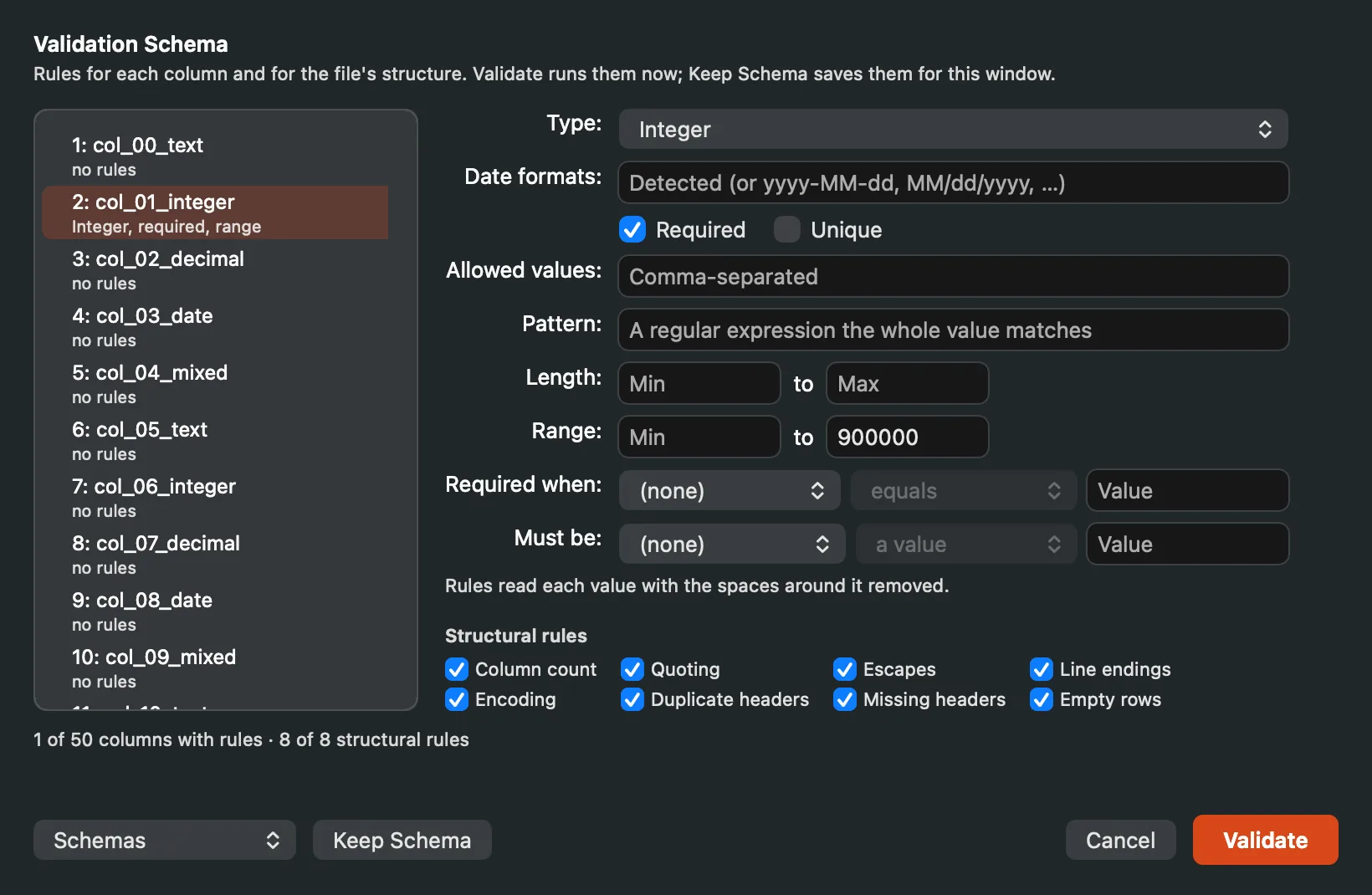
The Validation Schema sheet: columns at the left, their rules at the right, the structural rules below.
3. The structural rules
Checked across the file: the column count (every record has the header's number of fields), quoting and escapes (a quote that opens and never closes, a stray quote in an unquoted field), termination (a record ending without the file's line ending, or with the other one), the encoding (a byte sequence that is not valid UTF-8), duplicate and missing headers, and empty records.
4. The per-column rules
For each column: a type (Any, Number, Integer, Date, Boolean, UUID, IPv4 address, IPv6 address, IP address, Email address, URL), required, unique, an allowed values list, a pattern that the whole value must match, a minimum and maximum length, a minimum and maximum value for numbers, required when another column matches a condition, and must be. Numbers are read strictly: grouping marks come in threes, and 1.2.3 or 192.168.0.1 is not a number. Date formats is open when the type is Date.
5. Read the Problems panel
CSV ▸ Validate… runs the kept schema. Every finding is a row in the sidebar's Problems panel with its row, column, rule and message, grouped by rule. Double-click a problem, press Return, or choose Go to Problem, and the grid selects the cell; Back returns to where you were. A rule that cannot run says so instead of disappearing: an invalid pattern, a comparison column the file does not have, or a unique check that reached its cap of distinct values. Findings are tied to the version of the document they came from, so after an edit the panel says so and offers Re-run. Caxton Free.
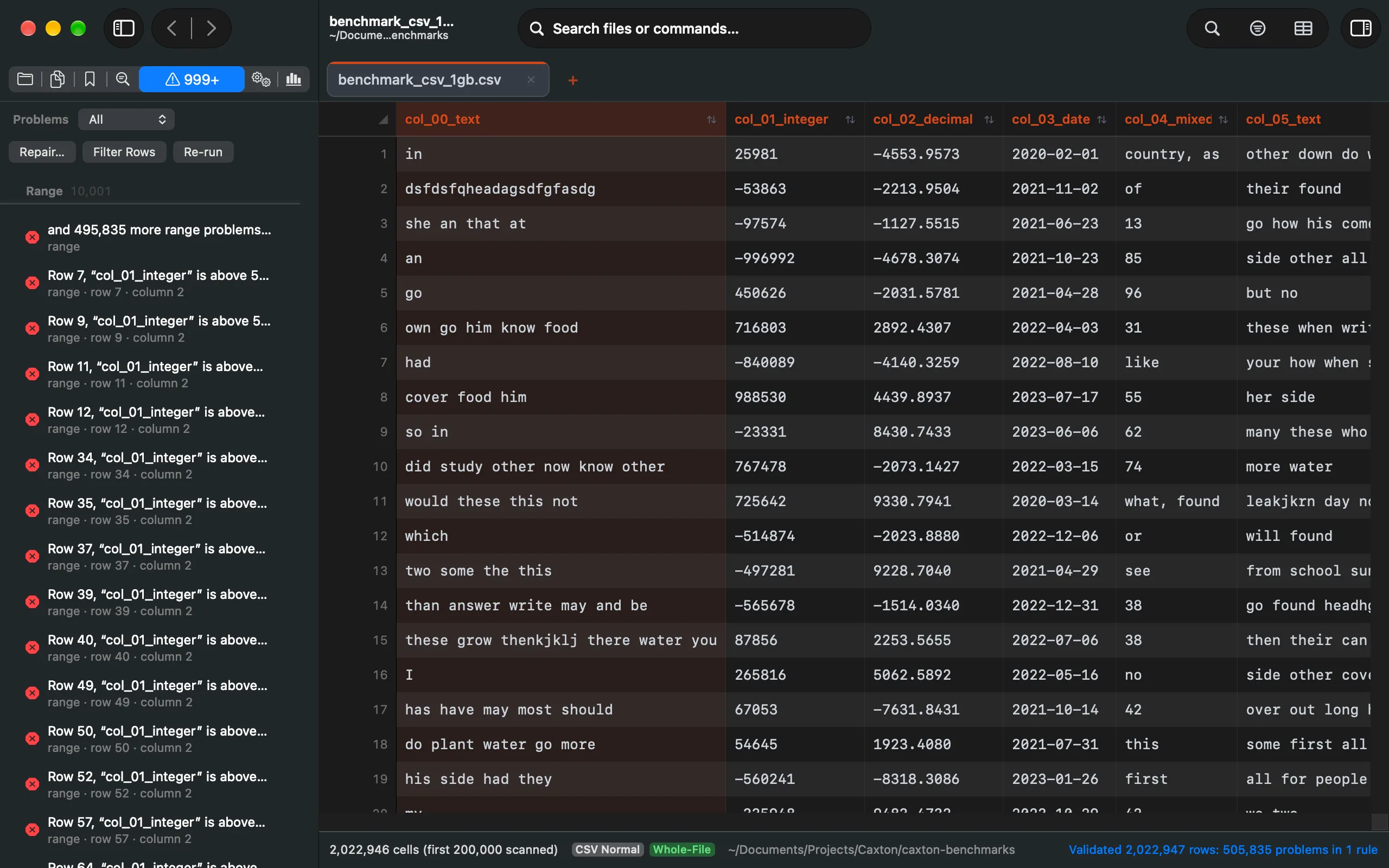
The Problems panel: every finding with its row, column, rule and message, grouped by rule.
6. Does validation change the file?
No. The schema reads the file and reports. Nothing is written until you choose a repair or a quarantine, and both say what they will do first.
7. Fix what it finds
CSV ▸ Repair offers nine repairs, each with a preview of exact examples before it applies and one undo after: Pad Missing Fields, Merge Overflow Fields, Remove Extra Fields, Repair Quotes, Normalize Delimiters, Normalize Line Endings, Remove Blank Rows, Replace Invalid Bytes, and Rename Headers. A repair changes the file, so it is Caxton Pro.
CSV ▸ Quarantine Problem Rows… says how many rows it will write and asks first, then writes every row with a problem to a new document with three columns added at the end, problem_rule, problem_message and original_row, and then offers to remove those rows from this file with a preview and one undo. In Caxton {product.version} the new document is written on Caxton Free; removing the rows from the file is Caxton Pro. When the Problems panel lists only the first rows of a capped rule, the quarantine scans the whole document again so every problem row is written.
Reparse with Another Profile… reads the file again with a different delimiter or header setting, for the case where the problem is how the file was read rather than the file. Caxton Free.
8. Save
⌘S writes the same file back as plain CSV. Saving is Caxton Pro.
Open the file before the import. See every row that would fail, and why.
Download Caxton for Free7-day free trial of Caxton Pro, every feature, no card. After it, Caxton Free keeps opening, searching and filtering at any size.
Which approach fits which job?
| Approach | Good for | Breaks when |
|---|---|---|
DuckDB store_rejects | Loading the good rows and keeping a table of every rejected one with its reason, free | The rule is about a value's pattern, range or uniqueness, or the goal is a corrected file |
Python csv | A check you can shape to one file in a few minutes, no install | Every new rule is more code, and the row is still only a line number |
csvclean | Line numbers for every uneven row in one pass, free | The fault is in a value rather than the row's shape |
| Caxton | A schema with structural and per-column rules, every finding on its cell, previewed repairs, quarantine, one undo, the same file saved | The check runs unattended every night; script that one |
A file that fails for a structural reason is a repair job: see repairing a malformed CSV. If it is too big to open where you are, start with opening a huge CSV. If the values were fine until a spreadsheet touched them, see editing a CSV without auto-formatting.
Frequently asked questions
What are the most common reasons a CSV import fails?
Rows with the wrong number of fields, values that cannot be cast to the column's type, blanks or repeats in a key column, a quote that never closes, a line break inside a cell, bytes that are not valid UTF-8, and duplicate or missing header names. DuckDB's reader documents the structural ones as its error types; the value rules are yours to state.
What does CSV validation actually check?
Two layers. Structural rules check the file's shape: the column count of every record, quoting and escapes, line termination, the encoding, headers and empty records. Column rules check values: a type such as Integer, Date, Email address or URL, required, unique, an allowed list, a pattern, a length range, a numeric range, a condition on another column, and must be. The free tools cover the first layer and whatever you script of the second; Caxton's Validation Schema sheet holds both.
Does validating change the file?
No. DuckDB loads a copy, csvclean writes its output to a new file, the Python check prints, and Caxton's validation reads the file and lists findings in the Problems panel. The file changes only when you choose a repair or a quarantine, and in Caxton each one previews what it will do and is one undo step.
How do I fix what validation finds?
Structural faults have named repairs in Caxton: Pad Missing Fields, Merge Overflow Fields, Remove Extra Fields, Repair Quotes, Normalize Delimiters, Normalize Line Endings, Remove Blank Rows, Replace Invalid Bytes and Rename Headers, each with a preview and one undo. Bad values are edited in the grid at the cell the Problems panel takes you to, or quarantined: the problem rows go to a new document with their rule, message and original row number appended, and Caxton offers to remove them from the file. Repairs and removals are Caxton Pro.
Sources
- DuckDB documentation: reading faulty CSV files (error types,
store_rejects, thereject_errorstable) - csvkit documentation: csvclean
- Python: the csv module
- RFC 4180: Common Format and MIME Type for CSV Files
- Caxton manual: Validate & Repair and CSV Workbench