Download Caxton for Free · 7 days, no card · 7 MB · macOS 13.0+
Where UltraEdit stands
UltraEdit has decades of history and positions itself squarely for big files: its own headline calls it a text editor "built for huge files," its support material covers opening and editing files of 10 GB and beyond through partial file loading, and one license covers Windows, Mac, and Linux. That cross-platform reach is genuinely useful if you work across all three.
The two structural facts that send people looking for alternatives are just that, structural. First, licensing: the vendor's pricing is subscription-first, with perpetual licenses offered for UltraEdit Core and the Enterprise suite; the vendor's pricing page has the current figures. Second, the product is one codebase serving three platforms rather than an application built for macOS specifically. Neither is a defect; both are design decisions, and whether they fit is your call, not this page's.
If the editor you are actually replacing is EmEditor, that is a different situation (there is no Mac build at all) with its own migration guide: EmEditor for Mac. Notepad++ users have their own page as well.
What are you replacing?
"UltraEdit" means different work to different people. Match the alternative to the job.
General code and text editing, natively
BBEdit has been the Mac professional's text editor for over three decades: a perpetual license, paid upgrades between major versions, and a documented free mode that continues working after the 30-day evaluation. Its FAQ addresses large files in writing: handling them presents no intrinsic problems, with some specific operations limited for files over 2 GB.
CotEditor calls itself "The Plain-Text Editor for macOS": free, open source, distributed through the Mac App Store, and built only for the Mac. For everyday plain-text work with zero spend, it is the direct answer.
Sublime Text sells a personal license as a one-time purchase with three years of updates and one key for all your machines and operating systems. Its vendor makes no large-file claims; code, markup, and prose is its stated brief.
Free and already installed
For inspection rather than editing, the terminal covers a lot of what a big-file editor gets opened for:
less -S big.log        # opens instantly at any size; /text searches, q quits
grep -n -C 3 "ERROR" big.log > errors.txt   # matches with context, into a small file
tail -n 1000 big.log   # the end of the file, now
This is a genuine recommendation, not a warm-up: less documents that it does not read the whole input before starting, which is why it opens anything instantly. If a read-only look answers the question, you are done, for free.
The large-file and huge-CSV job
This is the workload UltraEdit's large-file positioning describes, and it is the whole of what Caxton does. Caxton is a native AppKit application for macOS 13.0 and later; documents are memory-mapped rather than loaded, so opening copies nothing up front. The published numbers, measured on an M1 Max with 64 GB RAM (methodology and full table on the benchmarks page):
- The 10 GB benchmark log (80,610,954 lines) opens immediately; the background line index finishes in 3.7 s, and on the 50 GB log memory stays under 160 MB through every measured operation.
- A literal search across that file returns 1,613,344 matches in 1.0 s, with an exact counter; Replace All rewrites every one of them in 1.7 s as a single undo step.
- A 1 GB CSV (2,022,947 rows × 50 columns) parses to a typed grid in 2.3 s; a numeric sort of those rows takes 4.4 s.
- Batch Replace runs lists of find-and-replace pairs, and Find in Files searches folders; Batch Replace shipped in version 1.3, which also extended Find in Files, and both are in the changelog.
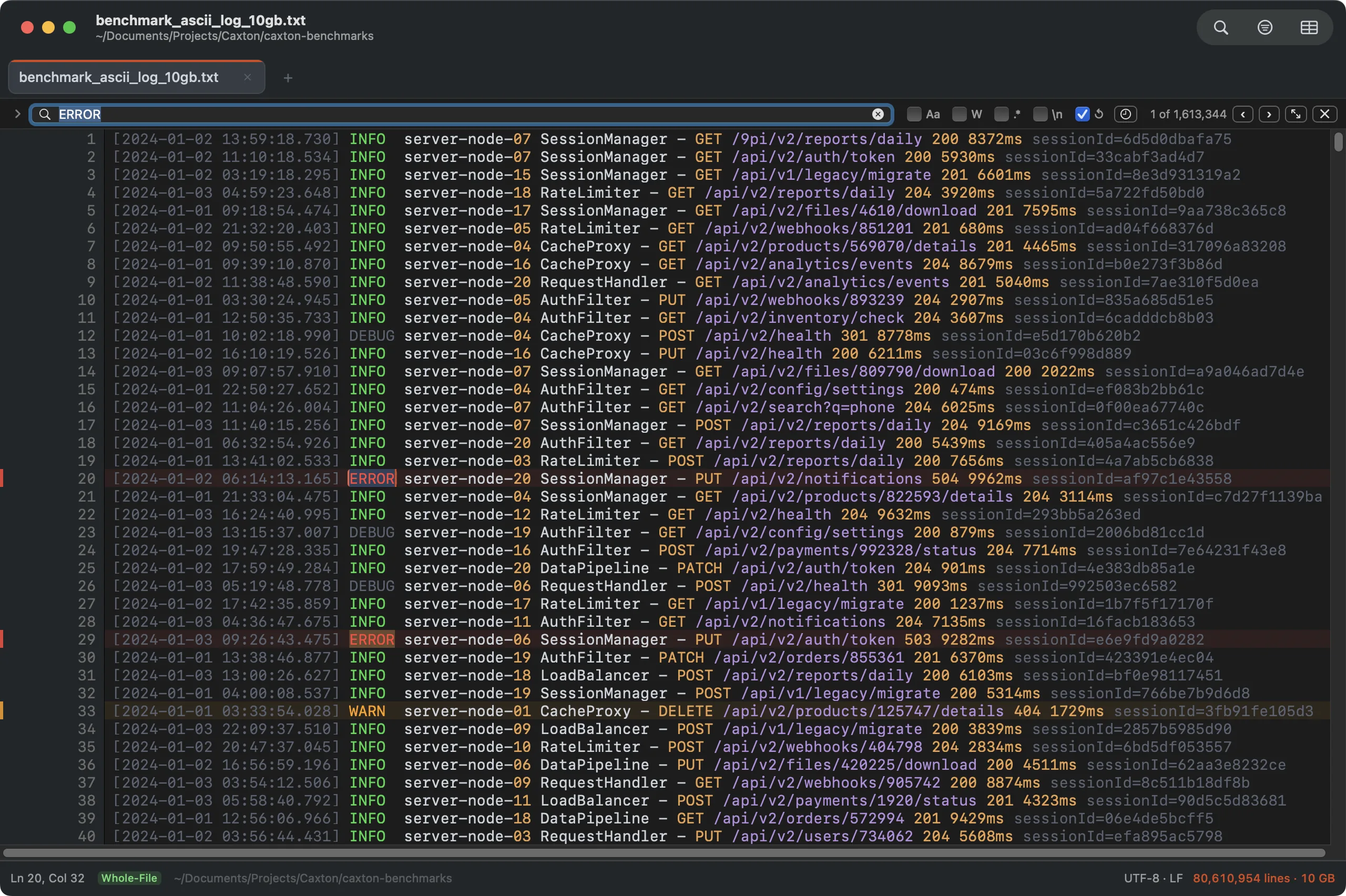
The 10 GB benchmark log with a literal search across all 80.6M lines: 1,613,344 matches in 1.0 s.
On licensing, since it is this page's search intent: Caxton is $9.99 per month, $99.99 per year, or $179.99 once for a lifetime license. The free trial of Caxton Pro is 7 days with no card. If a subscription lapses, the Mac returns to Caxton Free, which still opens files of any size, searches, filters, compares, and copies; files do not become read-only, and the application never locks you out of your own data.
The test that settles it is your own biggest file.
Download Caxton for Free7 days free, no credit card · 7 MB · macOS 13.0+ · notarized
When UltraEdit is the right answer anyway
Two cases, stated plainly. If you work across Windows or Linux as well as the Mac and want one editor everywhere, UltraEdit's single cross-platform license is exactly that, and none of the tools above offers it for this workload. And if your workflow depends on features UltraEdit documents that these alternatives lack (its column mode, integrated FTP and SFTP, or scripting per its documentation), that dependency does not transfer; check the specific feature against each alternative's documentation before moving. A survey of the wider tool landscape, vendor documentation cited throughout, is here: large file text editors on a Mac.
Frequently asked questions
Is there a native Mac alternative to UltraEdit?
Yes, several, and the right one depends on the job. For general native code and text editing: BBEdit (perpetual license, free mode after the trial) or CotEditor (free, open source). For the huge-file and huge-CSV work UltraEdit is positioned for, Caxton is a native macOS editor with published benchmarks: a 10 GB, 80,610,954-line log opens immediately and a search across it returns 1,613,344 matches in 1.0 s.
Does UltraEdit run on macOS?
Yes. UltraEdit ships a macOS build, and the vendor states that a single license covers Windows, Mac, and Linux. Licensing is subscription-first, with perpetual licenses offered for UltraEdit Core and the Enterprise suite; the vendor's pricing page has the current figures.
What is the best UltraEdit alternative for huge files on a Mac?
Caxton is built natively for that job. Its published benchmarks: a 10 GB, 80,610,954-line log opens immediately, memory stays under 160 MB on the 50 GB log, search returns 1,613,344 matches in 1.0 s, Replace All rewrites all of them in 1.7 s as one undo step, and a 2,022,947-row CSV parses to a typed grid in 2.3 s.
Is there a one-time-purchase text editor for Mac that handles large files?
Yes. BBEdit sells a perpetual license and its FAQ documents large-file handling with some operations limited past 2 GB. Caxton offers a $179.99 one-time lifetime license alongside its subscription, with published benchmarks measured to 50 GB. Sublime Text sells a one-time personal license with three years of updates, and makes no large-file claims.
Sources
- UltraEdit: license pricing
- UltraEdit: Mac text editor
- UltraEdit: large file handling
- Bare Bones Software: BBEdit store
- Bare Bones Software: BBEdit
- CotEditor
- Sublime HQ: Sublime Text store
- Caxton benchmark methodology and results
The decision is one download away from being empirical. Download Caxton for Free and open your biggest file: 7 days free, no card.