Download Caxton for Free · 7 days, no card · 7 MB · macOS 13.0+
Why won't anything open this file?
Two design decisions stack against you. First, most apps read the whole file into memory before showing anything, and a 2 GB export in an app's document model is comfortably more than 2 GB of RAM. Second, the export is usually minified: one physical line, no breaks, because JSON parsers do not need whitespace and omitting it makes the file smaller. An editor that assumes short lines can stall laying out the first screen of a one-line file long before memory runs out.
The instinctive fix, pretty-printing, makes both problems worse: the tool must parse the entire document first, and the indented copy it writes is larger than the original. If your only reason to pretty-print is to search the file, search the minified text instead.
What can I do free, right now?
head -c 1000 big.json    # what shape is this export?
less big.json            # page through it, free
grep -c '"order_id"' big.json      # rough record count by key

jq '.items | length' big.json      # real queries over the structure
duckdb -c "SELECT count(*) FROM read_json_auto('big.json')"
jq is the standard structural tool and the right first stop for questions like "how many records" or "give me these two fields." One caveat from its own manual: ordinary filters read the whole input into memory, so on a file near your RAM you need its streaming parser, which changes how filters are written. DuckDB (brew install duckdb) reads JSON and JSONL from SQL via read_json_auto, per its documentation, and never needs the file open in a window.
All of these answer questions about the file. None of them show you the raw bytes around record 1,400,000, and none of them edit the file.
How do I see and edit the raw text?
Caxton opens the file memory-mapped, so the 10 GB and 50 GB benchmark files both open immediately, and memory stays under 160 MB through every measured operation on the larger one (measured on an M1 Max with 64 GB RAM; methodology on the benchmarks page). The one-line problem is handled where it lives, in rendering: long lines draw in segments, so a single-line export scrolls, searches, and edits like ordinary text, and a literal find in the 500 MB single-line benchmark file returns in 0.5 s. The megabyte-long lines of a database dump are the same problem, covered in opening a SQL dump on a Mac. Honesty about the boundary: Caxton is a text editor, not a JSON tree viewer. There is no collapsible inspector; what you get is the actual file, opened and editable at sizes where tree viewers give up.
If your export is JSONL (one object per line, also called NDJSON), the whole line-oriented toolset comes alive. Each record is a line, so filter narrows the file to matching records as a live, editable view, search counts are per-record (on the 10 GB log benchmark, a literal search returns 1,613,344 matches in 1.0 s), and a Replace All across every record is one undo step.
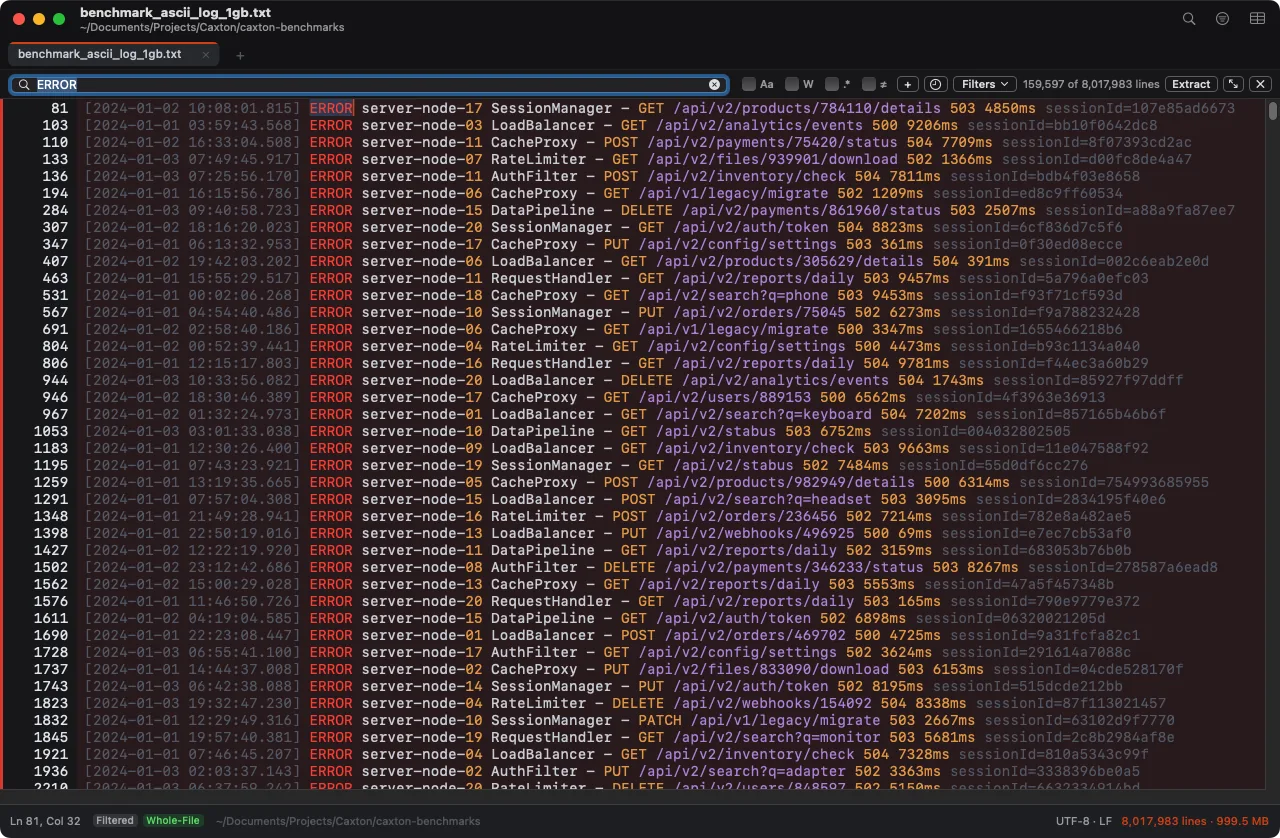
The live filter on the 1 GB benchmark log: 159,597 of 8,017,983 lines remain, original line numbers kept. On a JSONL export, each of those lines is one record.
One line, two gigabytes, opens anyway.
Download Caxton for Free7 days free, no credit card · 7 MB · macOS 13.0+ · notarized
Which approach fits which job?
| Approach | Good for | Breaks when |
|---|---|---|
head / less | Free first look at the shape and a full read-only page-through | The file is one line and the question needs structure, not a window onto bytes |
jq | Precise structural queries and field extraction, free | Ordinary filters load the whole input, per its manual; near-RAM files need its streaming mode |
| DuckDB | SQL over JSON and JSONL without opening the file | You need to see or change the raw text, not query it |
| Caxton | Opening, searching, filtering, and editing the raw text, one-line files included | You want a collapsible tree inspector; this is a text editor |
Frequently asked questions
How do I open a JSON file that is too big for my editor?
Ask what you actually need first. For answers, jq and DuckDB query the file from Terminal, free, without an editor at all. For the raw text, use a tool that does not load the file whole: Caxton memory-maps it, so a multi-gigabyte export opens immediately and a find in a 500 MB single-line file returns in 0.5 s on the published benchmark.
Why is my JSON file all on one line?
Because whitespace in JSON is optional and machines skip it: exports and API responses ship minified to save space. That is fine for parsers and rough on editors that assume short lines. Caxton renders long lines in segments, so a one-line file scrolls and searches like any other.
Should I pretty-print a huge JSON file?
Usually not. Pretty-printing rewrites the entire file and multiplies its size with indentation before you see anything, and the tool doing it must parse the whole document first. Searching the minified text directly answers most questions without creating a second, larger copy of the file.
What is the difference between JSON and JSONL for large files?
A .json file is one document, often one physical line. JSONL (also called NDJSON) is one complete JSON object per line, which makes it line-oriented: grep works per record, and line-based editors work at full strength. In Caxton each record is a line, so filter narrows a JSONL export to matching records and the result is editable in place.
Sources
- jq manual
- DuckDB documentation
- Greenwood Software: less home page and manual
- Caxton benchmark methodology and results
The export is still sitting there unopened. Download Caxton for Free and read it as the text it is: 7 days free, no card.