Download Caxton for Free · 7-day free trial of Caxton Pro, no card · 7 MB · macOS 13.0+
What counts as a duplicate?
Three different questions hide behind the word, and each tool answers a different one.
- Whole-line duplicates. Two rows whose bytes are identical. An export that ran twice, a merge that appended a file to itself. Byte tools find these; a trailing space or a quoted field that the other copy left bare makes two different rows out of one record.
- Duplicates by a key. Two rows that share an email, an order number or a customer id while the rest of the row differs. Here the question is not only which rows match but which one to keep: the first, the last, the one with the latest date.
- Near duplicates.
Appleandapple,12and12. These need a rule about case and whitespace before any tool can count them, and no tool below agrees with another by default.
The header row is a fourth concern. Any whole-file tool treats it as data unless you take it out first, and a sort puts it wherever it collates.
Free routes first
sort -u ships with macOS. Its manual page documents the option as "Unique keys. Suppress all lines that have a key that is equal to an already processed one," and notes that it "implies a stable sort." With no key given, the key is the whole line, so this removes exact whole-line duplicates and sorts the result. Keep the header out of the sort:
(head -n 1 data.csv; tail -n +2 data.csv | sort -u) > unique.csvThe order of the rows changes, the comparison is byte for byte, and -k keys count fields by a separator with no idea of quoting, so a quoted comma inside a field shifts the key.
awk keeps the first row for each value of one column, in the file's own order. The POSIX specification states that array "subscripts, or element identifiers, are strings, providing a type of associative array capability," which is all this idiom needs: the column value becomes a subscript, and a row prints only the first time its subscript appears.
awk -F, 'NR == 1 || !seen[$3]++' data.csv > unique.csvThat keeps the header and the first row for each distinct third field. Keeping the last row instead means a second pass, or reversing the file first. The same quoting limit applies: -F, splits on every comma, quoted or not.
DuckDB reads the CSV with its quoting rules intact. Its documentation describes SELECT DISTINCT as returning "only the unique rows in the result," and DISTINCT ON as returning "only one row per unique value in the set of expressions as defined in the ON clause." Which row that is depends on an ORDER BY: "If an ORDER BY clause is present, the row that is returned is the first row that is encountered as per the ORDER BY criteria. If an ORDER BY clause is not present, the first row that is encountered is not defined and can be any row."
COPY (SELECT DISTINCT * FROM read_csv('data.csv')) TO 'unique.csv';

COPY (
  SELECT DISTINCT ON (email) *
  FROM read_csv('data.csv')
  ORDER BY email, joined DESC
) TO 'latest-per-email.csv';
The second query keeps, for each email, the row with the latest joined value. The documentation also warns that "Queries starting with SELECT DISTINCT run deduplication, which is an expensive operation," which on a large file means time, not failure.
Where do the free tools stop?
Each of them writes a new file, and each decides in silence. None of them shows the groups before the rows are gone, none tells you that one email appears forty times while every other appears twice, and none lets you look at the forty before choosing. When the key column is quoted, the two line tools split it wrong. When the right row to keep is "the one with the largest amount," sort and awk have no way to say so, and the result is a copy you then have to compare against the original by hand.
How do I remove duplicates in the file itself?
Caxton opens the CSV as a typed grid over the file on disk, so the scan and the removal happen on the file you will save, with a report first and one undo after. The manual's Sort & Duplicates page has every option.
1. Open the file
Drag it onto Caxton or use File ▸ Open. A .csv opens in the grid, at any size. Opening and reading are Caxton Free.
2. Choose the key and the rule
CSV ▸ Delete Duplicate Rows… opens a sheet with three decisions. Match on all columns finds whole-row duplicates; Match on selected columns lists every column with a checkbox, so a key can be one column or several. Keep decides which row of each group stays: the first occurrence, the last, none at all, the earliest or latest date in a column, or the largest or smallest number in a column, with the column chosen in By column. First row is a header (exclude it) keeps the header out of every group and starts on when the grid has a header row.
Two rows are duplicates when their key fields decode to the same text, so a quoted "apple" and a bare apple match, which is the comparison the line tools cannot make.
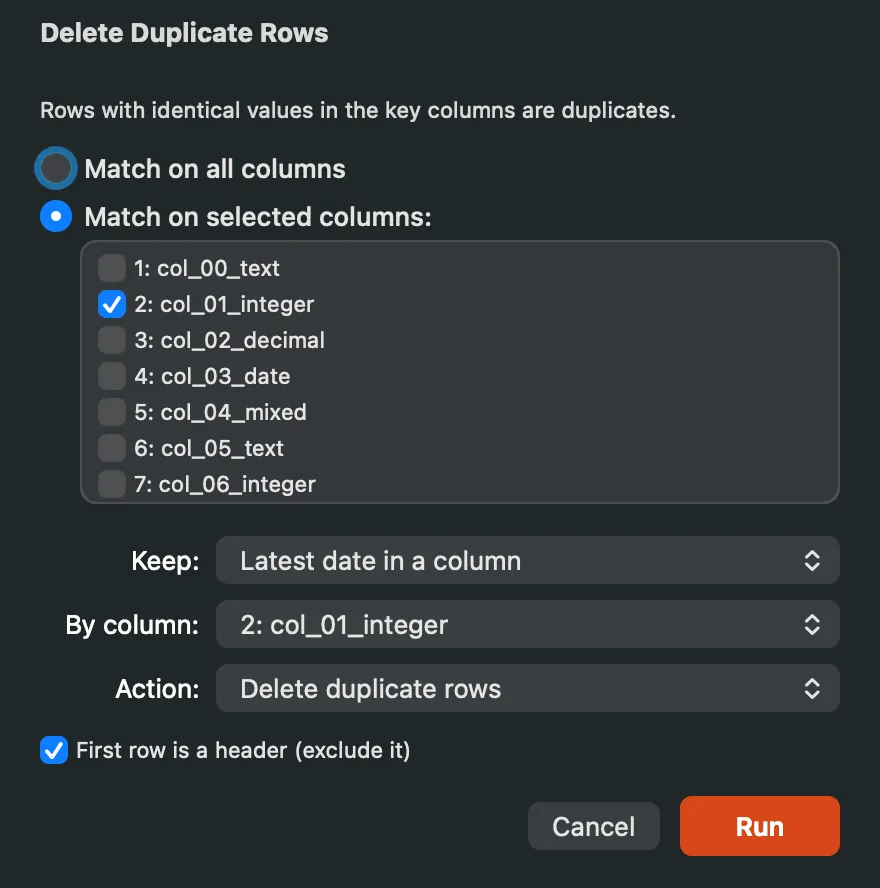
The sheet: the key columns, the keep rule, the action, and the header row left out.
3. Find the duplicates without deleting them
The Action popup has three choices, and two of them remove nothing. Bookmark duplicate rows marks the rows the rule would remove, so you can scroll the gutter and read them before deciding; the manual states the cap on how many it bookmarks. Export duplicate groups writes a new document with one line per row: its group number, the group's size, whether the rule keeps it, its row number in the file and its whole key, so a record of what was duplicated exists before anything changes. Both work on a read-only document, and in Caxton {product.version} both run on Caxton Free.
4. Read the report, then remove
With Delete duplicate rows as the action, pressing Run scans first and reports before it writes: how many groups, how many rows beyond the first of each group, how many the rule removes, the largest group with its key, and the size distribution (pairs, triples, 4 to 9, 10 or more). The removal is one undo step, and the same report is kept in the Operations panel. Past the in-place size limit, the removal streams the kept rows to a new document with the same report before the write, and the original is untouched. Deleting is Caxton Pro: on Caxton Free the sheet opens and the scan runs, and the removal itself is refused.
5. Save
⌘S writes the same file back as plain CSV, no export step. Saving is Caxton Pro.
Open the file with the duplicates. Bookmark them first, then decide.
Download Caxton for Free7-day free trial of Caxton Pro, every feature, no card. After it, Caxton Free keeps opening, searching and filtering at any size.
Which approach fits which job?
| Approach | Good for | Breaks when |
|---|---|---|
sort -u | Exact whole-line duplicates, one command, free | The order matters, a key is one quoted column, or you need to see what went |
awk | The first row per key column, in the file's order, free | The key is quoted, or the row to keep is the last or the latest |
DuckDB DISTINCT ON | One row per key chosen by an ORDER BY, with CSV quoting handled | You want the groups in front of you before the copy is written |
| Caxton | The report first, bookmarking the duplicates to read them, keep first, last, none, latest date or largest number, one undo, the same file saved | The step is a recurring pipeline job; script that one |
If the rows are not duplicates but the file will not import at all, that is a different repair. If the file is too large to open anywhere else, start with opening it. And if a spreadsheet changed the values before you got here, see editing a CSV without auto-formatting.
Frequently asked questions
How do I remove duplicates by one column only?
With awk, awk -F, 'NR == 1 || !seen[$3]++' keeps the header and the first row for each distinct third column, in the file's own order, as long as the column holds no quoted commas. With DuckDB, SELECT DISTINCT ON (email) with an ORDER BY picks one row per email by the order you give. In Caxton, CSV ▸ Delete Duplicate Rows… with Match on selected columns and one column checked does the same on the file itself, with the groups reported before any row is removed.
How do I keep the last occurrence instead of the first?
sort -u and the awk idiom keep the first copy they meet. DuckDB keeps whichever row comes first under the ORDER BY you write, so ORDER BY email, joined DESC keeps the latest joined date per email. Caxton's Keep popup offers first occurrence, last occurrence, none, the earliest or latest date in a column, or the largest or smallest number in a column.
Can I find the duplicates without deleting them?
The command-line tools write a copy with the duplicates gone and report nothing. In Caxton the Action popup has Bookmark duplicate rows, which marks the rows the rule would remove so you can read them in the gutter and the Bookmarks panel, and Export duplicate groups, which writes a new document listing every duplicated row with its group number, the group's size and whether the rule keeps it. Both run before anything is removed, and both work on Caxton Free.
How large a CSV can this handle?
sort and awk stream through a file of any size and are limited by disk. DuckDB reads the file into its own tables. Caxton memory-maps the file and scans the grid in place; the duplicate scan on the 10 million-row benchmark CSV is measured on the benchmarks page, and past the in-place size limit the removal streams the kept rows to a new document and leaves the original untouched.
Sources
- sort(1), the manual page shipped with macOS (
man sort): the-uoption - The Open Group Base Specifications: awk, on arrays and comparisons
- DuckDB documentation: SELECT, the DISTINCT and DISTINCT ON clauses
- Caxton manual: Sort & Duplicates and CSV Workbench
- Caxton benchmarks, the measured duplicate scan and sort