Your files.
One powerful editor.
Open CSVs as tables, edit text, clean up exports, and explore logs without switching apps. Work directly with your files, with nothing imported or uploaded. From everyday files to multi-gigabyte ones.
Text editing · Spreadsheet-style tables · Powerful data tools
Free to open, search, and filter. Try every Pro feature for 7 days, no credit card required. macOS 13.0 or later.


Open. Explore. Change. Save.
Open your file, explore the contents, make changes, and save. Even when you're working with millions of rows.
Below is a guided walk through Caxton 2.2.0, drawn in the page, on customers.csv: a fictional customer export with 412 rows and seven columns. One button takes you through it.
- OpenThe file opens as a table, straight from disk. Text is one switch away.
- ExploreSort by a header, filter to the rows you need. A filter is a view, not an edit.
- ChangeTransform a column, remove duplicates. Every change is counted first and is one undo.
- SaveSave writes your changes back to the same file. Nothing else is touched.
customers.csv opens as a table, straight from the file. No import, no workbook, nothing uploaded.
A guided walk through the app's own commands, drawn in the page. Caxton does the same on the file itself, at any size.
The same workflow at fifty million rows.
The steps above, taken in one sitting on benchmark_csv_50m_rows.csv: 50,003,363 rows, 7.7 GB. The grid is on screen 1.6 s after Open and the full record index finishes in 21.1 s.
Filter, then transform. A row filter across all 50 million rows in 40.0 s, then Upper Case on the 24,967 visible cells of one column: 24,943 changed in under 2 s, one undo.
Report before removing. Delete Duplicate Rows… on a three-column key reports 2,867 groups, 2,878 rows, in 73.9 s before anything is written. At this size the removal streams to a new document.
Validate every row. Eight structural rules and an integer rule over the whole file: 1,494 problems in 255.6 s, each one a click away in the Problems panel.
Measured in one take on October 7, 2026, on a MacBook Pro, Apple M1 Max with 64 GB on macOS 27.0, with a warm page cache.
Your CSV doesn't have to be huge.
Your files stay your files: open them directly on your Mac, with no cloud uploads, no proprietary formats, and no import step.
 Caxton
customers.csv
Caxton
customers.csv
| Where | zip | account_id | joined |
|---|---|---|---|
| In the file | 02134 | 9007199254740993 | 2026-01-12 |
| In Caxton | 02134 | 9007199254740993 | 2026-01-12 |
| After automatic type detection | 2134 | 9.0072E+15 | 1/12/2026 |
In the file
- zip
- 02134
- account_id
- 9007199254740993
- joined
- 2026-01-12
In Caxton
- zip
- 02134
- account_id
- 9007199254740993
- joined
- 2026-01-12
After automatic type detection
- zip
- 2134
- account_id
- 9.0072E+15
- joined
- 1/12/2026
- Open it where it is. Caxton reads the file in place, from any folder on your Mac.
- Keep its format. A CSV stays a CSV and a log stays a log. There is no workbook or project file to manage.
- What you typed is what you get. Leading zeros, long IDs and date-shaped text stay exactly as they sit in the file. Only the cells you edit are rewritten, and they are quoted only when they need it.
- Nothing leaves the Mac. No upload, no cloud processing, no telemetry.
- Save to the same file. Caxton updates the file in place with a recovery journal when it can, and writes a complete new copy otherwise.
- Big jobs leave the original alone. Past 256 MB, sort and duplicate removal stream to a new document.
One workspace. Different kinds of work.
Caxton is a text editor for Mac and a CSV editor for Mac in one window, and a log file editor when the file is a log. Each kind of file opens the way it reads best.
| id | name | city | plan | status | joined | ||
|---|---|---|---|---|---|---|---|
| C-1366 | Wyatt Murphy | wyatt.murphy@example.com | Minneapolis | Pro Monthly | Trial | 2025-05-20 | |
| C-1218 | Logan Garcia | logan.garcia@example.com | San Diego | Pro Monthly | Paused | 2026-06-19 | |
| C-1013 | Natalie Okafor | natalie.okafor@example.com | PORTLAND | Free | Active | 2026-07-24 | |
| C-1270 | Lucas Chen | lucas.chen@example.com | Phoenix | Pro Monthly | Trial | 2025-12-06 | |
| C-1241 | Isabella Dubois | isabella.dubois@example.com | Denver | Free | Trial | 2026-02-20 | |
| C-1042 | Emma Osei | emma.osei@example.com | Phoenix | Pro Annual | Active | 2025-07-08 | |
| C-1185 | Mason Fischer | mason.fischer@example.com | Seattle | Pro Lifetime | Active | 2025-06-19 | |
| C-1153 | Isaac Alvarez | isaac.alvarez@example.com | PHOENIX | Pro Annual | Paused | 2025-07-26 | |
| C-1331 | Henry Novak | henry.novak@example.com | Denver | Free | Active | 2025-09-04 | |
| C-1124 | Luke Marino | luke.marino@example.com | San Diego | Pro Monthly | Trial | 2025-06-09 | |
| C-1387 | Gabriel Patel | gabriel.patel@example.com | Atlanta | Free | Paused | 2026-04-11 | |
| C-1326 | Evelyn Reyes | evelyn.reyes@example.com | Boston | Free | Active | 2026-02-03 | |
| C-1131 | Ava Reyes | ava.reyes@example.com | Austin | Pro Annual | Paused | 2025-07-04 | |
| C-1085 | Samuel Reyes | samuel.reyes@example.com | Nashville | Free | Active | 2025-03-19 | |
| C-1118 | Sebastian Moreau | sebastian.moreau@example.com | San Diego | Free | Active | 2025-06-09 | |
| C-1204 | Benjamin Lindqvist | benjamin.lindqvist@example.com | Raleigh | Pro Monthly | Active | 2025-03-01 | |
| C-1091 | Scarlett Okafor | scarlett.okafor@example.com | BOSTON | Free | Trial | 2026-04-01 | |
| C-1151 | Henry Fischer | henry.fischer@example.com | Phoenix | Free | Active | 2025-03-01 |
| sku | product | category | price | stock | supplier | updated | |
|---|---|---|---|---|---|---|---|
| SKU-20001 | Monitor Stand Oak | Desk | 72.28 | 24 | Hollis & Co | 2026-10-02 | |
| SKU-20002 | Sketchbook 120 g | Notebooks | 105.74 | 259 | Marlow Supply | 2026-01-20 | |
| SKU-20003 | Pocket Notebook | Notebooks | 76.43 | 123 | Hollis & Co | 2026-08-06 | |
| SKU-20004 | Dot Grid Notebook | Notebooks | 170.65 | 322 | Hollis & Co | 2026-07-23 | |
| SKU-20005 | Ruled Notebook A5 | Notebooks | 10.29 | 68 | Kestrel Paper | 2026-08-03 | |
| SKU-20006 | Gel Pen 0.5 | Pens | 103.62 | 286 | Marlow Supply | 2026-02-22 | |
| SKU-20007 | Magazine Holder | Storage | 68.29 | 280 | Hollis & Co | 2026-01-31 | |
| SKU-20008 | Magazine Holder | Storage | 90.36 | 272 | Oriel Goods | 2026-06-10 | |
| SKU-20009 | Envelopes C5 | Paper | 66.36 | 127 | Marlow Supply | 2026-05-05 | |
| SKU-20010 | Sketchbook 120 g | Notebooks | 95.48 | 175 | Oriel Goods | 2026-05-28 | |
| SKU-20011 | File Box | Storage | 23.02 | 214 | Marlow Supply | 2026-06-25 | |
| SKU-20012 | Fineliner 0.3 | Pens | 77.06 | 342 | Hollis & Co | 2026-06-10 | |
| SKU-20013 | Cable Tray | Desk | 107.80 | 296 | Oriel Goods | 2026-02-05 | |
| SKU-20014 | Sketchbook 120 g | Notebooks | 86.39 | 340 | Hollis & Co | 2026-02-01 | |
| SKU-20015 | Light Strip | Lighting | 117.19 | 348 | Oriel Goods | 2026-05-26 | |
| SKU-20016 | Reading Lamp | Lighting | 159.89 | 177 | Hollis & Co | 2026-08-25 | |
| SKU-20017 | Monitor Stand Oak | Desk | 110.74 | 252 | Hollis & Co | 2026-04-22 | |
| SKU-20018 | Monitor Stand Oak | Desk | 133.43 | 203 | Oriel Goods | 2026-09-12 |
- notes.txt stays plain text, with find, multiple cursors and bookmarks.
- customers.csv opens in the grid, with typed columns and a frozen header.
- products.tsv opens in the grid too: 301 rows by 7 columns, saved back as tabs.
- settings.json opens as highlighted, foldable text. As a JSON editor, Caxton adds Format JSON to pretty-print it.
- app.log opens in Log Mode: severity tint, a severity filter and Go to Time.
Exports, SQL dumps and other large text files open as text, with the same find, filter and bookmarks. See opening a SQL dump.
Structured data tools, and the editor around them.
- Find and Replace with regular expressions, exact counts and Replace All as one undo step.
- Multiple cursors and rectangular selection for edits across many lines.
- Bookmarks on any line, with notes, listed in the sidebar.
- Filter Rows on the whole line, any column or one column, combined with and/or.
- Sort by clicking a header, or Sort Rows with a second column to break ties.
- 48 transforms in Transform Cells: case, whitespace, dates, numbers, regular expressions.
- Validation with eight structural rules and a schema for each column.
- Delete Duplicate Rows with a report before anything changes.
- Column Profile in the sidebar, for a quick read of what a column holds.
- The Inspector for encoding, line endings, delimiter and a cell's raw value.
- One search field for files, commands after
>and line numbers after:. - The sidebar with File Browser, Bookmarks, Search Results, Problems, Operations and Column Profile.
- Keyboard everything, from ⇧⌘C to ⌃⌘S, listed in Shortcuts.
420 lines or eighty million.
The same Text view, the same Find and Filter with exact counts, the same Log Mode, on a 10 GB log with 80,610,954 lines. Size changes how long a full pass takes, never where you work.
Open, then index. The file is on screen the moment it opens. The full line index of 80,610,954 lines finishes in 3.7 s in the background, and the status bar says when.
Find, counted exactly. ERROR across the whole file: 1,613,344 matches in 1.0 s. A regex alternation finds 5,643,688 in 1.8 s.
Filter, replace, save. Filter to the 1,613,344 matching lines in 1.0 s, Replace All at 1,613,344 sites in 1.7 s, Save after scattered edits in 11.3 s.
Measured in Caxton on a MacBook Pro, Apple M1 Max with 64 GB on macOS 27.0; the Replace All and Save rows on macOS 15.7. The same file on an 8 GB MacBook Air returns every count identical.
Built for the files other editors can't handle.
Caxton maps a file instead of loading it into memory, which makes it a large-file text editor with no special mode: the window that opens a 20 KB export opens a 50 GB log. Size changes how long a full pass takes. It never decides whether you can work.
- 3.7sto index a 10 GB log
- 1,613,344matches found in 1.0 s
- 50millionrows in one CSV, open in the grid
- 2,246,521duplicate groups found in 61 seconds
| col_00_text | col_01_integer | col_02_decimal | col_03_date | col_04_mixed | col_05_text | col_06_integer | col_07_decimal | col_08_date | col_09_mixed | col_10_text | col_11_integer | col_12_decimal | col_13_date | col_14_mixed |
|---|---|---|---|---|---|---|---|---|---|---|---|---|---|---|
| off if old | 498894 | 9479.8169 | 2020-05-01 | 89 | think hand name and | -949350 | -8082.3741 | 2021-12-28 | know | from study other ask | -296508 | -1127.8135 | 2023-05-16 | could them |
| much before long another | 38093 | 8386.3645 | 2023-01-08 | 23 | name ask oil get | -225094 | -7314.1750 | 2021-10-03 | you | these where about people | 355840 | 8920.5134 | 2022-09-27 | her |
| water go man other not such | 362010 | -7220.1238 | 2021-11-11 | 62 | of than here | -702524 | 6907.3567 | 2020-12-29 | 32 | because | -986773 | 1076.5641 | 2021-03-04 | 44 |
| on in who two | -642781 | -9258.1988 | 2021-10-19 | call same | are been around see were | 530083 | -2900.2881 | 2020-08-15 | 44 | was as | -776613 | -1022.0496 | 2021-04-12 | 8 |
| tell when thing | -237402 | 9899.4684 | 2023-04-07 | went you | water at where other | 920944 | 1222.1678 | 2020-07-17 | water will | we know read | -224770 | -6696.7648 | 2022-11-05 | 82 |
| these little with water large | -791138 | 1896.2207 | 2024-03-11 | 9 | over so | -641517 | 2318.7994 | 2020-09-22 | 58 | you right | -823271 | 9614.7456 | 2022-09-01 | 93 |
| need know | 630524 | 5239.0714 | 2020-08-07 | any live | give point time well | 5318 | -5171.3802 | 2020-04-11 | back | from may have | -62671 | -5932.7026 | 2023-11-28 | said went |
| "name" | 824631 | 6374.6691 | 2023-02-06 | the but | an | -893356 | 1432.5486 | 2021-09-20 | long went | then the | 627068 | 7565.8014 | 2021-09-13 | 50 |
| we his home made play look | -239808 | 348.4205 | 2020-06-26 | because same | number | -192387 | 5164.0433 | 2022-01-27 | 75 | then way way only sentence | -448512 | -9686.2206 | 2023-11-27 | 63 |
| had must when | 303833 | 5105.3564 | 2021-08-13 | 74 | she with | -172966 | 3826.6044 | 2020-02-03 | two | name that well take many | -588215 | 5789.6037 | 2023-06-30 | 14 |
| mean | 20284 | -3961.3915 | 2023-11-24 | 73 | know who boy he more | 412170 | 7355.0886 | 2021-08-14 | 79 | "up to point this each" | -444112 | 3664.8704 | 2021-07-25 | 79 |
| is three day other help down | 656940 | 2786.3398 | 2020-01-27 | any work | only still why small part still | -788297 | 1682.2064 | 2020-05-08 | 33 | place one answer its | -904470 | 8323.3991 | 2020-11-29 | 27 |
| call from use are | 572348 | 2758.3376 | 2022-09-01 | on | even | -490086 | 2869.8404 | 2020-03-22 | world | is big such just | 520532 | -4060.6630 | 2022-11-29 | move |
| did get | 425288 | -4358.9986 | 2023-12-10 | for year | think way with as | -964484 | -1080.7339 | 2021-03-04 | 12 | point made do | -426812 | -5762.8588 | 2021-04-11 | 23 |
| old page its | 233575 | 2640.5324 | 2022-04-14 | 13 | sound sentence how had | 788215 | -2384.2863 | 2023-08-01 | 77 | been as boy still down or | -664109 | 9141.8575 | 2023-07-30 | is did |
| write an | -23863 | -2777.3657 | 2020-05-04 | men | "need than line well long" | 972008 | -2801.0239 | 2021-06-25 | 4 | around | 565739 | -2532.7412 | 2023-01-13 | 53 |
What the numbers rest on.
The file stays on disk and only what is on screen is read. Edits go into a piece table with full undo, a line index builds in the background while you work, and jobs too large for memory stream to disk.
- Find counts all 1,613,344 matches in a 10 GB log in 1.0 s.
- Memory stays under 160 MB through every measured operation on a 50 GB log. That memory figure is the 50 GB text benchmark on macOS 15.7; CSV grids and other macOS versions use more.
- Sort 10 million CSV rows in 25 s, streamed to a new document.
- The same 10 GB log on an 8 GB MacBook Air: every count identical, a full search from disk in 15.7 s.
| operation | file | size | result | |
|---|---|---|---|---|
| Full background index | 10 GB log | 80,610,954 lines | 3.7 s | |
| Find, 1,613,344 matches, counted exactly | 10 GB log | 80,610,954 lines | 1.0 s | |
| Regex alternation, 5,643,688 matches | 10 GB log | 80,610,954 lines | 1.8 s | |
| Replace All, 1,613,344 sites, one undo | 10 GB log | 80,610,954 lines | 1.7 s | |
| Keystroke apply latency | 10 GB log | 80,610,954 lines | about 1 ms | |
| Full background index | 50 GB log | 403,046,288 lines | 22 s | |
| Find, 8,059,509 matches, counted exactly | 50 GB log | 403,046,288 lines | 46 s | |
| Memory footprint, every 50 GB row | 50 GB log | 403,046,288 lines | under 160 MB | |
| Parse to a typed grid | 1 GB CSV | 2,022,947 rows by 50 columns | 2.3 s | |
| Sort by a numeric column, streamed to a new document | 1 GB CSV | 2,022,947 rows by 50 columns | 4.4 s | |
| Sort, streamed to a new document | 5.1 GB CSV | 10,000,000 rows by 50 columns | 25 s |
- Full background index
- 3.7 s
- Find, 1,613,344 matches, counted exactly
- 1.0 s
- Regex alternation, 5,643,688 matches
- 1.8 s
- Replace All, 1,613,344 sites, one undo
- 1.7 s
- Keystroke apply latency
- about 1 ms
- Full background index
- 22 s
- Find, 8,059,509 matches, counted exactly
- 46 s
- Memory footprint, every 50 GB row
- under 160 MB
- Parse to a typed grid
- 2.3 s
- Sort by a numeric column, streamed to a new document
- 4.4 s
- Sort, streamed to a new document
- 25 s
Measured on the same M1 Max across macOS 15.7 and 27.0. Indexing ran from disk, the small-file searches used a warm cache, and the 50 GB search ran from disk. The benchmark table has each row's date, build, and conditions. On an 8 GB MacBook Air with M1 the same 10 GB log opens immediately, every count comes out identical, and a full search runs from disk in 15.7 s.
Will it handle my file?
Two inputs. The answers are arithmetic on the measurements above, not promises.
- Opens
- immediatelyAt any size, because the file is mapped, not loaded.
- Index
- about 4 to 20 secondsIn the background. The file is usable the whole time.
- Searches
- about 1 second per full passFrom the page cache: 10 GB fits comfortably in 32 GB of memory.
- Saving
- plan for about 20 GB freeA full rewrite needs room for a complete new copy, and indexes and temporary results can need more. Edits that keep the file the same length update it in place instead. See Sessions and Recovery.
Estimates from the published measurements. Index: 10 GB in 3.7 s and 50 GB in 22 s on the M1 Max, 20.9 s for 10 GB on the 8 GB Air. Search: 1.0 s per 10 GB from the page cache; from disk, about 650 MB/s on the Air's SSD to about 1 GB/s on the Pro's. A file counts as cached here when it is at most half of memory: 10 GB on the 64 GB machine ran from cache, while 50 GB on it and 10 GB on the 8 GB Air did not. Your SSD, and whatever else is in memory, move these numbers.
Those numbers run on your files too.
Download FreeMade for Mac.
Caxton is a native Mac app, written in Swift with AppKit from top to bottom. No Electron, no web view, no plugin runtime.
- Memory-mapped files. The file stays on disk; only what is on screen is read into memory.
- Under 200 MB through every measured operation on a 50 GB log.
- Private by default. No upload, no cloud processing, no telemetry. Privacy policy.
- A real Mac citizen. Tabbed windows, the Services menu, native file dialogs and the system print dialog.
- One universal download. Apple Silicon and Intel, macOS 13.0 or later, 7 MB.
- Coming from Windows? EmEditor and UltraEdit users looking for a Mac alternative can start with EmEditor for Mac and UltraEdit alternatives.
The sidebar.
File Browser, Open Documents, Bookmarks, Search Results, Problems, Operations and Column Profile, in one place beside the document. ⌃⌘S shows it.
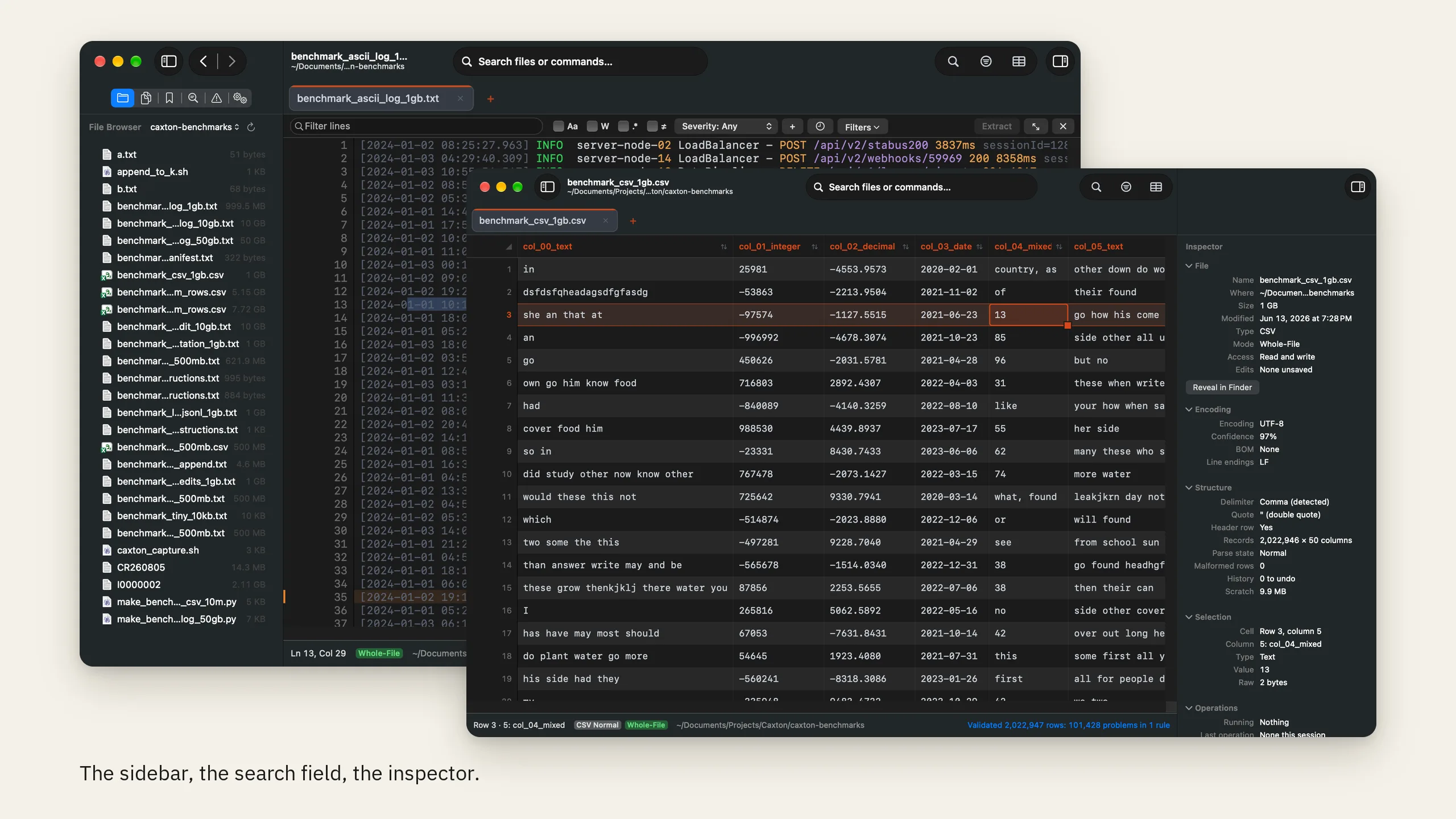
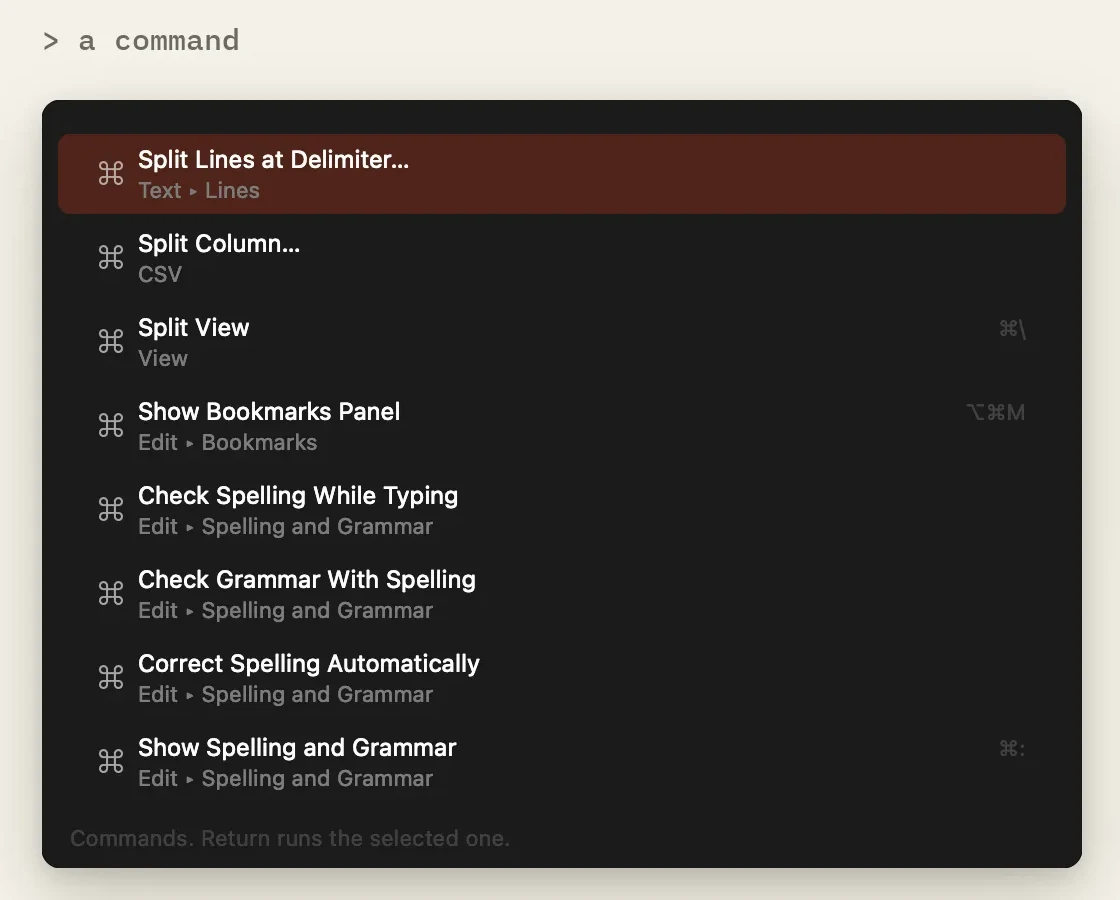
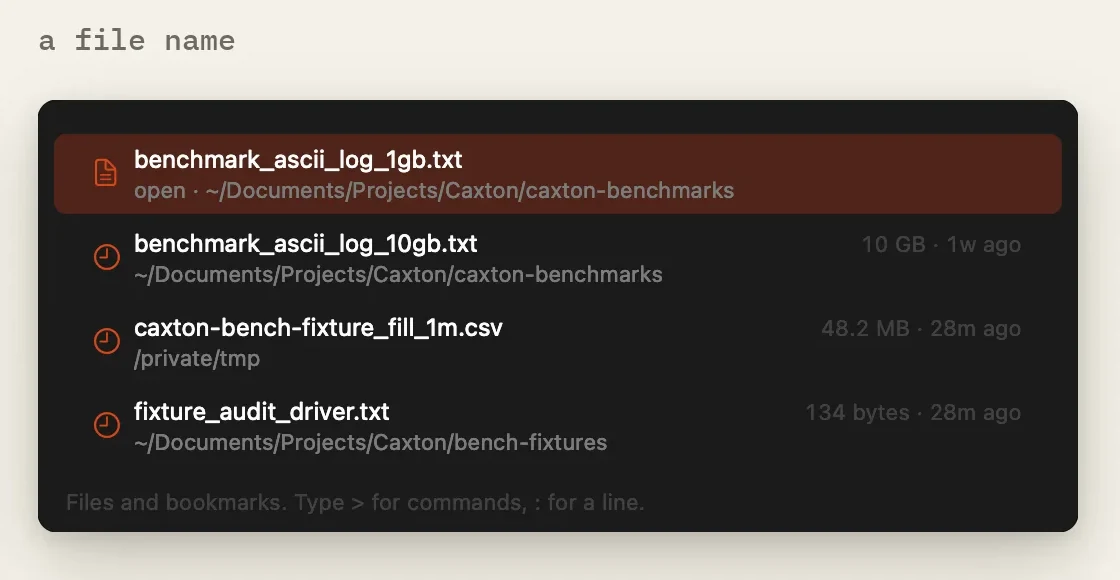
One search field.
Open a file by name, type > for a command, or : and a number to jump to a line. ⇧⌘P and ⇧⌘O open it.
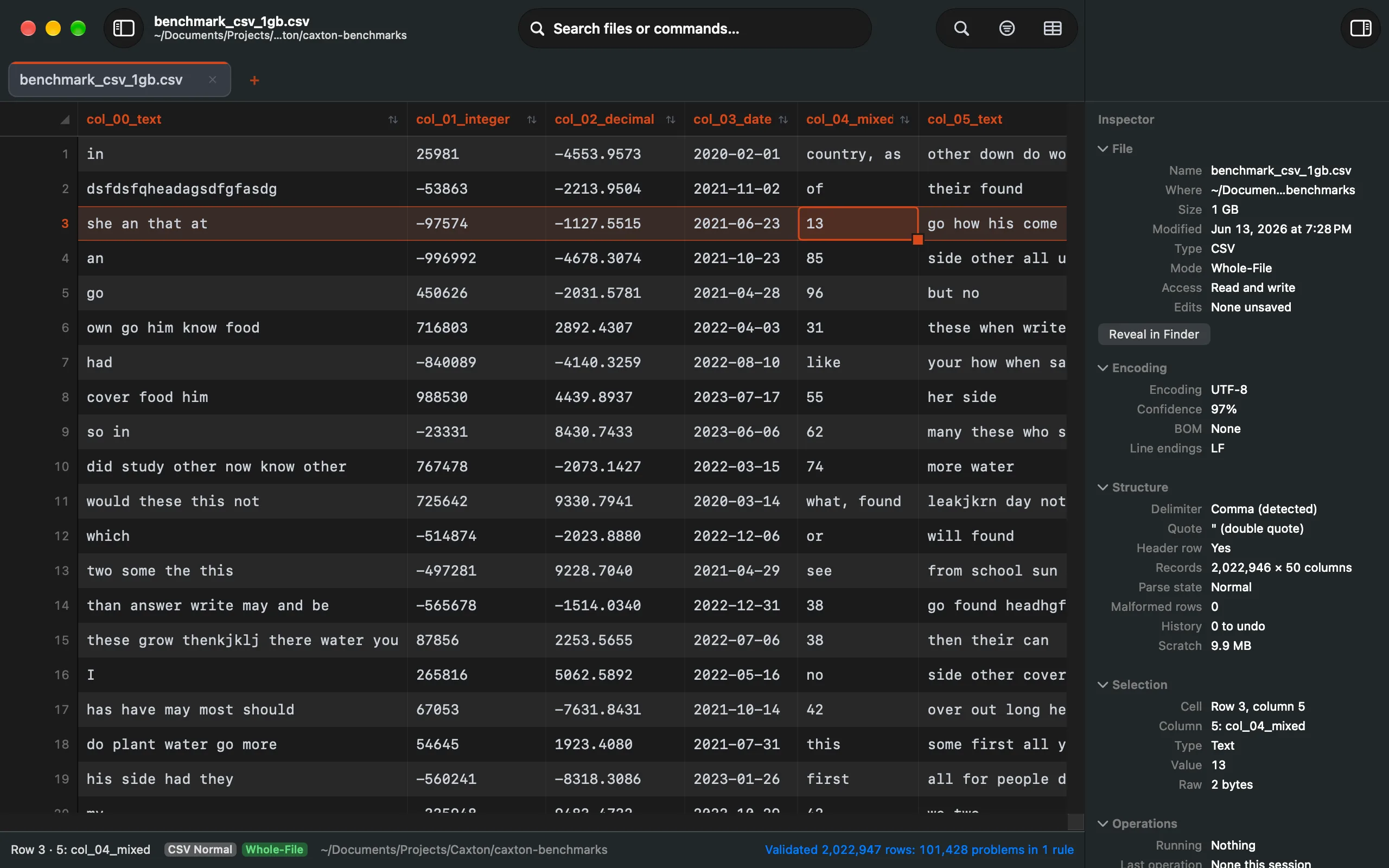
The Inspector.
Encoding, detection confidence, line endings and the detected delimiter, and for a cell its parsed value and raw bytes. ⌥⌘I shows it.
Keyboard first.
Every panel, view and common command has a shortcut: ⇧⌘C for the grid, ⌃⌘1 through ⌃⌘7 for the sidebar panels, Back and Forward between places you have been.
- Find
- ⌘F
- Find and Replace
- ⌥⌘F
- Filter Lines
- ⇧⌘L
- Go to Line
- ⌘L
- Go to Time
- ⌥⌘L
- CSV Grid View
- ⇧⌘C
- Search Files or Commands
- ⇧⌘O
- Command Palette
- ⇧⌘P
- Show Sidebar
- ⌃⌘S
- Show Inspector
- ⌥⌘I
- Select Next Occurrence
- ⌘D
- Split View
- ⌘\
The full list is in Shortcuts, and How it works explains the engine underneath.
Eight themes. Every one readable.
Dark and Light, Solarized, One Dark, Gruvbox and two High Contrast themes, each held to minimum contrast for text, syntax and line numbers. Follow the system appearance or pick one under View ▸ Theme.
| id | name | city | plan | status | joined | ||
|---|---|---|---|---|---|---|---|
| C-1366 | Wyatt Murphy | wyatt.murphy@example.com | Minneapolis | Pro Monthly | Trial | 2025-05-20 | |
| C-1218 | Logan Garcia | logan.garcia@example.com | San Diego | Pro Monthly | Paused | 2026-06-19 | |
| C-1013 | Natalie Okafor | natalie.okafor@example.com | PORTLAND | Free | Active | 2026-07-24 | |
| C-1270 | Lucas Chen | lucas.chen@example.com | Phoenix | Pro Monthly | Trial | 2025-12-06 | |
| C-1241 | Isabella Dubois | isabella.dubois@example.com | Denver | Free | Trial | 2026-02-20 | |
| C-1042 | Emma Osei | emma.osei@example.com | Phoenix | Pro Annual | Active | 2025-07-08 | |
| C-1185 | Mason Fischer | mason.fischer@example.com | Seattle | Pro Lifetime | Active | 2025-06-19 | |
| C-1153 | Isaac Alvarez | isaac.alvarez@example.com | PHOENIX | Pro Annual | Paused | 2025-07-26 | |
| C-1331 | Henry Novak | henry.novak@example.com | Denver | Free | Active | 2025-09-04 | |
| C-1124 | Luke Marino | luke.marino@example.com | San Diego | Pro Monthly | Trial | 2025-06-09 | |
| C-1387 | Gabriel Patel | gabriel.patel@example.com | Atlanta | Free | Paused | 2026-04-11 | |
| C-1326 | Evelyn Reyes | evelyn.reyes@example.com | Boston | Free | Active | 2026-02-03 | |
| C-1131 | Ava Reyes | ava.reyes@example.com | Austin | Pro Annual | Paused | 2025-07-04 | |
| C-1085 | Samuel Reyes | samuel.reyes@example.com | Nashville | Free | Active | 2025-03-19 | |
| C-1118 | Sebastian Moreau | sebastian.moreau@example.com | San Diego | Free | Active | 2025-06-09 | |
| C-1204 | Benjamin Lindqvist | benjamin.lindqvist@example.com | Raleigh | Pro Monthly | Active | 2025-03-01 | |
| C-1091 | Scarlett Okafor | scarlett.okafor@example.com | BOSTON | Free | Trial | 2026-04-01 | |
| C-1151 | Henry Fischer | henry.fischer@example.com | Phoenix | Free | Active | 2025-03-01 |
Drawn from the app's own theme values: the same log and the same CSV in every theme.

Meet the developer
I built Caxton because I needed it.
Melvin Hemingway · Founder · Principal Software Engineer
I'm Melvin Hemingway, a Principal Software Engineer and the developer behind Caxton.
When I switched from Windows to Mac, I couldn't find replacements for some of the tools I used every day, especially Notepad++ and EmEditor. I was tired of switching between a text editor, Excel, and SQL just to get my work done.
So I built Caxton.
Make it yours.
Try first: download Caxton and a 7-day free trial of Caxton Pro starts on its own, with no credit card or account required. Buy whenever you're convinced.
- Open files of any size, as text or in the grid
- Search, filter, switch views, copy out what you find
- Pay once, own it forever
- Every future update included
- The full app while the subscription runs
- Annual is two months free
- Cancel anytime
Caxton Free after the Caxton Pro trial, or after a subscription lapses
- Open files of any size, as text or in the grid
- Switch between Text and Table
- Search and filter with exact counts
- The Inspector, Column Profile and validation
- Compare two files, without copying changes across
- Save reports: duplicate groups, problem rows, frequency tables
- Copy out what you find, with no account and no time limit
Caxton Pro on three Macs per license
- Typing and every edit command, at any size
- Replace All, Batch Replace, and Replace across files
- Transform Cells, Fill, Paste Special, Sort Rows, Delete Duplicate Rows, and the repairs
- Save and Save As, back to the same file
- Extract filtered or bookmarked lines to a new document
- Every update while the license is active; Lifetime, forever
The three paid plans unlock the same Caxton Pro, every feature and priority support included. The only difference is how you pay. Caxton Free is the same app for opening, searching, filtering, comparing, and copying, and for saving reports, without editing or saving the files you opened. Buying for a team? Volume licensing with invoice billing is available: hello@caxton.app. Details on the pricing page.
Questions people ask.
Is there a free version?
Yes. After the 7-day Pro trial, Caxton Free keeps opening files, searching, filtering, comparing, and copying, and you can still save reports such as duplicate groups, problem rows, and frequency tables. Editing or saving a file you opened, and extracting its contents to a new document, need Caxton Pro.
Will it work on a base MacBook Air with 8 GB?
Yes. On an 8 GB M1 Air the same 10 GB log opens immediately, keystroke latency stays at about 1 ms, and every match count comes out identical to the 64 GB Pro. Searches that run from cache on a big machine run from disk on a small one, so a full pass over a 10 GB file takes about 15 seconds instead of 1.0. The Air numbers are on the benchmarks page.
Apple Silicon and Intel?
Both, one download, universal binary. macOS 13.0 or later.
Does my data leave my Mac?
No. Files are read in place and never uploaded; there is no cloud processing and no telemetry. License activation sends only what the privacy policy lists.
How is this different from Zed, BBEdit, or VS Code?
Caxton is text editing, CSV tables, and data cleanup in one native Mac app. Choose it when you want to work directly with a file, switch between text and columns, keep values like leading zeros exactly as they are, or open a file your current editor can't. The large-file engine is headroom even when today's file is small.
Is it a spreadsheet?
No. The grid opens delimited files as typed columns you can sort, filter, fill, dedupe, and edit, and it saves back to plain CSV. There are no formulas and no charts, on purpose.
How big is too big?
Caxton does not impose a file-size ceiling of its own. Measured to 50 GB and 403 million lines with memory under 160 MB; past that the limits are your disk (an atomic save needs about twice the file free) and time (searches past the page cache run from disk near the measured rate on the benchmarks page).
What happens if my subscription lapses?
Caxton stays installed and becomes Caxton Free: opening, searching, filtering, comparing, copying, and saving reports keep working. Editing or saving a file you opened, sorting, transforms, removing duplicates, and extracting to a new document need Caxton Pro. Nothing locks and nothing uninstalls. Lifetime licenses never lapse.
More in the documentation, the guides, the changelog and on the support page. The people behind Caxton are on the about page.
The file is already on your disk. Open it.
7 days of Caxton Pro, no credit card required. Apple Silicon and Intel.
7 MB, macOS 13.0 or later, notarized. SHA-256 361f61a8…ba499491
Install with Homebrew: brew tap hwyenigmallc/caxton then brew install --cask caxton