Download Caxton for Free · 7-day free trial of Caxton Pro, no credit card required · 7 MB · macOS 13.0+
The short answer
For a read-only look, less in Terminal opens a log of any size the instant you press Return, free. Caxton opens a multi-gigabyte log immediately as an editable document, with search that counts every match, filters that keep the line numbers, and bookmarks.
How do I view a huge log right now?
Terminal, zero installs. These four cover most on-call moments:
less -S app.log        # opens instantly; /text searches, G jumps to end, q quits
tail -n 1000 app.log   # the last thousand lines, now
tail -f app.log        # stream the file as it grows
grep -n -C 3 "ERROR" app.log > errors.txt   # matches with line numbers and 3 lines of context
less is the right first move because of what its own manual documents: it does not have to read the entire input file before starting. Inside it, F follows a growing file the way tail -f does, and &pattern shows only matching lines.
Often a slice is genuinely all you need. If the incident happened in the last hour, tail -c 200m app.log > tail.log carves the final 200 MB into a file any tool can open, and head does the same for the beginning. The grep-with-context pattern above turns a 10 GB haystack into a few thousand lines around the needles.
less already scrolls, searches, and moves between matches. Caxton adds an editable document, filters you can see, bookmarks, and incident tools in one Mac app.
Why can't my editor open a big log file?
Most editors, from TextEdit to the mainstream code editors, read the entire document into their own memory structures before rendering the first line. The cost of opening scales with what the file weighs, not with what you look at, and somewhere past a few gigabytes that means a stuck main thread, the beachball, and sometimes a machine deep in swap. Force-quitting is safe: the editor has only been reading. If the editor in question is VS Code, its large-file behavior and the ways around it are in file too large for VS Code.
The two designs that survive this size are streaming (read only the visible window, the way less does) and memory-mapping (let macOS page pieces of the file in on demand). Which mainstream editor was designed for what, with each vendor's own documentation as the record, is a survey of its own: large file text editors on a Mac.
This page is about logs. If your giant file is a CSV, the workflow is different enough to have its own guide: open a large CSV file on a Mac.
How do I search, filter, and edit the whole log?
Caxton's document model is a memory-mapped piece table: opening copies nothing and loads nothing up front. The published 10 GB benchmark log (80,610,954 lines) is scrollable and searchable immediately, while the full line index finishes in the background in 3.7 s. Memory stays under 160 MB through every measured operation on the 50 GB log, so an 8 GB MacBook is not the limiting factor. That memory figure is the 50 GB text benchmark on macOS 15.7; CSV grids and other macOS versions use more.
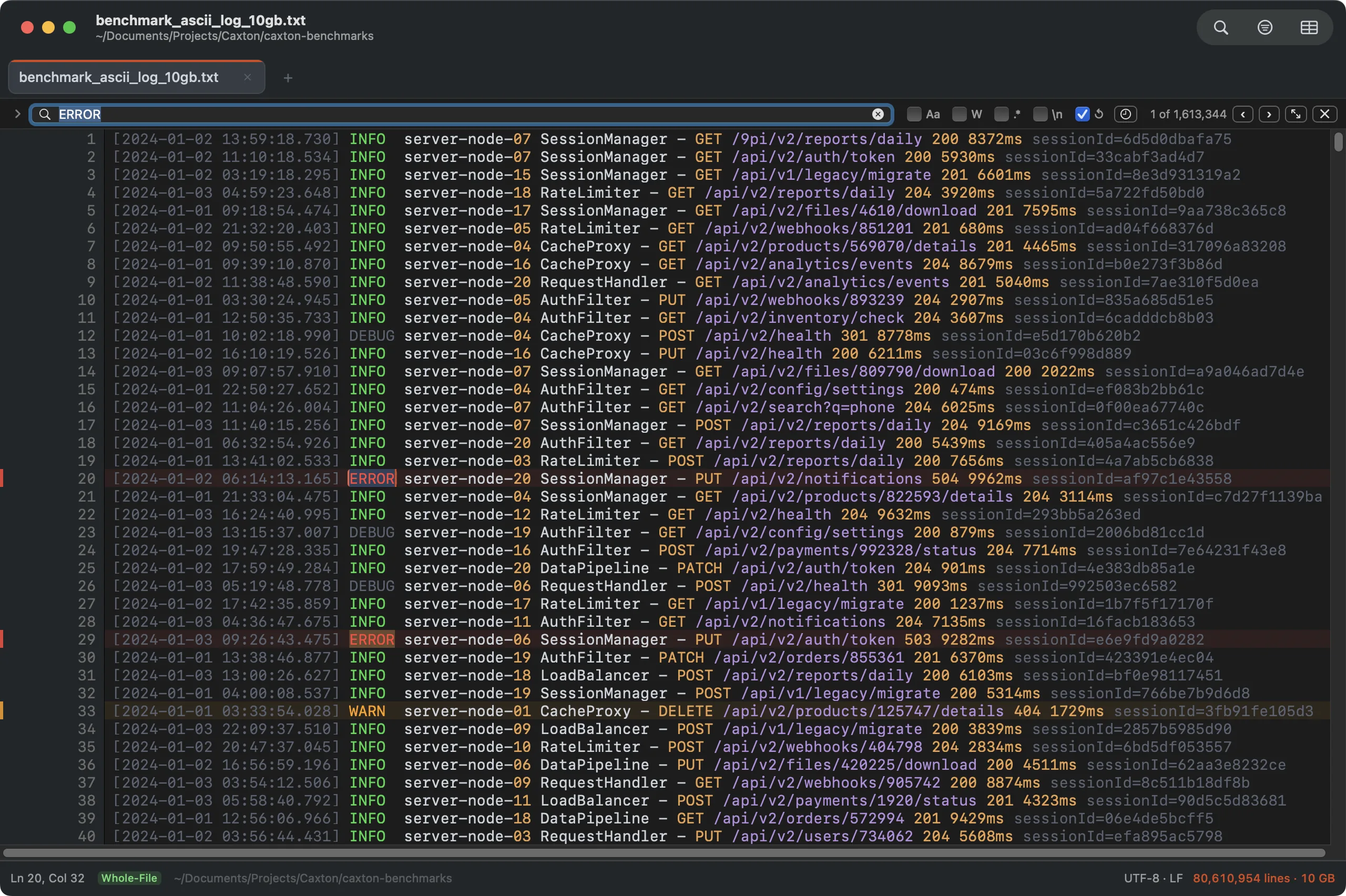
The 10 GB benchmark log with a literal search across all 80.6M lines: 1,613,344 matches in 1.0 s.
The working numbers, measured on an M1 Max with 64 GB RAM (methodology and the full table on the benchmarks page): a literal search over the 10 GB file returns 1,613,344 matches in 1.0 s, and filtering the view down to just those matching lines takes 1.0 s, with the noise gone and original line numbers preserved. A two-condition OR filter over the same file runs in 1.8 s. The filtering workflow end to end, from grep to multi-condition chains, has a guide of its own: filter a large log file on a Mac.
It is an editor, not a viewer, so the fix-it half of log work is on the table: a keystroke applies in about 1 ms at this scale, Replace All rewrites 1,613,344 sites in 1.7 s as one undo step (the whole replacement story, batch pairs and folders included: find and replace in a huge file on a Mac), and saving writes the same file back atomically in 11.3 s. For a log that is still growing, follow-tail pins the view to the end while search and filters keep working above. And when the "log" turns out to be one enormous line (JSON event streams do this), a search across a one-line 500 MB file still returns in 0.5 s.
The log is already on your disk. Open it.
Download Caxton for Free7-day free trial of Caxton Pro, no credit card required · 7 MB · macOS 13.0+ · notarized
Which approach fits which job?
| Approach | Good for | Breaks when |
|---|---|---|
less / head / tail | Instant read-only look at any size, free | You need to work across matches, or edit |
grep with -n -C | Extracting matches plus context into a small file | The next question needs the surrounding file, not the excerpt |
| Console.app | Browsing the Mac's own system log messages, per Apple's documentation | The file is an arbitrary multi-gigabyte application log, or needs editing |
| klogg | Read-only log browsing and searching, its documented design | You need to change the file (browse and search is the whole design) |
| Whaile | Read-only viewing of large log, text, and CSV files on Mac and iPad | You need to change the file; it describes itself as a viewer, not an editor |
| Caxton | Scrolling, searching, filtering, and editing the whole log | You want log aggregation across many hosts, not a file |
Two more jobs on the same log: compare it against another copy side by side, and find and replace across a folder of logs without opening them.
Frequently asked questions
Can a Mac open a 10 GB log file?
For a read-only look, less in Terminal opens a log of any size the instant you press Return, free. Caxton opens a multi-gigabyte log immediately as an editable document, with search that counts every match, filters that keep the line numbers, and bookmarks.
What's the fastest free way to view a huge log on a Mac?
less -S in Terminal. It opens the moment you hit Return at any file size, / searches, G jumps to the end, and q quits. If you only need the end of the file, tail -n 1000 prints it instantly; grep extracts matching lines with context.
Why does my editor freeze on large log files?
Most editors read the entire document into memory before showing the first line, so the cost of opening scales with the file's size rather than with what you look at. Past a few gigabytes that means a stuck main thread and the beachball. Streaming pagers and memory-mapped editors avoid the problem by design.
Can I edit a huge log, not just view it?
Pagers and log viewers are read-only by design. Caxton edits at log scale: a keystroke applies in about 1 ms on a 10 GB document, Replace All rewrites 1,613,344 sites in 1.7 s as one undo step, and an atomic save writes the same file back in 11.3 s.
The incident won't wait for a progress bar. Download Caxton for Free and have the log open before the next page-out: 7-day free trial of Caxton Pro, no credit card required.