How to repair a malformed CSV on a Mac
A CSV that will not import is usually broken in one of five ways: rows with different numbers of columns, line breaks inside cells, quotes that do not pair up, a delimiter the importer did not expect, or bytes in the wrong encoding. The free tools below tell you which one, and on which line. Repairing the file itself, in place and with every change undoable, is what Caxton is for, and that walkthrough is further down.
Download Caxton for Free · 7 days, no card · 5 MB · macOS 13.0+
What does malformed mean in practice?
CSV has a written description, RFC 4180, and three of its rules explain most failed imports. "Each line should contain the same number of fields throughout the file." "Fields containing line breaks (CRLF), double quotes, and commas should be enclosed in double-quotes." And a double quote inside a quoted field "must be escaped by preceding it with another double quote." The RFC is informational, not a standard anyone enforces, so real exports break all three.
- Ragged rows. Some rows have fewer or more fields than the header. An importer that expects a fixed width rejects the row, shifts its values into the wrong columns, or stops.
- Embedded newlines. A line break inside a quoted cell is legal CSV. A tool that reads line by line still counts it as two records: the first half comes up short and the second half is noise. If the cell was never quoted, the record really is split in two.
- Mismatched quotes. A bare quote inside a quoted cell, or an opening quote that never closes. A strict parser can swallow every following row into one cell until it meets the next quote.
- The wrong delimiter. A semicolon file read as comma-separated is one wide column. European numbers written with decimal commas add columns that are not there.
- The wrong encoding. Bytes that are not valid in the encoding the importer assumes. The row is rejected, or the names arrive garbled. That failure has its own guide.
Quoting is the one to see once. This row is from the sample orders file on this site, where every value is invented. It has two cells with commas in them, so both are quoted:
ORD-000002,2026-01-03,Hayden Lindqvist,hayden.lindqvist26@example.net,Boston,MA,02134,CX-2010,"Mechanical keyboard, 75%",1,129.00,5,122.55,shipped,"Fragile, double box"That is fifteen fields, the same as the header. Here is the same row after a tool dropped the quotes on the way out:
ORD-000002,2026-01-03,Hayden Lindqvist,hayden.lindqvist26@example.net,Boston,MA,02134,CX-2010,Mechanical keyboard, 75%,1,129.00,5,122.55,shipped,Fragile, double boxSeventeen fields. Every value after the item name now sits one column to the right, and the importer either refuses the row or files the quantity under the unit price.
How do I find what is wrong, for free?
Three free tools answer this, and each reports a line number. Start here even if you end up repairing the file somewhere else.
csvclean is part of csvkit, and its documentation describes it in one line: "Reports and fixes common errors in a CSV file." Its checks are opt-in. --length-mismatch is documented as "Report data rows that are shorter or longer than the header row," and -a enables every check. Errors go to standard error, in the form "Expected 3 columns, found 4 columns."
csvclean -a data.csv > cleaned.csv 2> errors.csvIt can also repair the simple cases on its way through. The documented options are --fill-short-rows ("Fill short rows with the missing cells."), --join-short-rows ("Merges short rows into a single row."), and --omit-error-rows. The result is a new file; the original is untouched.
Python's csv module is in the standard library, so there is nothing to install beyond Python, and on a Mac python3 comes with Apple's command line developer tools. Its documentation asks that a file be "opened with newline=''" so quoted line breaks are read correctly. It also defines line_num: "The number of lines read from the source iterator. This is not the same as the number of records returned, as records can span multiple lines." That is the number you want, the line in the file rather than the record count:
import csv, sys
with open(sys.argv[1], newline="") as f:
    reader = csv.reader(f)
    width = len(next(reader))
    for row in reader:
        if len(row) != width:
            print(reader.line_num, len(row))
DuckDB keeps the rows it refuses. Its documentation on reading faulty CSV files names the structural errors it detects, among them MISSING COLUMNS, TOO MANY COLUMNS, and UNQUOTED VALUE, and with store_rejects it records every one in a table:
FROM read_csv('data.csv', store_rejects = true);
FROM reject_errors;
The reject_errors table carries line, column_idx, error_type, csv_line, and error_message for each faulty row. ignore_errors does the opposite. In the documentation's words: "With this option set, rows containing data that would otherwise cause the CSV parser to generate an error will be ignored." Useful for a query, and a quiet way to lose rows if you forget it is on.
Where do the free tools stop?
At the repair. They locate the problem and can pad or drop rows wholesale, always into a second file. What they cannot do is show you row 48,112 next to its neighbors so you can decide what it should have been, let you fix it, and leave every other byte alone. When the file is large, each attempt is another full copy.
How do I repair the file itself?
Caxton opens the CSV as a typed grid over the file as it is on disk. Nothing is imported or converted. The grid is not a small-file feature: a 10 million row CSV of 5.1 GB parses to the grid in 4.4 s on the benchmark machine (an M1 Max, methodology on the benchmarks page). The repair commands below are edits, so they need the trial or a license; opening, searching, and filtering the file do not.
1. Open it and read what the parser says
A file that did not parse cleanly says so as it opens: "CSV parsed with 214 problematic rows," with whatever your count is, and the row gutter marks each one. Rows that are too short show their missing cells dimmed. ⇧⌘C switches between the grid and the raw text of the same document, so you can look at a marked row both ways.
2. Read it with the right delimiter
If every row is one wide column, the delimiter was guessed wrong. CSV ▸ Delimiter offers Auto-detect, Comma, Tab, Semicolon, Pipe, and Custom. It changes how the file is read, without changing a byte of it, and the choice is kept with the session. Detection already ignores decimal commas: a comma that mostly sits between digits does not count as a separator, so semicolon and tab files with European numbers open correctly. To rewrite the file with a different separator, that is Convert Delimiter, a separate command.
3. Fix the encoding before the structure
If the names are garbled, use File ▸ Reopen with Encoding first. The structural repairs rewrite cells, and you want them rewriting the right characters. The encoding guide covers how to tell which encoding it is.
4. Normalize Column Count
CSV ▸ Normalize Column Count… pads short rows with empty cells so every row has the expected width. A checkbox, off by default, also trims rows with extra columns by deleting their surplus cells; look at those rows first, because the surplus is often a real value pushed right by a missing quote. The dialog states the rest: rows with quoting problems are left byte for byte untouched, and quoting elsewhere normalizes to RFC 4180. One undo step.
5. Remove Embedded Newlines
For an importer that reads line by line, CSV ▸ Remove Embedded Newlines… replaces the line breaks inside quoted cells with a space, across the whole document. It asks before it runs, and undo restores the exact previous text.
6. Quote All Cells, or Remove Unnecessary Quotes
Two commands for two kinds of picky importer. Quote All Cells forces RFC 4180 quotes onto every cell. Remove Unnecessary Quotes strips the decorative ones and keeps only the quotes the format requires, which is the fix for a loader that treats a quoted number as text. Neither touches a row whose quoting is actually broken. Those rows stay marked in the gutter, and the honest repair for an unpaired quote is to read the row in the text view and type the missing character.
7. When the "CSV" is really column-aligned
Some files called CSV have no delimiter at all: every field starts at a fixed character position. From the text view, CSV ▸ Convert Fixed-Width to Columns… takes the character widths you give it, previews the first line live as you type them, and writes a new delimited document. The source file is not changed.
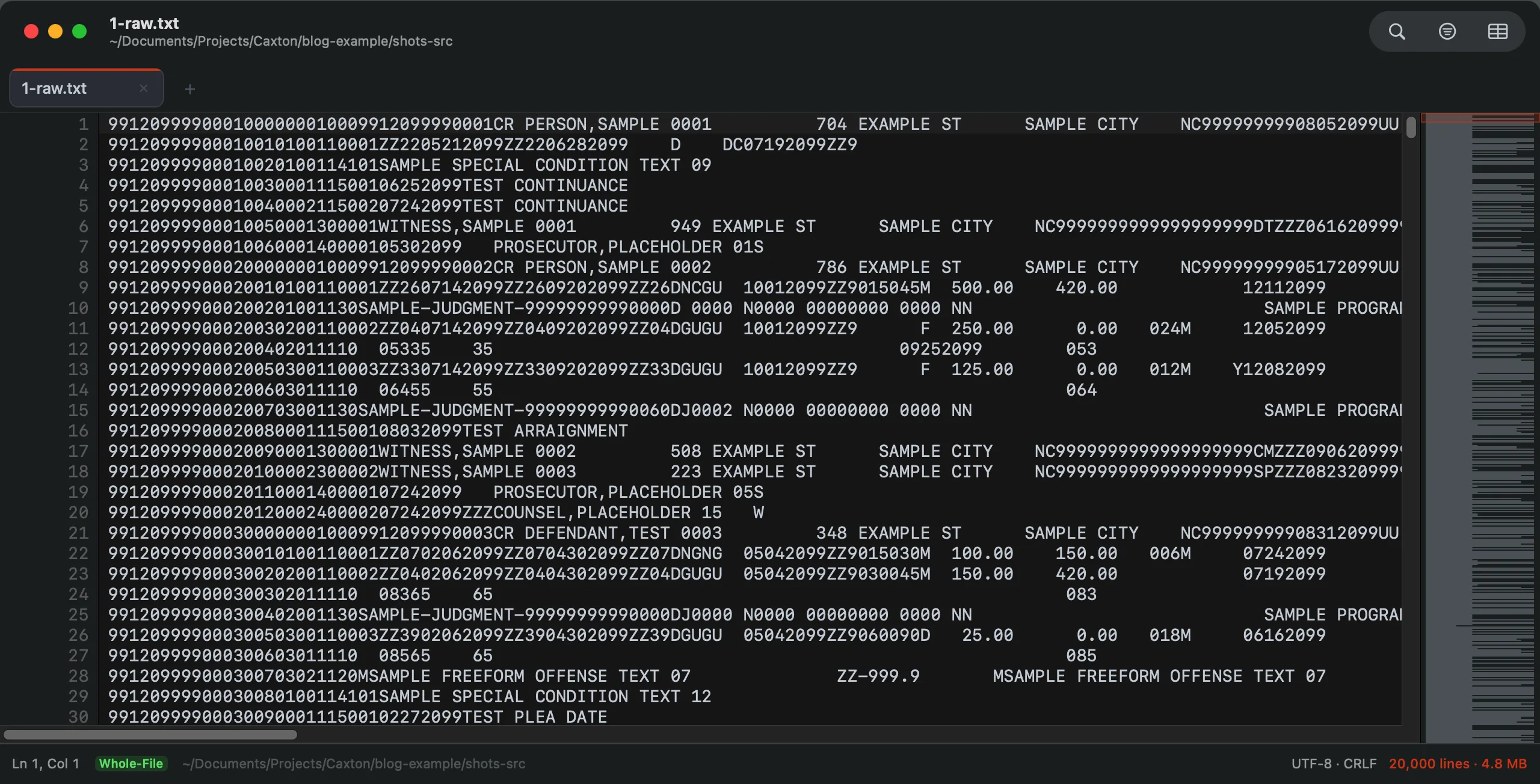
Fixed-width data has nothing to repair as CSV, because it never was one. This is the synthetic court extract from the essay: several record types in one file, each with its own widths. All data fictional.
8. Inspect it in the grid
Scroll the gutter. When no markers are left, every row has the same width. Click a header to sort a column, filter to the rows you changed, and read them in place before you trust the file.
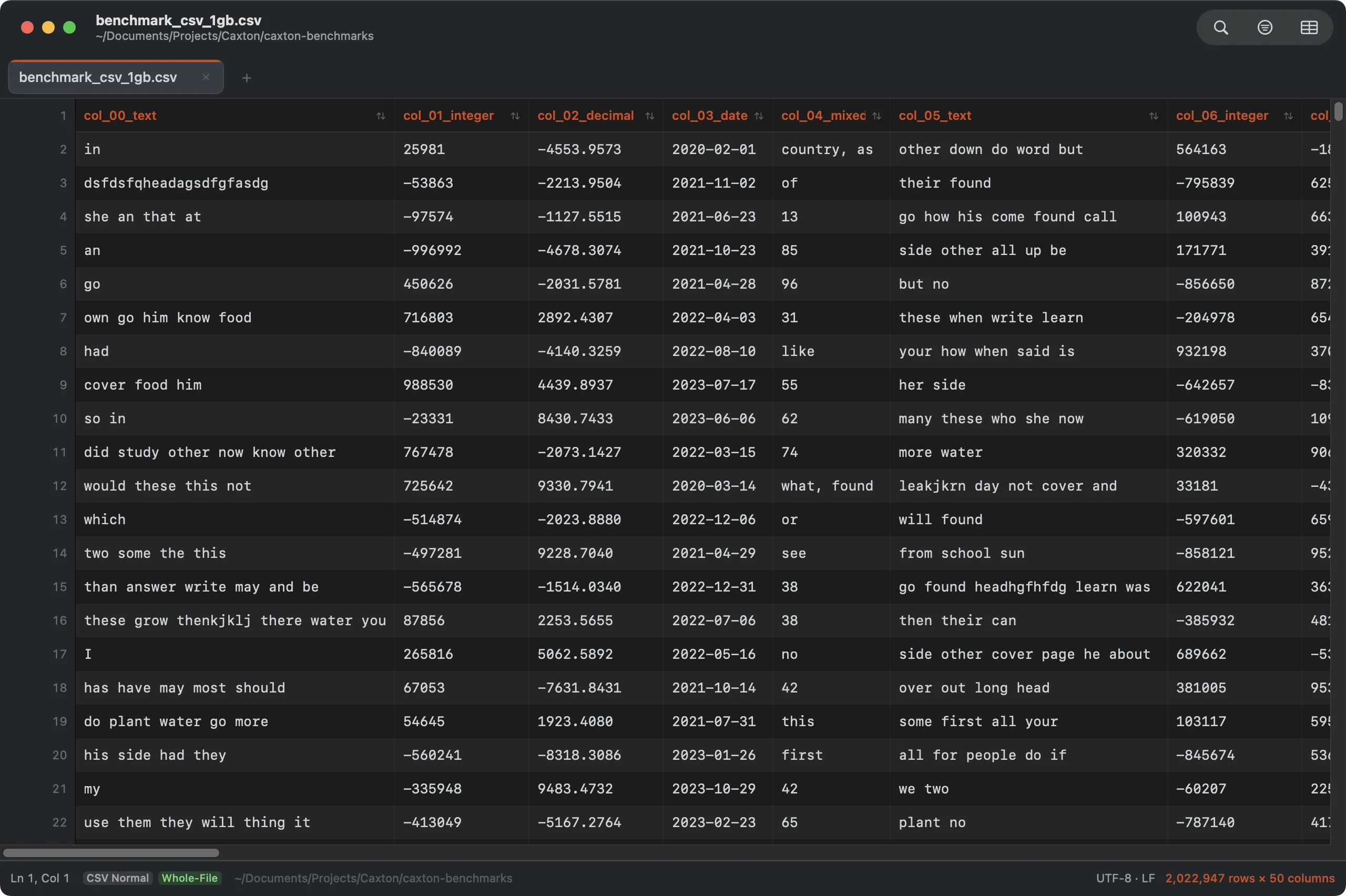
The grid is a view of the file, not a copy of it. Edit a cell here or a character in the text view; it is the same document.
9. Save it back as plain CSV
⌘S writes the same file, still plain CSV, with no export step and no second format. Nothing on disk changes until you save, and every command above is a single undo step until you do.
Open the file that will not import. See which rows are wrong.
Download Caxton for Free7 days free, no credit card · 5 MB · macOS 13.0+ · notarized
Which approach fits which job?
| Approach | Good for | Breaks when |
|---|---|---|
csvclean | Line numbers for every uneven row, and padding or dropping them in one pass, free | The row needs a decision, not a rule |
Python csv | A check you can adapt in a minute, no install | You need to see and edit the rows it names |
DuckDB store_rejects | Loading the good rows and keeping a table of the bad ones, with the reason | The goal is a corrected file rather than a query |
| Caxton | Repairing the file itself: marked rows, whole-file repair commands, undo, saved back as CSV | The fix is a recurring pipeline step; script that one |
If the file is sound and a spreadsheet is what changes it, that is a different problem: see editing a CSV without the data changing. If it is too large to open anywhere, start at opening a large CSV on a Mac.
Frequently asked questions
Why does my CSV have different numbers of columns per row?
Almost always one of four causes: a value that contains the delimiter and was not quoted, a line break inside a cell that split the record in two, an export that leaves off trailing empty fields, or two files with different headers joined into one. RFC 4180 says each line should contain the same number of fields, but nothing enforces it, so the first tool to notice is usually your importer.
How do I find the row that breaks the import?
Ask a tool that reports line numbers. csvclean --length-mismatch from csvkit writes one error per uneven row to standard error. DuckDB with store_rejects = true fills a reject_errors table with the line, the error type, and the text of each faulty row. In Caxton the count of problematic rows is stated when the file opens and each one is marked in the row gutter.
Can Excel fix a malformed CSV?
Microsoft documents importing, not repairing. Its support page describes two routes, "you can open it in Excel, or you can import it as an external data range," and states: "When Excel opens a .csv file, it uses the current default data format settings to interpret how to import each column of data." The import wizard lets you change the delimiter and how consecutive delimiters are handled. The page documents no command for uneven column counts, line breaks inside cells, or unpaired quotes. Saving from Excel afterwards writes what Excel understood, with its typing applied, which is its own problem.
Will repairing change my data?
Only in the way each command states. Normalize Column Count adds empty cells to short rows, and deletes surplus cells only if you tick that box. Remove Embedded Newlines replaces line breaks inside cells with a space. The two quoting commands change quotes and nothing else, and none of them touches a row whose quoting is broken. Each is one undo step, and nothing is written to disk until you save.
The importer only tells you that the file is wrong. Download Caxton for Free and see where.