Sort Rows
CSV ▸ Sort Rows… sorts by a column as text, as case-sensitive bytes, natural (numbers inside text in numeric order), numeric, currency or date, ascending or descending, with one Then by column as the tie-breaker; a click on a header's sort arrows sorts by it with the column's detected type (the CSV Workbench page has the detail), and a sort can be kept as a preset. Up to 256 MB the sort shows what it will do before it does it: how many rows move, the first of them before and after, and whether ⌘Z reverses it.
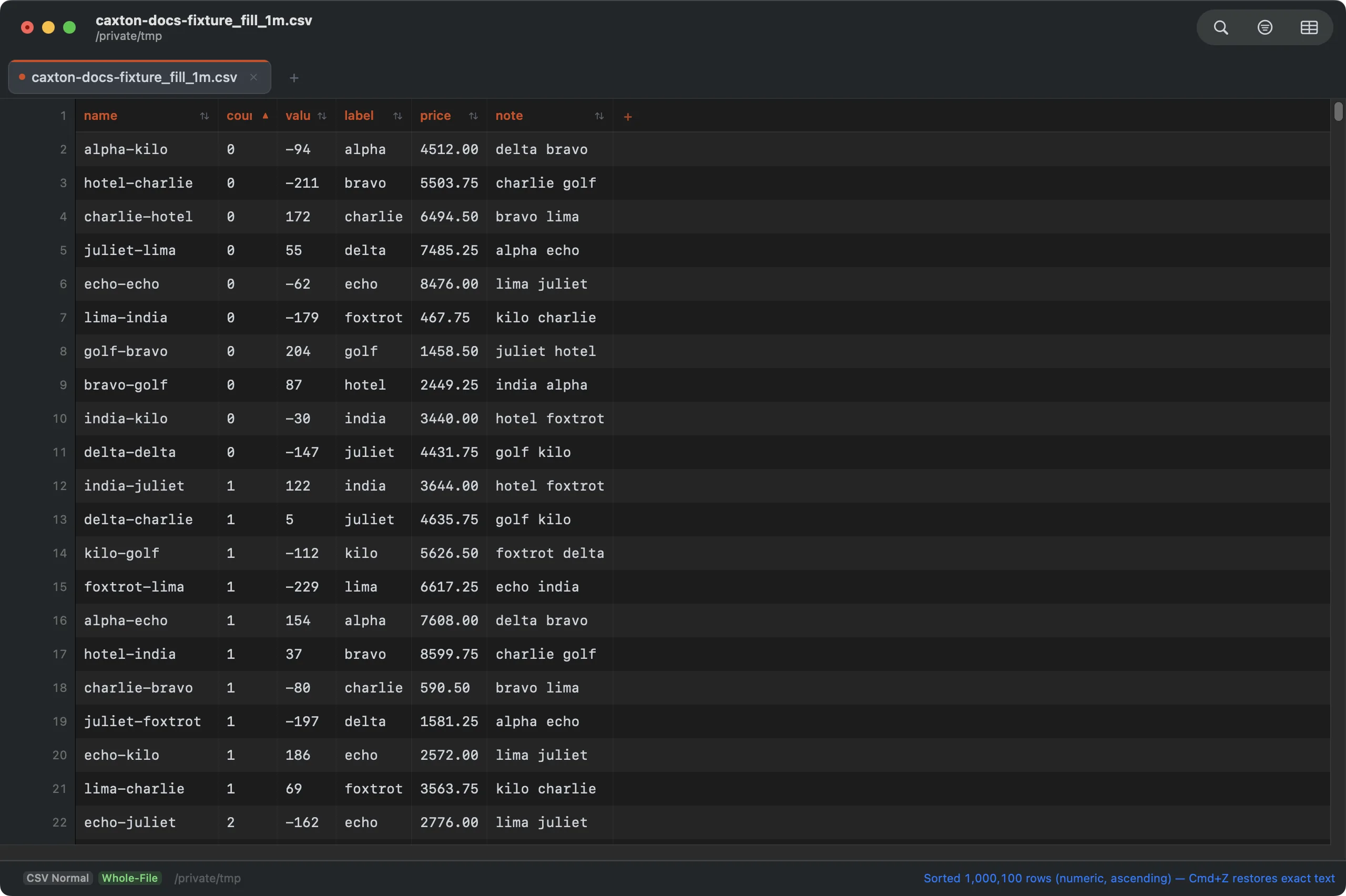
Sorted by a numeric column; the header shows the sort.
The dialog's fields:
- Preset: Custom, then your saved sorts. Picking one fills the form; presets apply by column number, so a preset made on another file lands on the same positions here.
- Sort by: the column, starting on the selected one.
- Type: Text (alphabetical), Text (case-sensitive bytes), Natural (Finder-style), Numeric, Currency or Date, starting on the type the column looks like.
- Order: Ascending or Descending.
- Then by: None, or a second column for ties, sorted ascending by its own detected type.
- First row is a header (keep in place): on when the grid treats the first row as a header.
- Save as preset: check it and type a name to keep this configuration when you press Sort; a preset with the same name is replaced.
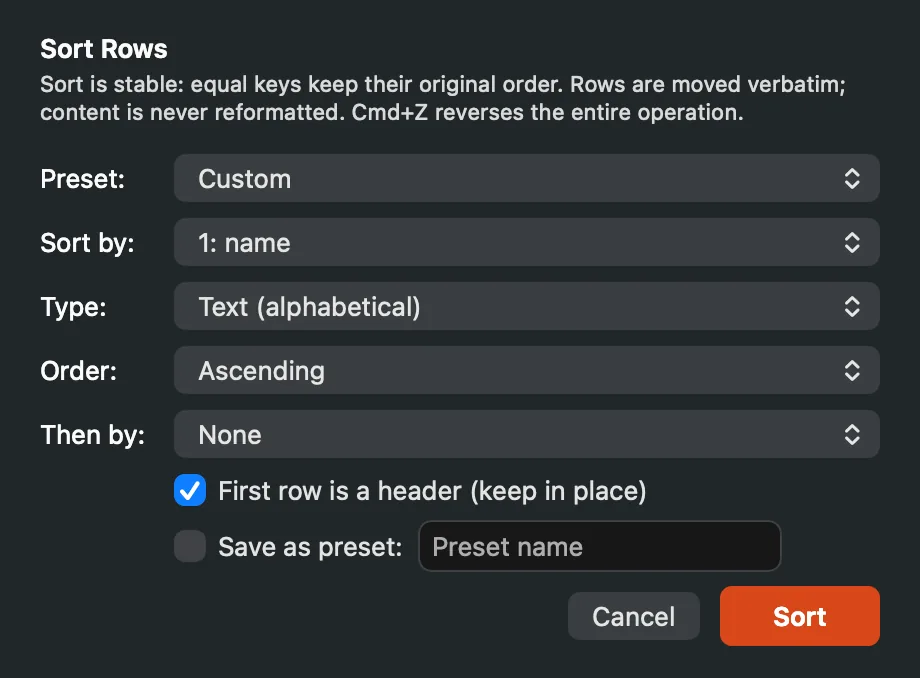
Sort Rows: the explanation says whether ⌘Z can reverse this sort on this Mac.
Date reads ISO dates and dates with slashes, dashes or dots month first (3/4/2026 is March 4); day-first dates such as 31/12/2026, month names and zone offsets are read the way the column profile reads them. In a Numeric, Currency or Date sort, blank cells and values that do not parse go last in either direction, in their original order. When more than 5% of the column's non-empty values do not parse, the sort asks first (Column doesn't look numeric, or Column doesn't look like dates) with the count: Sort as Text sorts it as text and keeps that choice for the column, Sort Numeric Anyway goes ahead, and Cancel stops.
Sort presets
Below the saved sorts, the Preset menu holds three commands. Delete a Preset… opens Delete Sort Preset, a form with one Preset popup: pick the name and press Delete. The preset is removed from this Mac; no file changes. It appears only when there is a preset to delete. Export Presets… writes every sort preset to a JSON file (caxton-sorts.json to start), and Import Presets… reads one back, on this Mac or another; an imported preset replaces one of the same name. Sort presets are also listed in Settings & Storage.
The sort runs as a job with its phases in the Operations panel and the status bar: Building keys, then, for a file whose keys do not fit the 200 MB budget, Writing run 1 of N and Merging N runs. Before it writes a run it checks the scratch volume for the runs' bytes plus a margin, and a short disk refuses up front with a banner naming the space needed and the space free, with nothing written. Under 256 MB the sorted file replaces the document as one undo step; past that it streams to a new document and the original is untouched. A 50-million-row file sorts through five runs and streams its 7.7 GB result in under two minutes on the benchmarks page.
Delete Duplicate Rows
CSV ▸ Delete Duplicate Rows… finds rows with identical values in the key columns: every column, or the columns you check. Two rows are duplicates when their key fields decode to the same text, so "apple" and apple match.
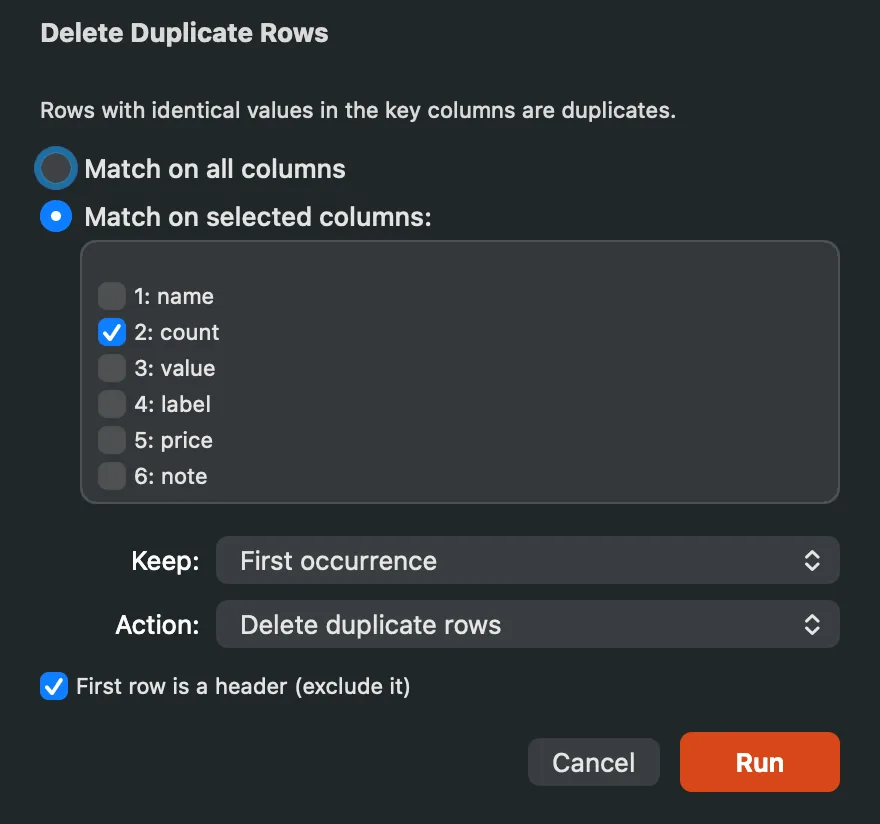
Key columns, the keep rule, the action, and the header row left out.
Match on all columns or Match on selected columns sets the key; the checklist lists every column by number and name. First row is a header (exclude it) keeps the header out of every group; it starts on when the grid has a header row. Run starts the scan.
Keep decides which row of each group stays: the first occurrence, the last, nothing (every row of every group goes), the earliest or latest date in a column, or the largest or smallest number in a column, with the column chosen in By column. With a date or number rule, a value that does not parse never wins, and ties keep the first seen for earliest and smallest and the last seen for latest and largest.
Action removes the rows, bookmarks them instead so you can look before deciding (the first 10,000 of them), or exports the groups to a new document: one line per row with its group number, the group's size, whether the rule keeps it, its row number in the file (the header counts as row 1) and its whole key, so a report of what was duplicated exists before anything is removed. Bookmark and Export work on a read-only document too, and the panel opens on one with a note saying so; only Delete needs a document you can write.
Before a removal the preview reports what the scan found: how many groups, how many rows beyond the first of each group, how many the rule removes, the largest group with its key, and the size distribution (pairs, triples, 4 to 9, 10 or more). The same report is kept in the Operations panel. Up to 256 MB the removal is one undo step; past that it streams the kept rows to a new document like a sort, with the same report before the write, and the original is untouched.
The scan keeps its tables in pages the system takes back, and a sort or a dedupe releases them as soon as the operation reports, not when the window closes; the time and memory of a 50-million-row scan are on the benchmarks page.