Every setting, its default, where it lives
| Setting | Default | Changed in |
|---|---|---|
| Theme | Dark for a dark Mac, Light for a light one | View ▸ Theme (see Themes) |
| Follow System Appearance | On | View ▸ Theme ▸ Follow System Appearance. While it is on, Caxton keeps one palette for dark and one for light |
| Imported themes | None | View ▸ Theme ▸ Import Theme… / Remove Imported Theme |
| Editor size | 13 pt (range 9 to 36) | View ▸ Zoom In ⌘+ / Zoom Out ⌘− / Actual Size ⌘0 |
| Word Wrap (default for new windows) | Off | View ▸ Word Wrap ⌥⌘W |
| Wrap At | Window width | View ▸ Wrap At ▸ Window Width / 80 / 100 / 120 Columns |
| Show Invisibles | Off | View ▸ Show Invisibles |
| Minimap | On (unavailable past 500 MB) | View ▸ Minimap |
| Tab Width | 4 | Text ▸ Whitespace ▸ Tab Width ▸ 2 / 3 / 4 / 8 |
| Auto-Close Brackets | On | Edit ▸ Brackets ▸ Auto-Close Brackets |
| First Row Is Header | On, per window | CSV ▸ First Row Is Header (kept with the session, like a Delimiter override) |
| Keyboard shortcuts | The shipped set | Caxton ▸ Keyboard Shortcuts… ⌘, (the Keyboard Shortcuts window, below) |
| File Pattern Rules | None | Edit ▸ File Pattern Rules… |
| Snippets | None | Edit ▸ Snippets… |
| Log Severity Patterns | None (the built-in level words apply) | View ▸ Log ▸ Severity Patterns… |
| Saved searches | None | The Advanced Find panel's Presets menu |
| Filter presets | None | The filter bar's Filters menu ▸ Save Filter As… |
| Sort Rows presets | None | The preset menu in CSV ▸ Sort Rows… |
| Batch Replace lists | None | The Batch Replace panel |
| Validation schemas | None | CSV ▸ Validation Schema… ▸ Schemas ▸ Save as Schema… |
| Transform Cells presets | None | CSV ▸ Transform Cells… ▸ Presets ▸ Save Current as Preset… |
| Transform Cells last-used values | Each transform's own defaults | Remembered on their own: the sheet opens on the transform you ran last, and each transform keeps the options you last ran it with |
| Pinned clipboard entries | None | Edit ▸ Clipboard History… ⇧⌘V |
| Find, replace and filter histories | Empty, 20 entries each | Recorded as you search and filter |
| File Browser recent folders | None, up to 8 | Recorded as you pick folders; listed in the File Browser's folder popup |
| Sidebar and inspector layout | Both closed; sidebar 260 pt on the File Browser, inspector 280 pt, every panel shown | View ▸ Show Sidebar ⌃⌘S, View ▸ Show Inspector ⌥⌘I, the dividers, and the right-click menu on the sidebar's panel buttons. A new window starts from the layout last used; a restored session does not change it |
| Inspector collapsed sections | All expanded | Click a section's heading in the inspector |
| Search Files or Commands recents | Empty; up to 30 recent items and 20 recent commands | Recorded as you open items and run commands from the field |
| Toolbar arrangement | Sidebar toggle, Back and Forward, title, Search Files or Commands, Find · Filter · CSV, inspector toggle | View ▸ Customize Toolbar… |
| Automatically Check for Updates | On | Caxton ▸ Automatically Check for Updates |
What persists where: everything in the table above is app-wide and survives relaunch. Per-window state (grid or text mode, wrap for that window, cursor, scroll position, window frame, open mode, a CSV ▸ Delimiter override, the header row and column type choices) rides in session restore instead. One thing deliberately resets every launch: the Diagnostics Overlay. Follow Tail is a toolbar toggle with no stored default: it pauses itself when you scroll up and resumes when you return to the bottom.
When a new window opens, wrap and tab width resolve in this order: the app-wide default, then a matching File Pattern Rule, then the session's memory of that exact file. Pattern rules resolve per field: rules are an ordered list, and each field (wrap, tab width, encoding, syntax, CSV delimiter, header row) takes its value from the first matching rule that sets it, so a specific rule above a general one wins field by field. A pattern matches the file's name, or the full path when the pattern contains a /.
The Keyboard Shortcuts window
Caxton ▸ Keyboard Shortcuts… ⌘, opens the Keyboard Shortcuts window. The item was called Preferences before 2.0.1; the window is the same. It lists every menu command in the app with its shortcut, and every one is rebindable. The Caxton menu, Services and Open Recent are excluded, so About, Keyboard Shortcuts…, License…, Hide, Hide Others and Quit keep their keys. Select a command, click Record Shortcut, press the keys; Esc cancels the recording. If the combination is taken, the conflict is named and confirming reassigns it, unbinding the other command. Clear Override returns a command to its shipped shortcut. Export… and Import… move your overrides to another Mac as a file. Only your overrides are stored, keyed by the command's menu path, so app updates that add commands never disturb your customizations.
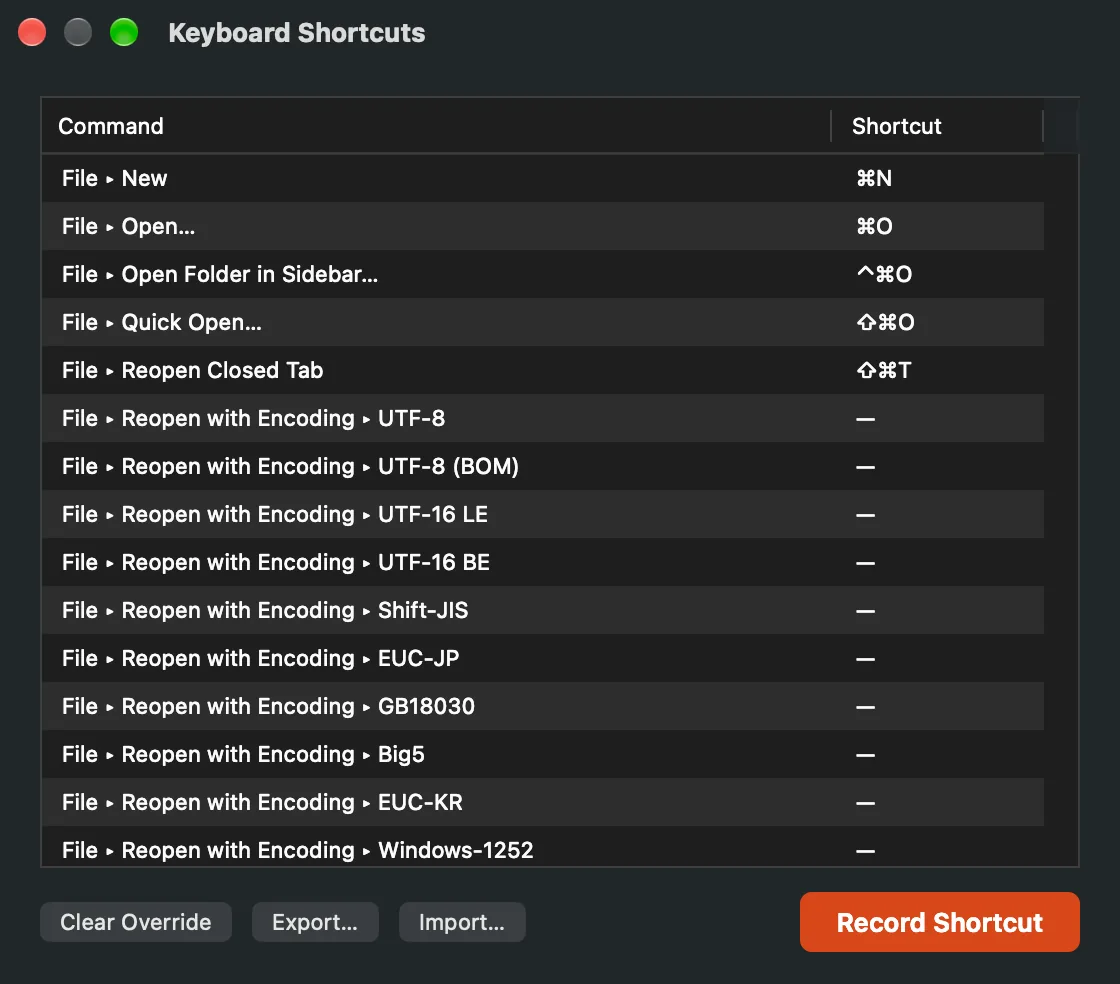
The Keyboard Shortcuts window, with Clear Override, Export… and Import… at the bottom left and Record Shortcut at the right.
Updates
Caxton ▸ Check for Updates…, right under About Caxton, checks caxton.app for a newer version now and offers to install it. Caxton ▸ Automatically Check for Updates is on by default; uncheck it and Caxton checks only when you ask.
Where Caxton keeps things
The complete write inventory. Nothing on this list leaves your Mac; Caxton has no telemetry.
| What | Where |
|---|---|
| Settings, presets, histories | ~/Library/Preferences/com.hwyenigma.Caxton.plist: every setting above, including the presets, imported themes, validation schemas, severity patterns, shortcut overrides, pinned clipboard entries, recents and histories |
| Session | ~/Library/Application Support/Caxton/session.json: open windows, modes, cursors, scroll positions, frames; written at quit |
| Named workspaces | …/Caxton/workspaces.json; each exports as <name>.caxton-workspace.json, and import resolves file paths relative to the workspace file first, so a workspace can travel with its folder |
| Bookmarks and markers | …/Caxton/Bookmarks/ and …/Caxton/Markers/, one small JSON sidecar per document, deleted when the document has none left. Your files are never annotated |
| Crash-recovery journals | …/Caxton/recovery/: rewritten every 30 seconds while a document has unsaved edits, removed on save or clean close, swept after 7 days. Recovery never writes to your file itself; it replays into a window and lets you decide |
| Scratch space | …/Caxton/scratch/: in-place-save rollback journals, disk-backed line and record indexes for the largest files, undo spills, sort and frequency runs and tables, streamed outputs, and UTF-8 working copies of converted documents. A crashed copy’s files are removed at the next launch at any age; other leftovers are cleaned after 24 hours, except rollback journals, which are kept for recovery |
| New documents | …/Caxton/untitled/: one small backing file per new, never-saved document, so its edits can be recovered after a crash |
| Restore guard | …/Caxton/restore-attempts.txt: a count of launches that began restoring the session, cleared once the app runs quietly for a minute or quits normally. Two in a row make Caxton offer to start without restoring |
| Trial and license | The login Keychain, mirrored by a small file in Application Support; the earlier of the two wins, so deleting either does not restart a trial. Stated plainly because you would find it anyway |
| Next to your files | Only when you ask: Find in Files ▸ Replace writes .bak backups (the checkbox defaults to on), and Save As / atomic saves stage through the destination volume's own temporary area |
Import and export
Every kind of preset can leave the Mac as a JSON file and come back on another one. An import merges by name: a preset with the same name is replaced, and new names are added.
- Snippets, File Pattern Rules, Log Severity Patterns and Keyboard Shortcuts: each window has Import… and Export… buttons. An export saves as
caxton-snippets.json,caxton-file-pattern-rules.json,caxton-severity-patterns.jsonorcaxton-key-bindings.json. - Filter presets: the filter bar's Filters menu has Import Filters… and Export Filters….
- Sort Rows presets: the preset menu in Sort Rows has Import Presets… and Export Presets….
- Validation schemas: the Schemas menu in the Validation Schema sheet has Import Schema… and Export Schema…. Import also reads a plain JSON object of column names to rule lists.
- Saved searches: the Advanced Find panel's Presets menu has Import Presets… and Export Presets… (
caxton-searches.json). - Themes: View ▸ Theme ▸ Import Theme… and Export Theme….
- Batch Replace pair lists export and import as CSV or TSV (
replace-pairs.csv; a.tsvextension switches the delimiter). - Workspaces export as JSON from the Workspaces menu.
A file of the wrong kind is refused with what it holds, such as "these are snippets, not filters". A theme or preset file written by a newer Caxton says so and asks you to update Caxton, instead of calling the file unreadable. Transform Cells presets have no export of their own; they move with the preferences file.
For the Terminal-inclined
One capability has no UI: custom fill lists for the grid's Fill Series (your own rotation names, region lists, anything ordered). They live in defaults as an array of lists, each needing at least two distinct entries:
defaults write com.hwyenigma.Caxton CaxtonCustomFillLists '(( "North", "South", "East", "West" ))'After a relaunch the list appears in Fill Series ▸ Custom List as "Custom: North, South, East…". Every other setting on this page also lives at a sensible key in the same domain; the app reads them with plain defaults, no private state.