The trial
The trial starts the first time you open Caxton and lasts 7 days, with every Caxton Pro feature on, no card and no account. There is nothing to cancel: enter a license key any time, or let the trial run out. The start date is kept in the login Keychain and in a small file in Application Support, and the earlier of the two wins, so removing either does not start a new trial. When the trial ends, every open window shows a banner that says Caxton is on Caxton Free, and the License window opens.
The License window
Caxton ▸ License… opens Caxton License. Its headline says where you stand (the trial with its days left, Caxton Free, Caxton Pro, offline grace, or a lapsed or unconfirmed subscription) and the line under it explains what that means. The Welcome window's license button and the status bar's license pill open the same window.
- License key: the field for the key from your purchase email. It shows while you are on the trial, on Caxton Free, or on a lapsed subscription, and takes the focus when entering a key is the likely next step.
- Activate: sends the key to the licensing server and activates this Mac. Return in the key field does the same. While the request runs, the field and the button are disabled, so a second Return cannot take a second seat.
- Status line: under the key, it reports each step (
Activating…,Deactivating…) and the server's answer, such as a key that has expired, been disabled, or is not for Caxton. It updates as Caxton retries, and the window grows to fit it. - Get Caxton Pro…: opens the pricing section of caxton.app in your browser.
- Deactivate This Mac: releases this Mac's seat so another Mac can use the key. It shows while a license is active, in offline grace, or lapsed.
- Lost your key?: opens the store's order lookup, where you look up your orders and license keys with the email you bought with.
With a license active, the headline reads Caxton Pro. Thank you! and the line under it names the plan, Lifetime license or Subscription, with the purchase email when the store has one, followed by activated on this Mac. The key field is hidden then, and Deactivate This Mac is the one action.
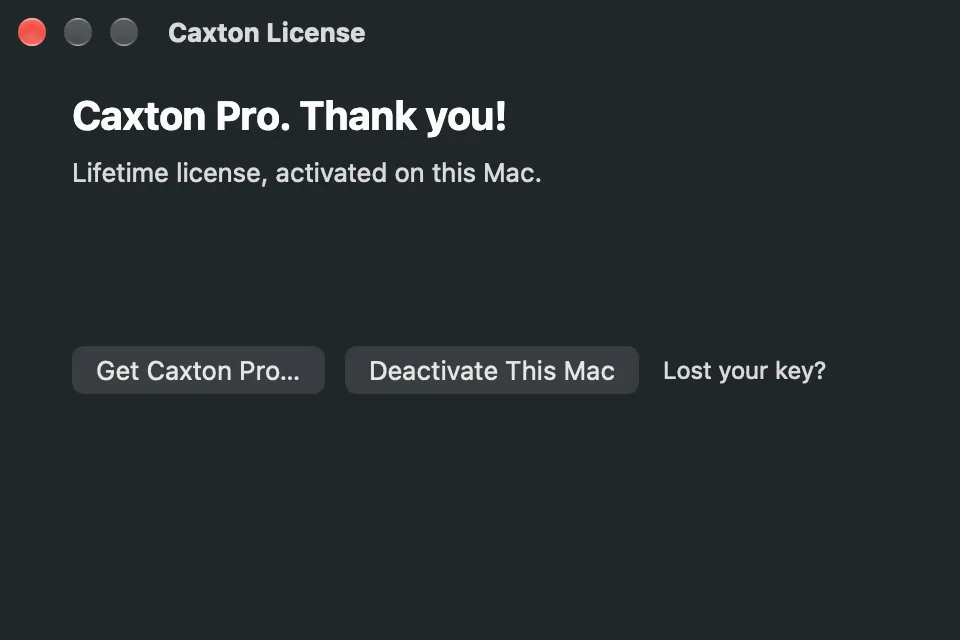
Caxton License with a lifetime license active: the plan line, Get Caxton Pro…, Deactivate This Mac and the key lookup.
Seats
Each license activates on up to 3 Macs. Activating takes a seat, and activating again with the key this Mac already holds confirms the existing seat instead of taking another. Deactivate This Mac frees the seat and returns this Mac to the trial or Caxton Free; the status line says Deactivated on this Mac. The seat is free for another Mac. If the server cannot be reached, this Mac stays activated and the line says so, so you can try again online or free the seat from your account page.
When a key is at its device limit, the refusal names the way out: Deactivate This Mac on the Mac that holds the seat, or free it from your account page, which Lost your key? opens.
A license record belongs to the Mac it was activated on. A Mac set up with Migration Assistant, or restored from another Mac's backup, does not count the copied record. The License window says the license was activated on another Mac and fills the key field with that key, so activating this Mac is one click.
Checking a license
A subscription checks with the licensing server every 24 hours. Missing one check changes nothing. When Caxton has not reached the server for two days, the subscription enters offline grace: everything keeps working, the License window's headline reads Caxton Pro: offline grace, and the status bar pill counts the days left, Offline · 3 days to revalidate for example. Grace lasts 30 days from the last confirmation, and Caxton revalidates on its own as soon as you are online. Past that, the subscription is unconfirmed and the Mac is on Caxton Free until the server answers or you enter the key again.
A lifetime license does not check on a schedule and works offline indefinitely; only the server reporting the key as disabled ends it. A lifetime license activated by Caxton 1.x needs one answer from the server to bind it to this Mac. Until that answer arrives it stays Caxton Pro: Caxton retries during the session and at every launch, a busy server or an unexpected answer never removes it, and the status line says when the server could not be reached and since what date.
Caxton accepts the licensing server only through a certificate from Apple's built-in set of trusted authorities. On a network whose proxy inspects secure connections, the License window names the certificate problem, and those days do not count against a subscription. Activate from another network, or write to hello@caxton.app.
When a subscription ends
If the server reports a subscription as expired or disabled, the headline reads Subscription lapsed: you’re on Caxton Free. The license stays on this Mac with its key: renew the subscription and activate the same key again, or enter a new one. The Welcome window's button reads Renew…, and every open window shows a banner. A subscription that only could not be reached is told that, not that it lapsed: its headline reads Subscription unconfirmed: you’re on Caxton Free, and connecting to the internet restores it.
The status bar pill
While you are not on an active license, the right end of the status bar carries a pill with the state, and clicking it opens the License window. With an active license there is no pill.
| Pill | Meaning |
|---|---|
Pro trial · 5 days left · Buy | The trial, with its days left |
Caxton Free · Get Caxton Pro | The trial has ended |
Offline · 3 days to revalidate | A subscription in offline grace, fully working |
Caxton Free · subscription lapsed · Renew | The server reports the subscription expired or disabled |
Caxton Free · subscription unconfirmed · License… | The server has not been reached since the grace ran out |
Every pill except the trial's is drawn in the warning color.
Caxton Free and Caxton Pro
Caxton Free opens files of any size, and you can scroll, search, filter, navigate, view a delimited file as a grid, compare two files and copy what you find. Anything that changes a file, saves it, or writes new data from it is Caxton Pro. That covers typing and every edit command, Save and Save As on a file you opened, the grid's cell edits, extracting filtered lines, bookmarked lines, Find matches, an incident window or a column to a new document, and converting fixed-width text to columns.
A report about the file is not new data, so it opens as a new document on Caxton Free and saves with Save As: the duplicate groups from Delete Duplicate Rows, the rows Quarantine sets aside, a frequency table from Count Frequent Values, a column profile export and a compare report.
A refused action names the tier: a banner says the action is available in Caxton Pro. Caxton ▸ License… to activate. and the first refused keystroke in a document says where editing is. The status bar's Read-Only badge appears only for a document opened in Read-Only Inspect mode, never for Caxton Free. Unsaved edits that crash recovery restores are replayed into the window even on Caxton Free, so a lapse never takes work you already did.
Activating a license takes effect at once in every open window, with no relaunch.
In 2.1.0
- Paste Special is Caxton Pro, like every edit; the sheet opens on Caxton Free with the refusal and the License window.
In 2.0.2
- Extract Column, Convert Fixed-Width to Columns and the Find panel's Export Matches are Caxton Pro, like the other extracts.
- Save As on a file you opened is Caxton Pro; a report that opened as a new document still saves on Caxton Free.
In 2.0.1
- A lifetime license from 1.x stays Caxton Pro when the licensing server cannot be reached, and the License window says when it could not be reached.
- Behind an inspecting proxy, the License window names the certificate problem instead of a connection error.
- Every refusal names Caxton Free or Caxton Pro instead of Read-Only.
- A migrated Mac is told how to move its license here.
- Extracting to a new document is Caxton Pro, as it always was in the app; the License window now says so.
- The License window's status line updates as Caxton retries, and an expired subscription keeps its key and shows the renewal path.