Bookmarks
⇧⌘B toggles a bookmark on the current line. Edit ▸ Bookmarks ▸ Next Bookmark (⌥⌘B) and Previous Bookmark (⌥⇧⌘B) walk forward and back, wrapping at the ends. Bookmarks show as gutter badges.
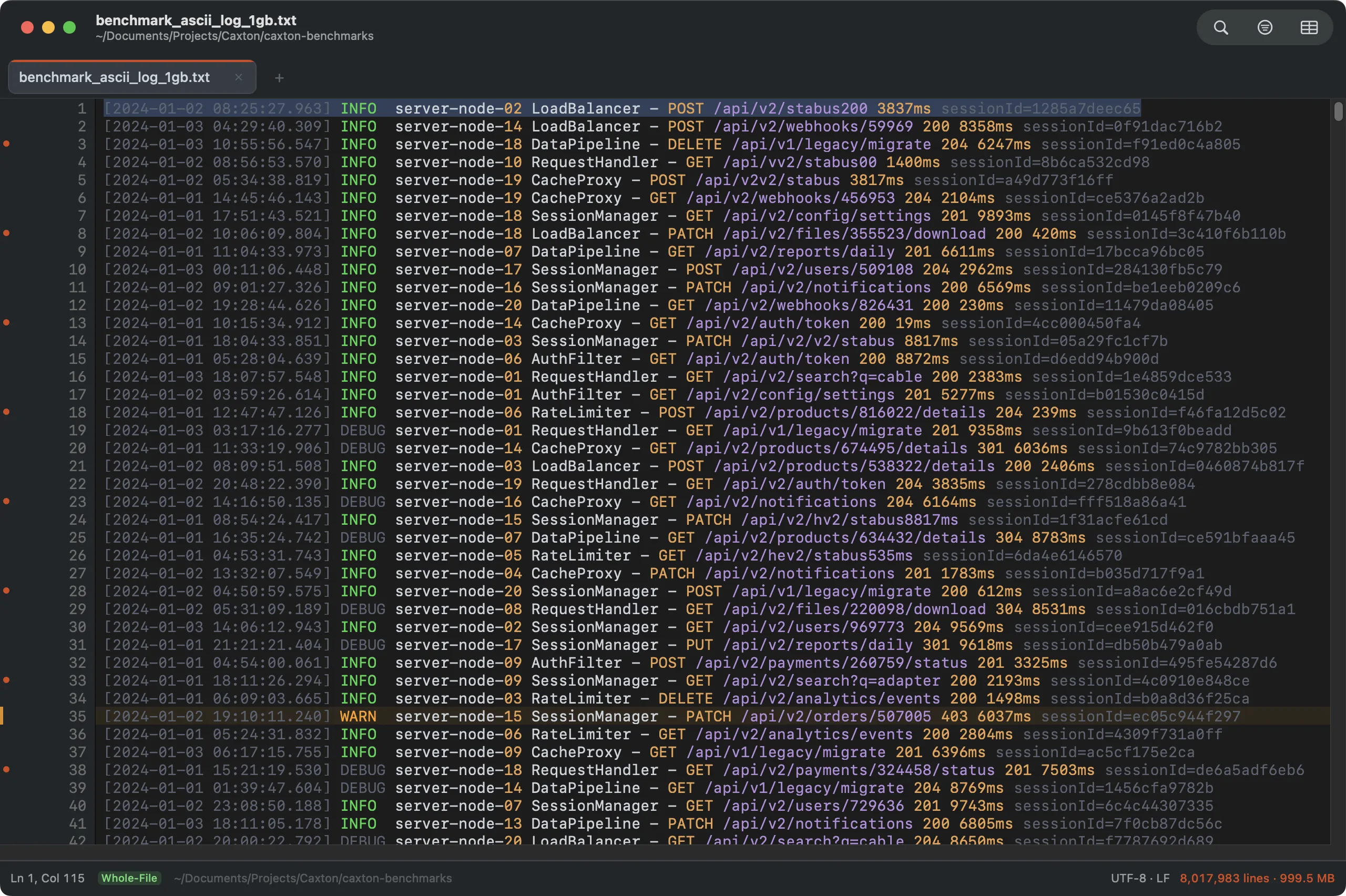
Bookmarks in the gutter, marker highlights in the text. Both survive quitting the app.
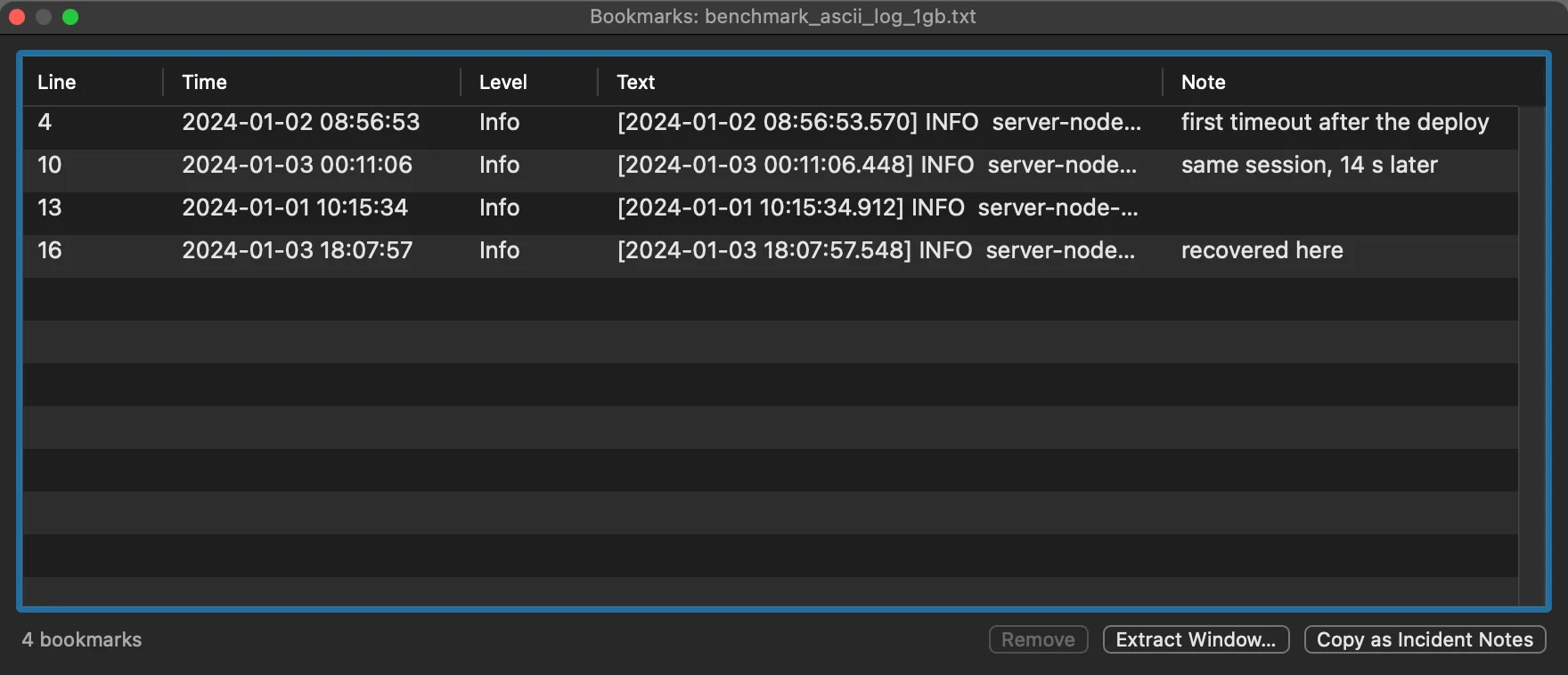
The Bookmarks panel: every bookmark with its time and level, the line text, and a note you can edit in place; Copy as Incident Notes puts the table on the clipboard.
- Bookmark Lines Matching…: bookmark every line matching a pattern in one pass. The form takes the Pattern, with Regular expression and Match case checkboxes; Bookmark runs it, and the banner says how many lines it bookmarked. A regular expression that does not compile is named in the banner.
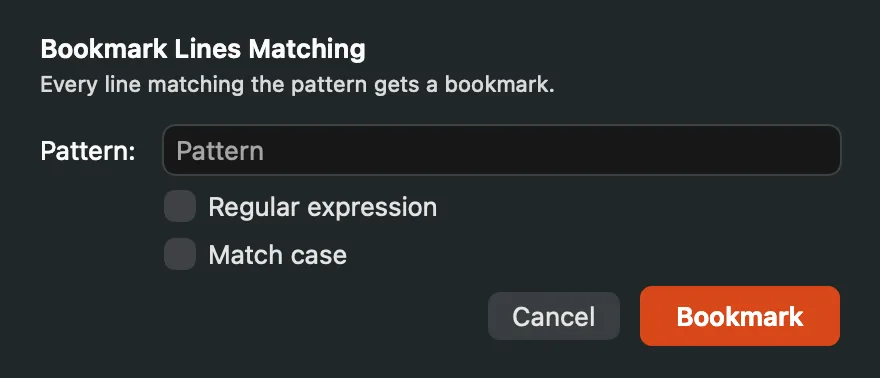
Bookmark Lines Matching: one pattern, every matching line bookmarked.
- Bookmark All (find) and Bookmark All Filtered (filter) integrate with search.
- Extract Bookmarked Lines copies every bookmarked line to a new document. Extracting to a new document, here and with Extract Incident Window…, is a Caxton Pro feature.
- Incident notes. Edit ▸ Bookmarks ▸ Add Note to Bookmark… puts a note on the caret line (bookmarking it first if needed); a noted bookmark shows as a ring in the gutter, and hovering the ring shows the note. Notes move with their line, go when it goes, and survive relaunch in the bookmark sidecar. Move Line Up and Move Line Down carry the bookmark and its note with the line, and undo brings them back with it; Join Lines on a selection keeps the bookmark and note of the first joined line.
- The Bookmarks panel (⌥⌘M, or ⌃⌘3 in the sidebar) lists every bookmark with its timestamp and severity in a log, its first line of text, and its note, editable in place. Double-click navigates. Copy as Incident Notes puts the table on the clipboard as plain text for a ticket.
- Extract Incident Window… takes the lines around every bookmark, N lines before and after, or in a timestamped log N seconds before and after by record time, merges overlapping windows, and writes them to a new document with a header naming the source span above each block. With no bookmarks it works around the caret line.
- Bookmarks persist across sessions and re-anchor by content: if the file changed on disk while closed, each bookmark finds its line again by matching the line's content hash, and Caxton reports anything it had to reposition or drop. A bookmark set while a large file is still indexing is merged with the saved set when it loads; the saved bookmarks are never overwritten. In the benchmark suite, 5,000 bookmarks on a 5-million-line file round-trip exactly.
Markers
Markers are persistent pattern highlights. Select a word or a short phrase on one line, right-click it, and choose a color under Mark “selection”: every occurrence stays highlighted in that color. Right-click a marked selection again and Unmark “selection” removes its marker. Markers are per-document and survive relaunch.
⇧⌘M, or Markers… at the bottom of the same right-click menu, opens the Markers window: a table of every marker with its Color, Pattern and Options, and a row below it for adding one. Type the Pattern to mark, pick a color (Yellow, Green, Blue, Pink, Orange or Purple), tick Regex or Match case if you need them, and click Add or press Return in the field. The − button removes the selected marker.
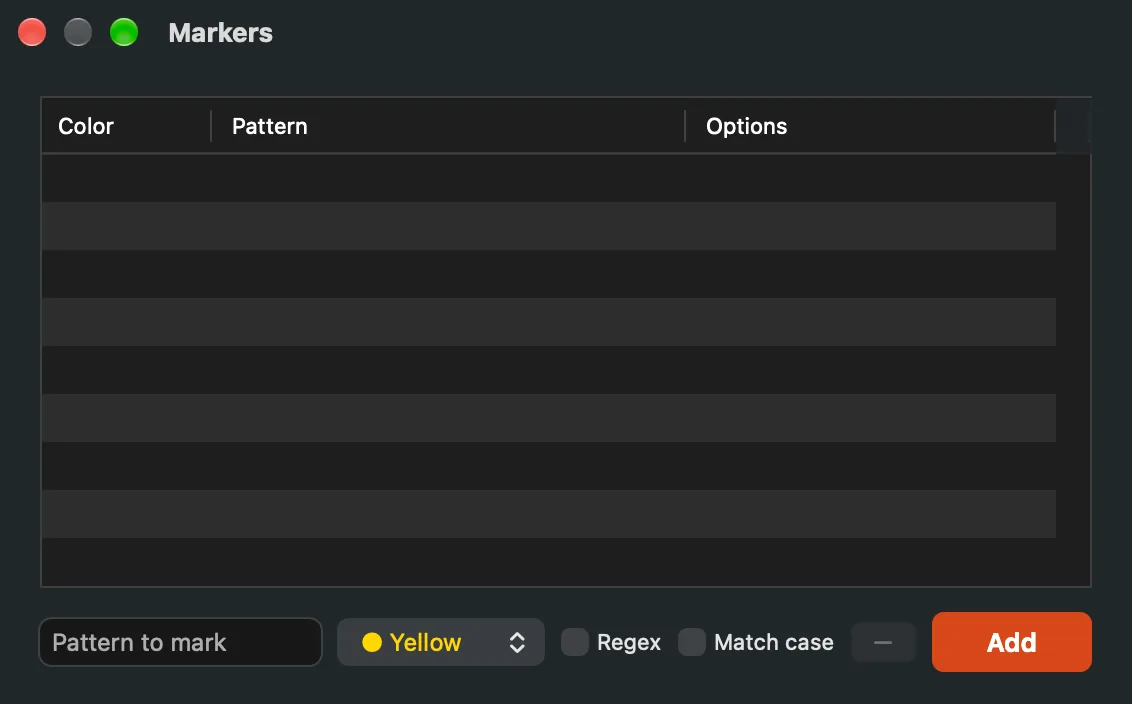
The Markers window, with the add row under the table.
A regex marker that does not compile is matched literally and says so in the panel's options column; a pattern that takes too long to match on one line is paused for that document, with a banner, for ten seconds or until you edit the markers, whichever comes first.
Search files or commands
The field at the top of the window is where Quick Open and the command palette went: ⇧⌘O focuses it for files, ⇧⌘P for commands, and : with a number goes to a line or row. The Search Files or Commands page has the details.
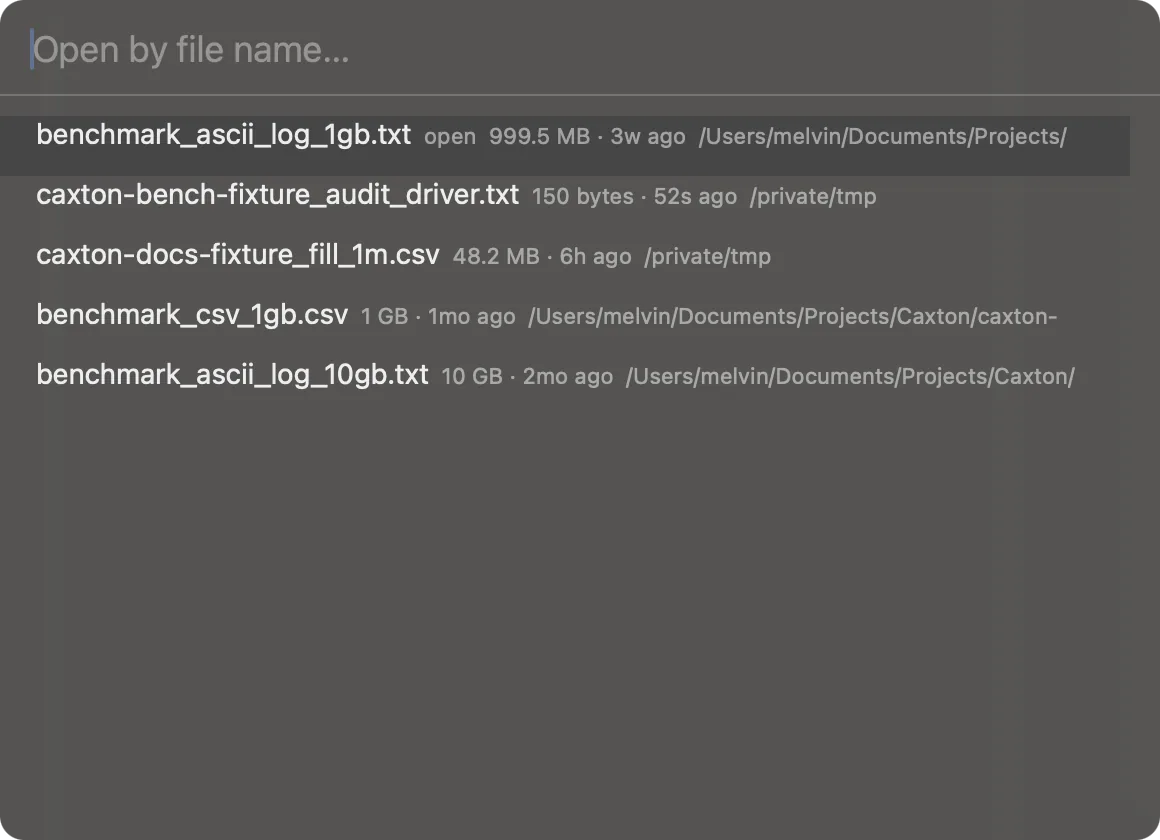
Open by name from anywhere. Files already open switch instead of reopening.
Typed text also finds the current document's bookmarks, by their note or their line, and : also takes a record (:r1234) and, in a log, a time or an offset such as :+5m.
Back and Forward
Go to Line, a problem, a bookmark or a match from a panel is a jump you can walk back from: ⌃⌘← goes back to where the caret was and ⌃⌘→ forward again, in the text or in the grid, with the two buttons beside the sidebar toggle while the sidebar is open. Two hundred places are kept per window; a new jump drops the forward entries. A Go to Line that waits for the index records one place, so Back takes one step. In the grid, the places recorded in cells are dropped when rows are sorted, deduplicated or deleted, so Back never lands on a row that now holds other data.
Go to line & jump
- ⌘L opens the Go To form: one Go to field, four targets. A plain number goes to that line (instant at any file size);
50%goes to the middle of the file by bytes, so it works even while a huge file is still indexing;b1234lands the caret on an exact byte, snapped so it never splits a character;r1234goes to a record when the document has a record index, and falls back to lines with a banner when it doesn't. In the grid, the same shortcut takesroworrow:column. - While the index is still building, a line or row past the indexed frontier jumps to the frontier, the banner says “not indexed yet, jumping when the index reaches it”, and the jump completes on its own when the index gets there. If the file ends before the target, the banner says the line does not exist. Percent and byte targets work at any point of the build.
- ⌥⌘L, Go to Time: in a log whose lines start with a timestamp, the same field takes a time.
12:34:56lands on the first line at or after that time on the caret line's day (or the first record\'s day);2026-09-04 12:34and a bare date take a full date;+5m,-30s,+2hand+1dmove from the caret line's record. Times are read in the log\'s own zone when its lines carry one (Z,UTC,GMT, an offset such as+05:00or+0500, or a named zone with an offset such asGMT+02:00,UTC+2orGMT-0530; a bare+05followed by text is message text, not a zone), otherwise in the zone chosen in Timestamp Format; the banner names the line and time it landed on, and says so when the log is not in time order near there. A near miss (14:3,+5 m) is accepted; anything unrecognized is named in the banner instead of closing silently. An offset with no unit (+5,-30) is refused, and the banner asks for one (s, m, h or d) rather than reading the number as a line. - ⌘J: jump back to the selection.
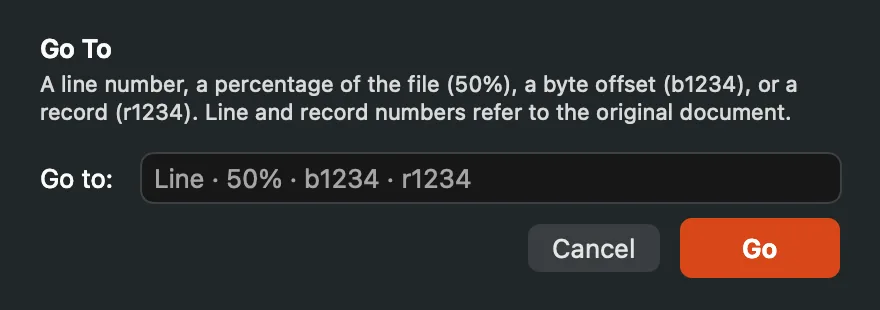
The Go To form in a document without timestamps; in a log the hint and placeholder add times and offsets.
Folding
Indented regions and brace pairs fold. Chevrons in the gutter mark foldable anchors (▾) and collapsed regions (▸); a folded line carries a “⋯ N lines” pill so hidden content is never silent, and the status bar counts active folds (click the badge to unfold everything). ⌥⌘← folds the region at the cursor, ⌥⌘→ unfolds, and Fold All (⌥⇧⌘←) runs as a cancellable background job on big files. In files with a syntax grammar, brace pairs fold; braces inside strings and comments are ignored, using the same lexer that highlights them. Everywhere else, indentation decides.
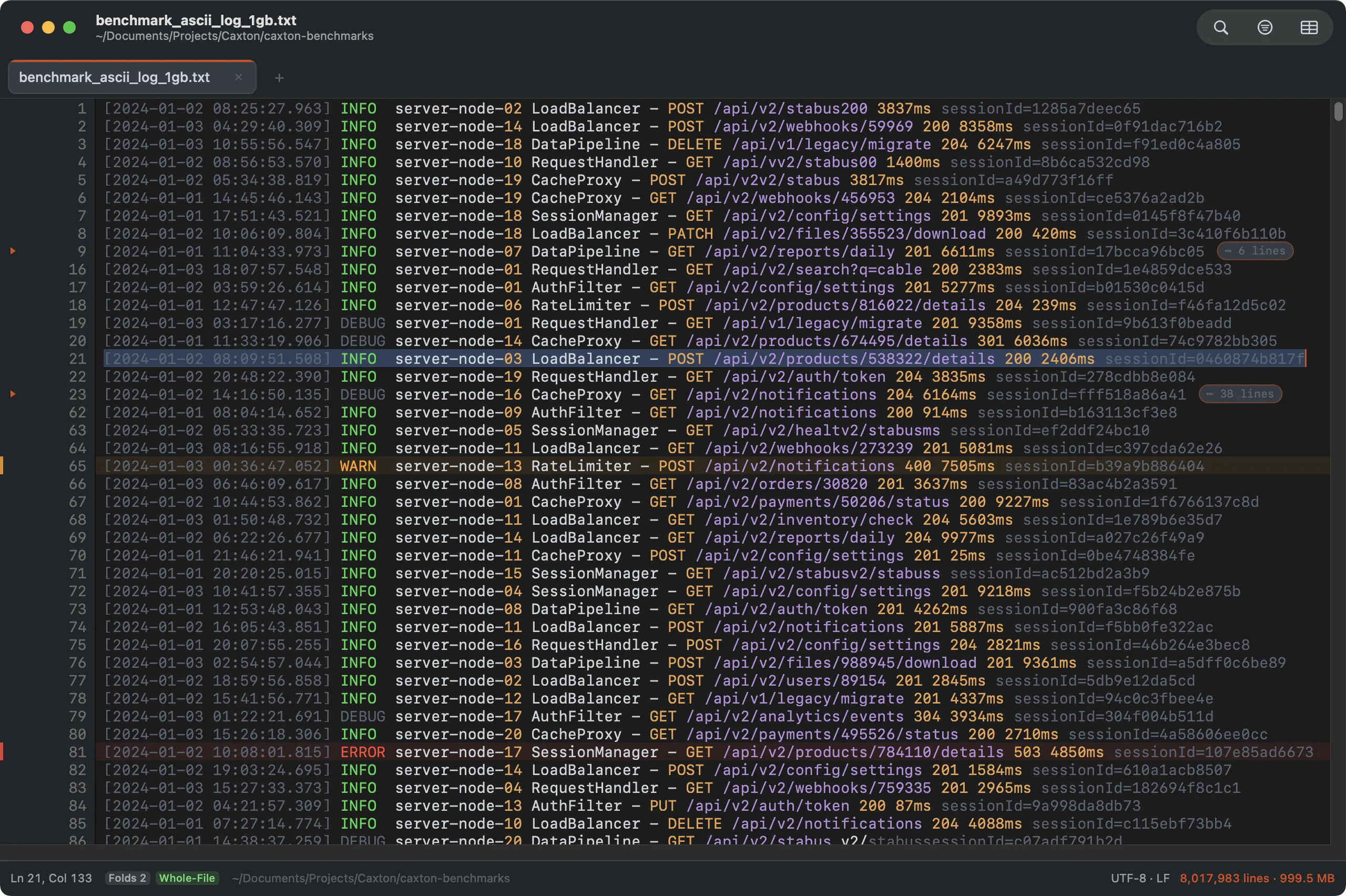
Two collapsed regions: chevrons in the gutter, hidden-line counts inline.
Folds are view state: edits that touch a folded region unfold it rather than letting hidden bytes change, search hits and Go To targets inside a fold open it automatically with a banner, and Replace All treats folded content as normal text. Entering the CSV grid clears fold state.
Change markers
Lines that differ from the last save carry an accent bar in the gutter; a deletion leaves a tick at the seam. View ▸ Next Change (⌃⌘↓) and Previous Change (⌃⌘↑) jump between changes, and View ▸ Revert Selected Change restores the original bytes for the change under the cursor as one undo step. The markers come straight from the document model (no diff pass, no shadow copy) and clear on save. Rows moved by a CSV sort are marked as changed but refuse revert (there is no single home to restore them to; undo covers that).
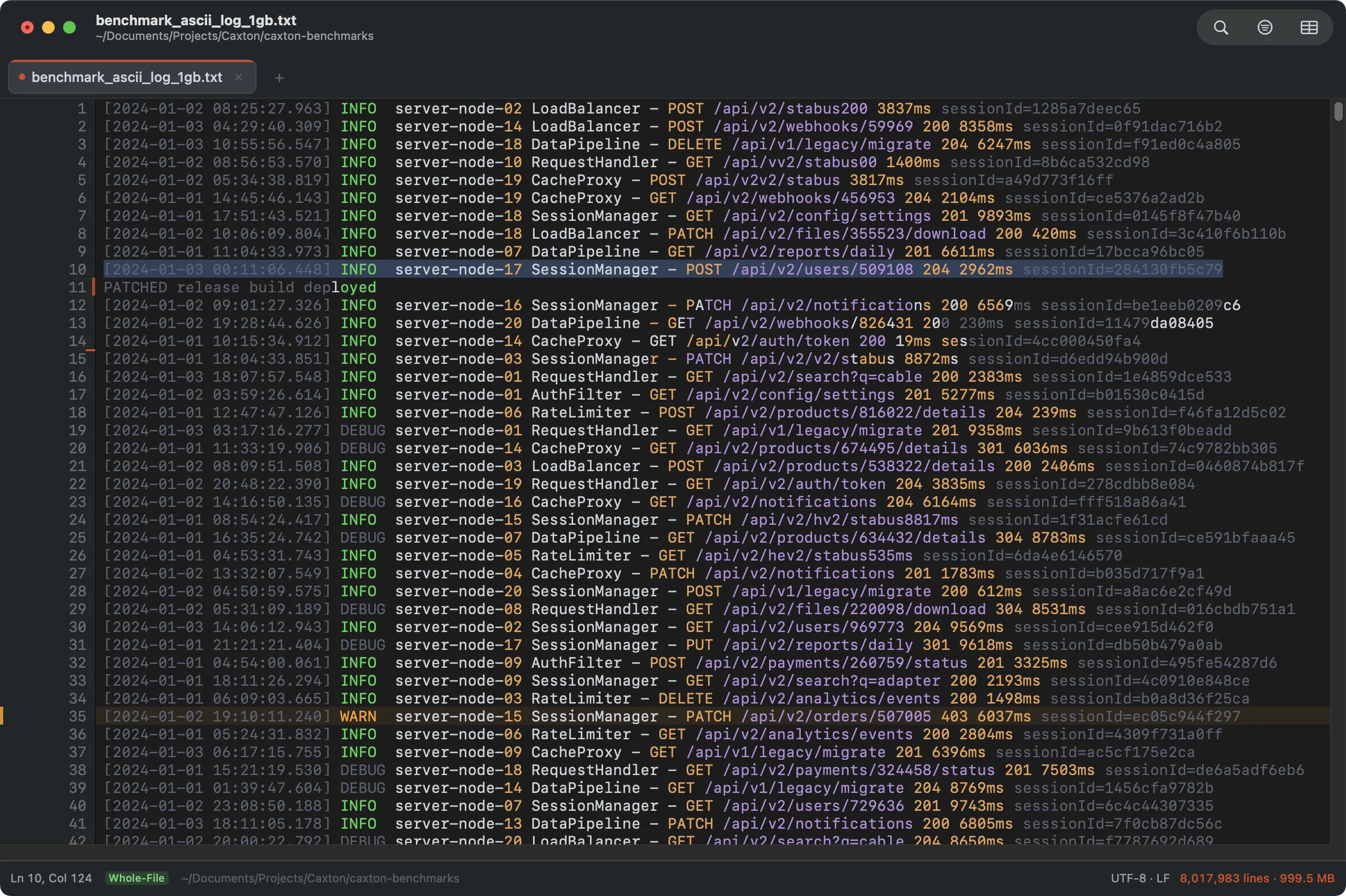
Edited lines bar, deletions tick. ⌃⌘↑↓ walks the changes.
Windows and tabs
- Drag a tab within the strip to reorder, out of the strip to give it its own window (Window ▸ Move Tab to New Window does the same), or onto another window's tab row to move it there.
- Pin a tab from its right-click menu: pinned tabs lead the row behind a pin glyph and lose their close button: the accidental-close guard. Pins persist with the session.
- Close Tab in a tab's right-click menu closes that tab, asking first when it has unsaved edits, as the close button does.
- ⇧⌘T reopens the last closed tab with its cursor, scroll position, mode, and pin intact.
Workspaces and Jobs
- File ▸ Workspaces ▸ Save Workspace As… saves the open windows and their tabs as a named workspace; the menu then lists it by name, and choosing it reopens the whole set in one step. It suits a recurring investigation's log, CSV and notes. With nothing open, Caxton says there are no documents to save. Workspaces remember their common folder: a project that moves or mounts elsewhere still opens, and a member file that moved inside the project is found again by name, size, and modified time (the search is bounded and never crawls your disk).
- Workspaces ▸ Delete ▸ name removes that workspace from the list at once. The files it named are not touched.
- Workspaces ▸ Export ▸ name writes the workspace as a
.caxton-workspace.jsonfile you can drop in the project folder or send to another Mac; if the file cannot be written, an alert gives the reason. Import Workspace… reads one, adds it to the list and opens it, resolving the files against the folder the definition sits in first. A file that is not a Caxton workspace is refused with the reason, and a workspace whose name is already taken asks before it replaces the one you have. - Operations (⌥⇧⌘J, or ⌃⌘6 in the sidebar): the sidebar's Operations panel is where long saves, sorts, validations and extracts report progress, with a Cancel button for the selected one, and where every operation's report is kept. The Jobs panel of 1.x lives here.
Minimap
View ▸ Minimap shows a strip at the right of the text that draws the document in miniature: every character is a small mark in the color the editor gives it, so indentation, blank lines, comment blocks and long lines read at a glance. Each row of the editor is one row of the map.
- A document shorter than the map ends where its text ends, and the rest of the strip stays empty. In a taller one the map shows a window of rows that slides with the editor: as you scroll from the first line to the last, the window moves through the document so the map always holds the rows on screen.
- The rows the editor shows sit under a neutral wash with a thin outline. Drag it to scroll; click anywhere else on the map to bring that row to the middle of the editor and keep dragging from there. A scroll gesture over the map scrolls the editor.
- In a log, ERROR and WARN rows (FATAL with the errors) carry a translucent band across the map in the theme's error and warning colors, so a burst of errors shows before you reach it. See Log Mode.
- The map reads only the few hundred lines around the window, whatever the file's size. It is off for documents over 500 MB, where the menu item is unavailable, and it is hidden in the CSV grid and on a one-line document.